
Installing and building gsc-indexer for a first run
· 3 min read
Install Go, build gsc-indexer, and run your first URL inspection against Google Search Console in under five minutes.
You've got sa.json from the service-account setup.
Now let's build the tool and get your first INDEXED result.
Prerequisites
Go 1.25 or newer installed. Check with:
go versionIf that's missing, install Go 1.25 or newer from go.dev/dl.
Your
sa.jsonfile from the previous step.
Install
The fastest way is go install: it builds the tool and drops the
gsc-indexer binary into $GOBIN (default ~/go/bin):
go install -v github.com/toolsura/gsc-indexer@latest
Make sure $GOBIN is on your PATH. If it isn't, add this to your shell
profile:
export PATH="$PATH:$(go env GOPATH)/bin"
Once that's set you can run gsc-indexer from any directory.
Build from source (alternative)
Prefer to compile from a clone?
git clone https://github.com/toolsura/gsc-indexer.git
cd gsc-indexer
go build -o gsc-indexer .
That produces an executable named gsc-indexer in the folder. There's no
separate installer.
Tell it your credentials
Pass the key file directly:
gsc-indexer -creds /path/to/sa.json "https://www.toolsura.com/"
Or use the environment variable (set it once per terminal session):
export GSC_CREDENTIALS=/path/to/sa.json
gsc-indexer "https://www.toolsura.com/"
Read the output
A successful first run looks like (colors shown in a real terminal; a green
✓ and a dim detail line):
[1/1] https://www.toolsura.com/
  ✓ INDEXED
  coverage: Submitted and indexed  ·  fetch: SUCCESSFUL  ·  crawled: 17d ago
→ inspection submitted for all URLs; Google will re-crawl on next pass.
Here's a real run against two toolsura.com URLs, with the colors as they appear in a terminal:
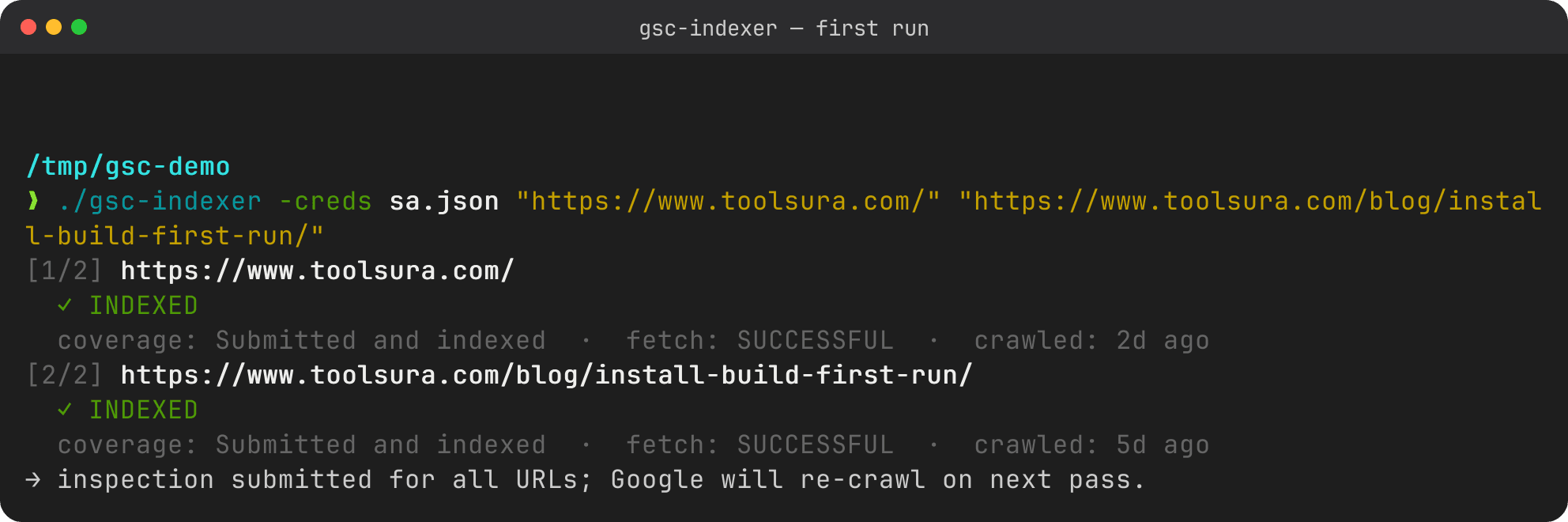
[1/1]: position in this run.✓ INDEXED: Google already has the page. A⚠ NOT INDEXED(yellow) means Google doesn't have it yet, and✗(red) marks a real error.- The dim detail line shows GSC's inspection fields; empty fields are hidden and the last-crawl time is rendered as a friendly age ("17d ago", "never").
- The last line means the re-crawl request was submitted.
Output is colored automatically in a terminal and stripped when piped, so
logs stay clean. Set NO_COLOR or pass -color never to force plain text,
or -color always to keep colors through a pipe.
If you see ⚠ NOT INDEXED or an error instead, don't panic. That's covered
in understanding your results and the
troubleshooting guide.
Next steps
- Decode the verdict: understanding results.
- Have many URLs? Batch files, stdin, and sitemaps.
Sources
- Google Search Console
- URL Inspection API documentation
- Google Search APIs overview
- Service account OAuth (Google Identity)
- About service accounts (Google Cloud IAM)
- Verify site ownership
- Property types: URL-prefix vs Domain
- URL Inspection tool help (request indexing)
- Indexing API (JobPosting/BroadcastEvent only)

Written by
Abhay Khant
Hi, I'm Abhay Thakor
I'm a developer, builder, and technology enthusiast interested in turning ideas into useful products.
I enjoy working across web development, cybersecurity, automation, SEO, and content creation. Rather than only learning technologies individually, I like putting them together to build things that people can use.
One of my main projects is Toolsura, a free online utility platform that brings practical tools into one place. I'm building Toolsura as a product and a learning project where I can explore development, infrastructure, SEO, content distribution, automation, and product growth.
What I Build
My work currently revolves around several areas:
Web development with Next.js, React, Tailwind CSS, and modern web technologies
Backend development with Go, APIs, databases, and server-side systems
Automation using n8n, APIs, Docker, and connected services
SEO and content systems for building organic search traffic
Cybersecurity including web security, bug bounty, SOC concepts, and malware analysis
Content creation including video editing, YouTube content, graphics, and promotional videos
I enjoy going beyond tutorials and experimenting with complete systems, from the frontend interface all the way to the backend, deployment, automation, and distribution.
Toolsura
Toolsura is one of the projects I'm most actively building.
The idea is simple: create useful, accessible online tools that solve small problems quickly.
Toolsura includes utilities for things such as text, JSON, URLs, PDFs, images, security checks, and other everyday technical tasks.
Building it has also become a practical way for me to learn how a modern web product works.
That means working on:
Product → Development → Infrastructure → SEO → Content → Distribution → Automation → Growth
Technology & Learning
I'm particularly interested in understanding how systems work rather than simply learning how to use them.
My development work has included technologies such as:
Next.js · React · TypeScript · Tailwind CSS · Go · Gin · GORM · PostgreSQL · MongoDB · Docker · RabbitMQ · MinIO · Strapi
I've also worked with Linux environments and tools such as Kali Linux, Termux, and related security tooling.
My cybersecurity interests include web application security, bug bounty research, SOC analysis, and malware analysis.
Building in Public
I also create content around the things I build and learn.
This includes:
Tutorials and technical articles
YouTube videos
Product demonstrations
Visual explainers
Promotional videos
SEO-focused educational content
My goal is to turn projects and experiments into useful resources that other people can learn from.
Why I Build
For me, building is one of the best ways to learn.
Instead of learning a technology in isolation, I prefer starting with a real problem and figuring out what is required to solve it.
Sometimes that means writing code. Other times it's debugging a deployment at midnight, or working out why a page isn't being indexed, why an API isn't behaving correctly, or how to automate something that would otherwise take hours.
Those problems are part of the process.
Every project gives me another opportunity to understand how technology works in the real world.
What I'm Working Toward
I'm continuing to develop my skills across software engineering, cybersecurity, automation, and digital products.
At the same time, I'm building Toolsura into a useful platform and experimenting with different ways to create, distribute, and grow technical products.
There is still a lot to learn, but that's exactly what makes building interesting.
Let's Connect
If you're interested in web development, cybersecurity, automation, SEO, online tools, or building products, feel free to connect.
I'm always interested in learning, experimenting, and building something useful.
Build. Learn. Improve. Repeat.