
Exporting Zod schemas as JSON Schema with z.toJSONSchema()
· 9 min read
Generate JSON Schema from Zod schemas with z.toJSONSchema(): draft 2020-12 export, recursion, unrepresentable types, AJV validation, and CI gates.
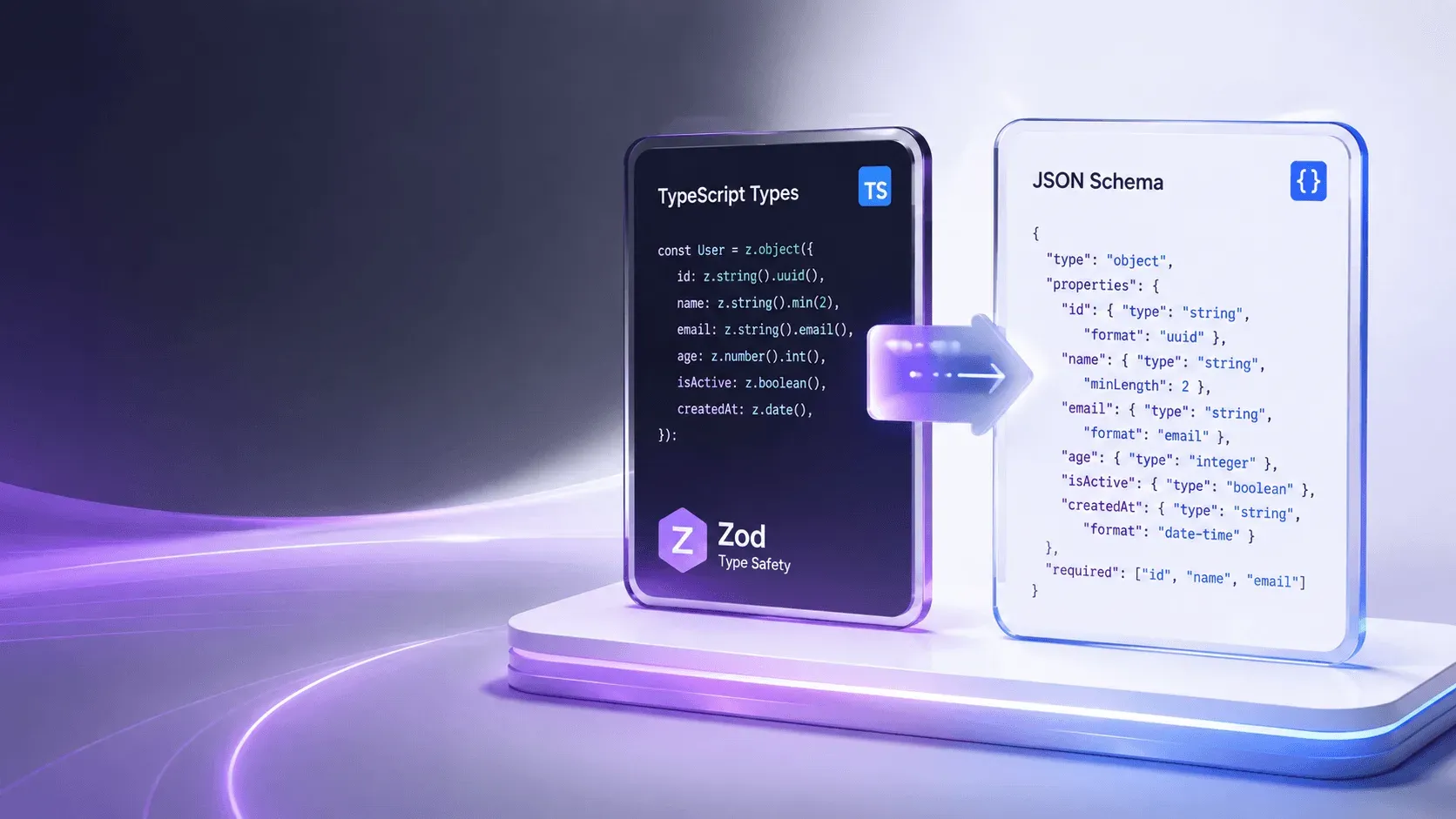
Zod can turn a validated TypeScript schema into a standard JSON Schema document in one call: z.toJSONSchema(UserSchema). You define the data model once in Zod, get compile-time types and runtime validation from it, and export a machine-readable contract that any JSON Schema tool — AJV, OpenAPI generators, code generators, or validators in other languages — can consume. That single export closes the gap between your TypeScript types and the schemas your API documents (1).
JSON Schema tooling now sees tens of millions of weekly downloads, and Draft 2020-12 is the stable specification target for most new tooling (2). If you are already using Zod for validation, generating JSON Schema from it costs nothing extra and keeps your contracts from drifting. This guide walks through the export API, the options that matter, recursion, unrepresentable types, and wiring the result into validation and CI. It assumes you know the basics of Zod — if you are new to schema-first development, start with our JSON Schema generator guide to see how the approaches compare before committing to one.
From Zod to JSON Schema in one call
Zod 4 ships z.toJSONSchema() as a first-party utility (1). Before that, the community zod-to-json-schema package filled the role. The export maps Zod primitives to JSON Schema keywords:
z.string().email()becomes{ "type": "string", "format": "email" }z.string().min(1).max(100)becomes{ "type": "string", "minLength": 1, "maxLength": 100 }z.number().int()becomes{ "type": "integer" }z.enum([...])becomes{ "enum": [...] }z.object({...})becomes{ "type": "object", "properties", "required" }z.array(...)becomes{ "type": "array", "items" }
The result is a plain JSON document with $schema pointing at the draft you target, so it validates in any spec-compliant validator (3).
Setting up for schema generation
You need Zod 4 for the native export. Install it in your project:
npm install zod
The function you want is exported at the top level:
import { z } from "zod";

const UserSchema = z.object({
  id: z.string().uuid(),
  email: z.string().email(),
  name: z.string().min(1).max(100),
  roles: z.array(z.enum(["admin", "user", "viewer"])),
  createdAt: z.string().datetime(),
});

const schema = z.toJSONSchema(UserSchema, {
  target: "draft-2020-12",
});
Zod is the most widely used validation library in the TypeScript ecosystem, which makes it a JSON Schema generator TypeScript projects already have on hand — no extra dependency to justify.
target selects the draft. Zod supports Draft 7, Draft 2019-09, and Draft 2020-12 (1). Draft 2020-12 is the right default for new work: it is the current stable spec, and modern validators and registries expect it (2).
If you are on Zod 3, the zod-to-json-schema community package offers the same options with zodToJsonSchema(schema, { target }) — worth knowing when upgrading an older codebase.
What the generated document looks like
The export above produces a self-contained JSON document. The exact shape varies slightly by draft, but Draft 2020-12 output resembles:
{
  "$schema": "https://json-schema.org/draft/2020-12/schema",
  "type": "object",
  "properties": {
    "id": { "type": "string", "format": "uuid" },
    "email": { "type": "string", "format": "email" },
    "name": { "type": "string", "minLength": 1, "maxLength": 100 },
    "roles": { "type": "array", "items": { "enum": ["admin", "user", "viewer"] } },
    "createdAt": { "type": "string", "format": "date-time" }
  },
  "required": ["id", "email", "name", "roles", "createdAt"],
  "additionalProperties": false
}
Notice what maps cleanly and what needs judgment. Zod's datetime() validator accepts several ISO 8601 variants, and the exporter picks format: "date-time" for the schema. An AJV validator configured with the ajv-formats plugin checks that format at runtime (4).
Options that change the output
Three options control how Zod maps your types to the schema, and getting them right avoids surprises downstream.
unrepresentable
Zod types like bigint, Date, Map, and transforms have no exact JSON Schema equivalent. unrepresentable decides what happens when Zod meets one:
"throw"fails fast so nothing silently loses meaning"any"emits an empty schema{}, accepting anything
z.toJSONSchema(z.string(), { unrepresentable: "throw" });
For most teams "throw" is the honest default: you learn about the gap at build time, not in production. If you deliberately want a loose boundary, choose "any" and document it.
cycles and reused
Object graphs with recursion or shared references map to $ref and $defs. The cycles option handles recursive types, and reused controls whether a repeated type is inlined or emitted once in $defs and referenced. Emitting a $defs table keeps the document readable and the schema smaller, which matters when you serialize it into API specs or registries.
Strictness defaults
Zod objects are closed by default — unknown keys fail validation. The generated schema mirrors that with additionalProperties: false. If your consumers use the schema to validate payloads that carry extra fields, that strictness is usually what you want at the API boundary (4).
Recursive schemas
Trees, linked lists, and nested comments are recursive. Zod expresses them with z.lazy(), and the exporter turns them into $ref cycles through $defs:
const CategorySchema: z.ZodType<Category> = z.lazy(() =>
  z.object({
    name: z.string(),
    children: z.array(CategorySchema).optional(),
  })
);

const schema = z.toJSONSchema(CategorySchema, {
  target: "draft-2020-12",
  cycles: "ref",
});
The output references the category schema inside $defs instead of inlining an infinite structure. Validators like AJV resolve those $ref links at compile time, so recursion costs nothing at runtime (4).
Validating with AJV
A generated schema is only useful if something enforces it. AJV compiles JSON Schema into fast JavaScript validation functions and is the reference implementation in the ecosystem (4). Pair the two:
import Ajv from "ajv/dist/2020.js";
import addFormats from "ajv-formats";

const ajv = new Ajv({ strict: true });
addFormats(ajv);
const validate = ajv.compile(schema);

if (!validate(req.body)) {
  return res.status(400).json({ errors: validate.errors });
}
ajv-formats registers the format assertions (email, uuid, date-time) that the generated schema relies on. Without it, AJV skips format checks entirely in its default configuration, and a payload with "not-an-email" would pass (4).
You now have three layers of the same contract: the Zod schema validates at runtime, TypeScript infers the types at compile time, and the JSON Schema validates anywhere AJV runs — serverless functions, edge workers, or non-TypeScript services.
Shipping schemas to other languages
Once the schema is a plain JSON file, it stops being TypeScript-specific. The schema-to-code path works in the other direction too: json-schema-to-typescript reads a schema and emits TypeScript types, and quicktype targets dozens of languages (5, 6). A common pattern in multi-language monorepos:
- Define the model in Zod
- Export JSON Schema at build time
- Commit the
.jsonfile - Generate Python, Go, or Java types from it
The schema becomes the source of truth across the stack, and breaking changes surface in CI before services deploy against them. Version the schema package and let consumers pin to a release, so npm ls @yourorg/schemas tells you exactly which contract each service runs. See our JSON Schema generator guide for the full comparison of generation approaches.
OpenAPI and API documentation
JSON Schema is a subset of the OpenAPI 3.1 Schema Object, so a generated schema drops into OpenAPI documents with no conversion step (7). If your API documentation pipeline reads OpenAPI, wire Zod exports directly into the component schemas. For OpenAPI 3.0, which predates the alignment, you may need light conversion for $defs and examples keywords — the same tools directory lists converters (3).
Common pitfalls
Forgetting $schema. Zod sets it from target, but if you hand-edit or re-serialize, keep the URI. Validators and editors use it to pick the right draft (2).
Silent any. If unrepresentable defaults surprise you, a Date field becomes {} and every payload passes that field. Audit your schemas for {} before shipping them as contracts.
Missing format plugins. Without ajv-formats, string formats are annotations, not assertions. A strict validator configured for the draft accepts anything in an email field. Decide whether formats are enforced and configure AJV to match (4).
Strictness mismatches. Zod's closed objects produce additionalProperties: false. If your consumer validates request bodies and your API adds a field, the schema breaks before the handler runs. That is the point — but budget for schema versioning when it happens.
Not testing the export. A schema that compiles in TypeScript can still fail in a strict validator. Paste a sample payload into the ToolSura JSON validator alongside the generated schema to confirm it accepts what Zod accepts.
Assuming one schema fits every consumer. An internal admin endpoint and a public API can share a model but need different strictness. Export two schemas from the same Zod source with different options rather than loosening one shared file, and let each consumer pick its contract.
Automating export at build time
Exporting by hand works for one schema but drifts fast across a codebase. A small Node script regenerates every schema on each build and fails when something breaks:
// scripts/export-schemas.ts
import { z } from "zod";
import { writeFileSync, mkdirSync } from "node:fs";

const models = {
  user: z.object({ id: z.string().uuid(), email: z.string().email() }),
  order: z.object({ id: z.string(), total: z.number().nonnegative() }),
};

mkdirSync("schemas", { recursive: true });
for (const [name, schema] of Object.entries(models)) {
  writeFileSync(
    `schemas/${name}.schema.json`,
    JSON.stringify(z.toJSONSchema(schema, { target: "draft-2020-12" }), null, 2)
  );
}
Commit the generated files so diffs are reviewable. A pull request that changes a Zod schema but not the exported JSON is visibly incomplete, which is the check you want long before a consumer complains. Teams that skip this step discover drift weeks later, when an API client breaks against a contract nobody regenerated.
Zod vs Valibot for JSON Schema export
If bundle size matters, Valibot offers an equivalent path through @valibot/to-json-schema, which emits Draft 2020-12 by default at roughly half Zod's footprint (8). The tradeoff is maturity: Zod's export API has been through more real-world edge cases, and the ecosystem around it — documentation, community examples, AI assistants' familiarity — is larger. For a server-side API contract layer, bundle size rarely justifies switching; for edge functions and client bundles, Valibot's smaller size earns its keep.
Validating generated schemas in CI
Add a pipeline step that compiles every exported schema so drift fails the build:
name: Schema Validation
on: [push, pull_request]
jobs:
  validate:
    runs-on: ubuntu-latest
    steps:
      - uses: actions/checkout@v4
      - run: npm ci
      - run: npx ajv compile -s schemas/*.json
      - run: npx ajv validate -s schemas/user.schema.json -d test/fixtures/valid-user.json
The same two commands slot into GitLab CI or any other runner. Keeping known-good and known-bad fixtures catches regressions when someone edits a Zod schema and forgets to regenerate the export (4).
Related tools and further reading
- Compare every generation approach in our JSON Schema generator guide
- Test a generated schema against real payloads with the ToolSura JSON validator
- Format and inspect sample payloads before export with the ToolSura JSON formatter
- For runtime validation that matches compile-time types, see our TypeScript type safety guide
- JSON Guide: 21 Tools and Guides Indexed by Problem
References
[1] Zod — JSON Schema Conversion — https://zod.dev/json-schema [2] JSON Schema Specification — https://json-schema.org/specification [3] JSON Schema Tools Directory — https://json-schema.org/tools [4] AJV Validator Documentation — https://ajv.js.org/ [5] json-schema-to-typescript — https://github.com/bcherny/json-schema-to-typescript [6] quicktype — https://github.com/glideapps/quicktype [7] OpenAPI 3.1 Specification — https://spec.openapis.org/oas/v3.1.0.html [8] Valibot — https://valibot.dev/

Written by
Chloe Bertrand
I hold one rule for everything on this beat: generated code is still code, and it lands in your repository where somebody has to read it. If you cannot show me what it produced, I cannot recommend the tool. Payload to typed client is the most useful of these. The generator reads a schema or a sample document, infers field types and emits a structure that fails at compile time when a field is missing.
The limits are honest and worth stating. Types come from the samples provided, so a field seen only as null becomes nullable, and one seen as an integer may arrive as a string from a different endpoint. Generating from a real schema beats generating from a sample every time. SQL to ORM goes the other way and is harder to do well.
The generator has to guess a data model from query text, and a join between two tables produces a nested structure whose shape depends on assumptions about cardinality. The generated layer is a reasonable starting point and rarely the finished article. Every generated file should carry a header saying so, should be excluded from formatting rules that fight it, and should never be edited by hand.
Drift between the generator and a hand-edit is the failure mode that costs the most time, because the next regeneration removes the change silently. One security note belongs with the ORM pages. Query builders make the safe path easy, and raw fragments inside them put it back within reach. Every page covering generated query code shows which calls parameterise and which interpolate.