
Why binary data needs a text disguise to travel the web
· 9 min read
Base64 turns binary into plain text at a fixed 33 percent size cost. How the alphabet, padding, and URL-safe variant work, plus free encode and decode.

Attach a photo to an email, embed a font in a stylesheet, or push an image through a JSON API, and the same problem appears: the channel only speaks text. Raw binary is full of control codes, nulls, and byte sequences that text-based protocols read as instructions instead of cargo. Send those bytes as-is and the message corrupts, truncates, or gets refused. Base64 exists for exactly this moment: it rewrites arbitrary bytes as plain printable characters that survive any channel built for text.
That safety has a fixed toll: every 3 input bytes become 4 output characters, so encoded data runs about 33 percent larger than the original. This guide explains why the trade is worth making, how the 3-bytes-to-4-characters mechanism works, what the trailing = signs mean, where the URL-safe variant fits, and how to encode and decode in five steps with a free encoder that runs entirely in your browser.
Key Takeaways
- Text-only channels (email bodies, JSON strings, data URIs, URLs) cannot carry raw binary. Base64 rewrites bytes as printable ASCII at a fixed 33 percent cost.
- Each 24-bit group (3 bytes) splits into four 6-bit indices, each naming one of 64 alphabet characters;
=pads a short final group.- Standard and URL-safe alphabets differ in exactly two characters (
+/versus-_). Pick by channel.- Base64 is not encryption, not compression, and not a hash. It expands data by design, and anyone can reverse it.
- The tool below runs fully client-side with no upload, and handles Unicode through the UTF-8 path.
Why text-only channels cannot carry raw binary
Mail was designed for short text messages, and later formats never removed that foundation. Mail bodies and headers, JSON string values, and URLs each restrict which bytes may appear: a null byte ends strings in C-based parsers, a carriage return ends an SMTP line, a double quote breaks out of a JSON value, and +, /, = already have jobs inside URLs. Raw file bytes collide with that control syntax, producing mangled data or a rejected message.
The specification states the problem plainly: "Base encoding of data is used in many situations to store or transfer data in environments that, perhaps for legacy reasons, are restricted to US-ASCII data." Email attachments, JSON file payloads, inline data URIs, and token strings are all instances of that restricted environment. Base64 is the bridge: encode on the way in, decode on the way out.
How Base64 turns 3 bytes into 4 characters
Take 3 input bytes (24 bits) and slice them into four 6-bit groups. Each group is a number from 0 to 63 naming one printable character from a fixed 64-character alphabet. That is the whole trick: since each 6-bit index still occupies a full 8-bit character, every 3 bytes of input yield exactly 4 characters of output. The Base64 specification, section 4 phrases it as: "A 65-character subset of US-ASCII is used, enabling 6 bits to be represented per printable character. (The extra 65th character, "=", is used to signify a special processing function.)" And: "The encoding process represents 24-bit groups of input bits as output strings of 4 encoded characters. Proceeding from left to right, a 24-bit input group is formed by concatenating 3 8-bit input groups."
Walk one word through it: Man is bytes 77, 97, 110, or 01001101 01100001 01101110 in binary. Regrouped into sixes (010011 010110 000101 101110, i.e. 19, 22, 5, 46), the alphabet gives TWFu. The alphabet itself is fully regular:
| Values | Characters |
|---|---|
| 0–25 | A–Z |
| 26–51 | a–z |
| 52–61 | 0–9 |
| 62 | + (standard) / - (URL-safe) |
| 63 | / (standard) / _ (URL-safe) |
| padding | = |
So output length is always a multiple of 4, and the size ratio is locked at 4/3: the 33 percent overhead is structural, not optional. The specification's test vectors confirm the small cases: BASE64("f") = "Zg==", BASE64("fo") = "Zm8=", BASE64("foo") = "Zm9v", BASE64("foobar") = "Zm9vYmFy".
What the = padding actually means
Those trailing equals signs are bookkeeping for a short final group. The rule has three cases (specification, section 4): a final quantum that "is an integral multiple of 24 bits" needs no padding; one "exactly 8 bits" ends with two =; one "exactly 16 bits" ends with one =. In plain arithmetic: input length mod 3 of 0, 2, 1 takes zero, one, two = signs. That is why f (1 byte) becomes Zg== and fo (2 bytes) becomes Zm8=, while foo (3 bytes) needs nothing. Valid Base64 length is always divisible by 4, and a length leaving remainder 1 is never valid (a check the free encoder-decoder applies before decoding).
Standard Base64 vs URL-safe Base64: one section, then stop
The standard alphabet ends in +, /, and =: three characters that all carry meaning inside URLs, where + reads as a space, / separates path segments, and = separates query pairs. The URL-safe variant, called base64url, swaps exactly two characters: 62 becomes - and 63 becomes _. The specification is explicit that the two are different encodings: "This encoding is technically identical to the previous one, except for the 62:nd and 63:rd alphabet character", and it "should not be regarded as the same as the "base64" encoding". Padding may be dropped in URL-safe output when the data length is known, since a %-escaped = would defeat the purpose.
The choice is mechanical: MIME bodies, data URIs, and JSON payloads take the standard alphabet; URLs, filenames, query strings, and token segments take URL-safe. If you have ever seen a value shaped like xxxxx.yyyyy.zzzzz, those segments are base64url without padding. That single sentence is the full extent of tokens here. For density math against base62 and base32, read the Base64 vs Base62 comparison, which owns that territory.
Where you will meet Base64 in the wild
First, email attachments: a message part declares Content-Transfer-Encoding: base64 under RFC 2045, section 6.8, and the encoded body historically wraps at 76 characters per line. That wrapping is a mail rule, not a Base64 rule. The specification warns that "MIME enforces a limit on line length of base 64-encoded data to 76 characters", while encoders generally "MUST NOT add line feeds" unless directed. JSON and data-URI usage has no wrapping.
Second, data URIs: pages embed small files inline as data:[<media-type>][;base64],<data>. MDN's example is data:text/plain;base64,SGVsbG8sIFdvcmxkIQ==. An icon that loads with no network request is usually one of these. When the embedded file is an image, the dedicated Base64 image encoder is the shorter path, including guidance on when inlining stops being worth its 33 percent toll.
Third, JSON APIs: JSON has no binary type, so APIs moving file bytes inside JSON embed them as Base64 strings wherever multipart upload is impractical. Fourth, the token one-liner: three base64url segments separated by dots, described in the jwt.io introduction as strings "that can be easily passed in HTML and HTTP environments". The tool's own options mirror these contexts: its URL-safe, MIME-wrap, and data-URI toggles exist because each destination demands a different shape.
The Unicode trap: why btoa("✓") throws
Here is the sharpest practical edge. JavaScript's btoa() does not accept text; it accepts a binary string: "a string in which each character in the string is treated as a byte of binary data" (MDN's btoa() reference). Any character wider than one byte throws InvalidCharacterError: "The string contained a character that did not fit in a single byte." So btoa("a") gives YQ== while btoa("✓") fails, along with nearly every accented letter, emoji, and non-Latin script.
The MDN-prescribed fix is to convert the string to UTF-8 bytes first and encode those: "For use cases where you need to encode arbitrary Unicode text, it is necessary to first convert the string to its constituent bytes in UTF-8, and then encode the bytes." TextEncoder does that conversion ("Takes a string as input, and returns a Uint8Array containing the string encoded using UTF-8") and TextDecoder reverses it after atob():
// Unicode-safe encode: text -> UTF-8 bytes -> Base64
const bytes = new TextEncoder().encode("✓ ok 🌍");
const b64 = btoa(String.fromCharCode(...bytes));
// Reverse: Base64 -> bytes -> text
const back = new TextDecoder().decode(
  Uint8Array.from(atob(b64), (ch) => ch.charCodeAt(0))
);
The tool recommended here already takes this path: its encoder converts text with TextEncoder before touching Base64, and its decoder runs atob() output back through TextDecoder. Its default sample text even contains an emoji raw btoa() would reject. As a check, 🌍 encodes to 8J+MjQ== and decodes back cleanly.
The boundary for any encoder you use: paste an emoji and decode the result. If the emoji returns, the path is correct; if it throws, the tool hands text to raw btoa(). Try it in the free Base64 encoder-decoder.
How to encode and decode Base64 in 5 steps
The flow below uses the client-side tool: files are read locally, nothing is uploaded:
- Open the tool and choose Encode. Load the free Base64 encoder-decoder and confirm Encode mode is selected.
- Supply your input. Paste text, or drop in a file. It is read into memory in your own tab and encoded there, so nothing leaves your device.
- Pick the output shape for your destination. Standard for email bodies and JSON; URL-safe for URLs and filenames; MIME wrapping only where 76-character lines are required; the data-URI prefix for output embedded in a page.
- Copy the output into your message body, JSON field, or markup.
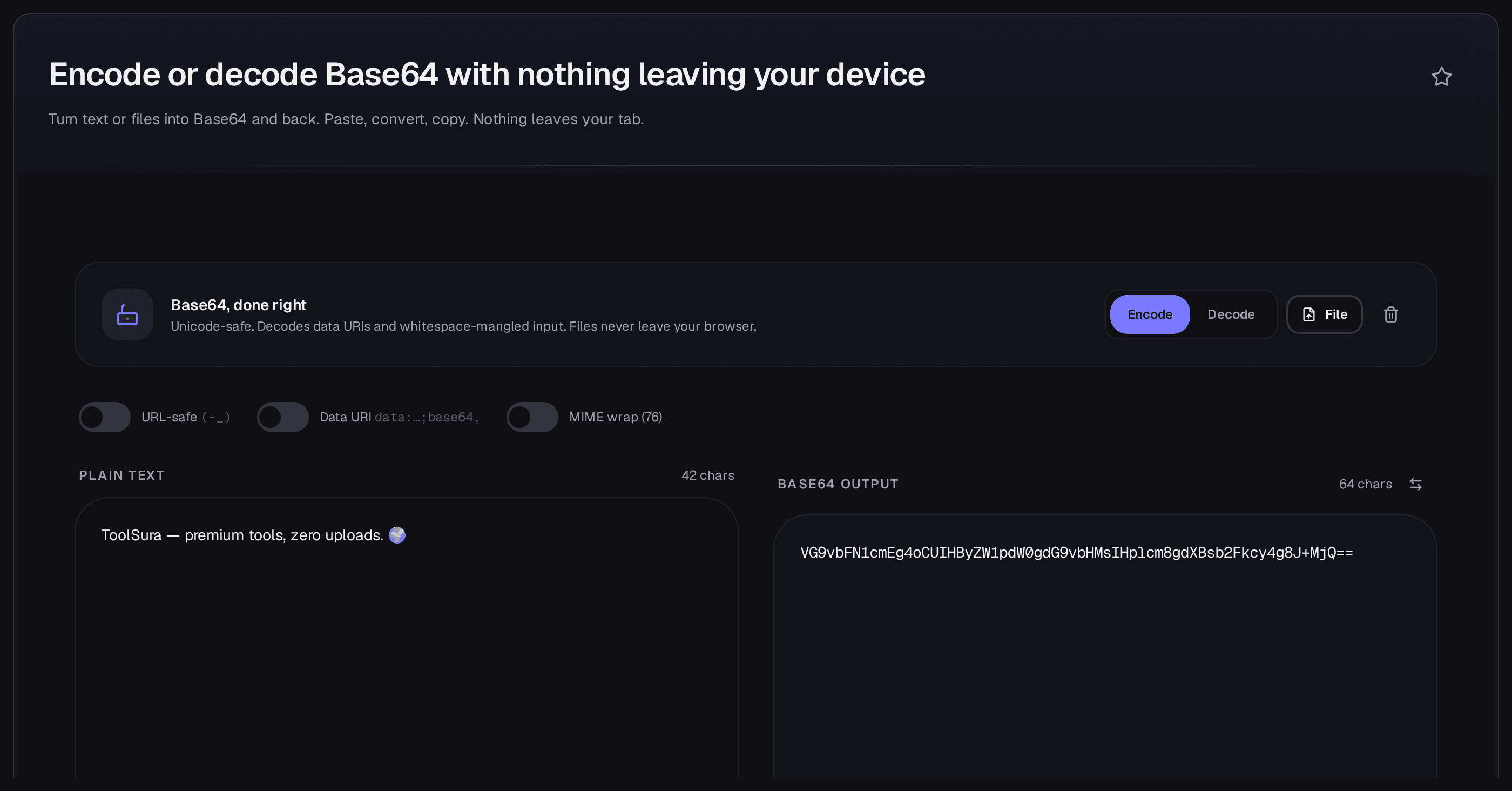
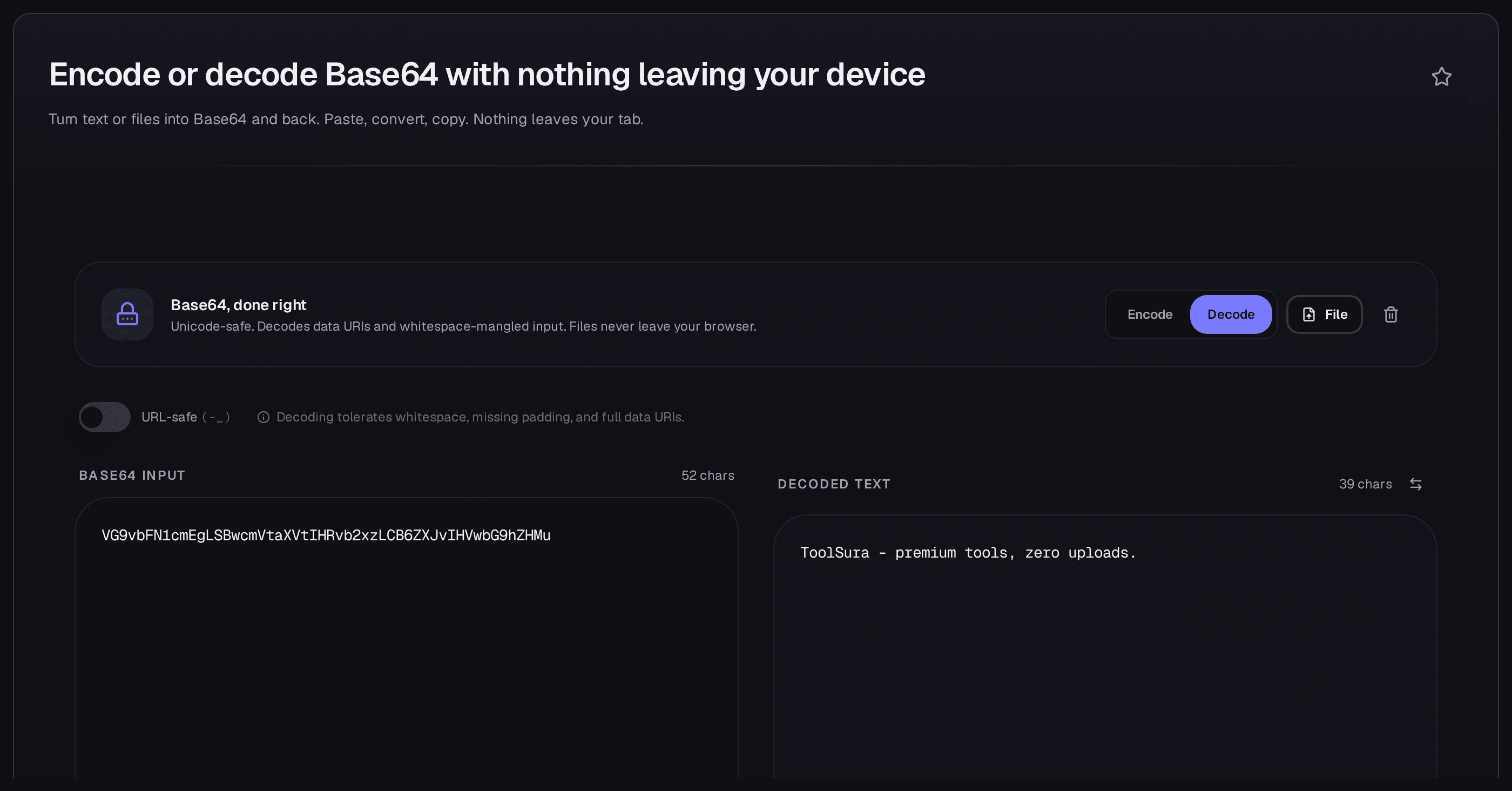
- Verify with a round trip. Flip to Decode, paste the output back, and confirm the original returns byte-for-byte, emoji included. A decoder that cannot return your exact input has a bug, not an opinion.
What Base64 is not: three myths, corrected
Encoding makes data bigger on purpose, which already hints the folk theories are wrong.
Base64 is not encryption
Anyone can decode Base64: there is no key, no secret, and no computation standing between the output and the input. The specification's security section warns that "Base encoding visually hides otherwise easily recognized information, such as passwords, but does not provide any computational confidentiality", noting real incidents of leaked passwords pasted in protocol exchanges. Obscured is not secured: never put secrets in Base64 unless the channel itself is encrypted.
Base64 is not compression
Compression shrinks data; Base64 expands it by a third. "Encoding to save space" is exactly backwards. When size matters on a text-only path, compress the bytes first and encode the compressed result, never the reverse.
Base64 is not a hash
A hash is one-way, fixed-length, and avalanche-sensitive; Base64 is none of those. It is fully reversible by design (the round trip above proves it); equal inputs give equal outputs, and output grows with input.
Limits worth knowing before you rely on it
- The 33 percent overhead is permanent. Budget for it in payload sizes, URL lengths, and storage; it cannot be tuned away.
- Line wrapping belongs to mail, not to Base64. Emit wrapped output only where a specification demands it; elsewhere it breaks parsers expecting one continuous string.
- Data URIs have practical ceilings. Usable limits arrive well before browser caps, through memory and parse time; keep large assets as separate files and let the image encoder guidance call the boundary.
- Reject stray characters. Decoders must refuse bytes outside the alphabet unless the referring specification says otherwise; a tool that flags odd input instead of guessing is doing you a favour.
The next move is one click: open the free Base64 encoder-decoder, run the five steps, and confirm the round trip on your own data. It costs nothing and uploads nothing.
Related Tools & Further Reading
- Free Base64 Encoder & Decoder — perform the encoding this post explains: text and file input, URL-safe, MIME-wrap, and data-URI toggles, fully client-side with Unicode handled.
- Base64 Image Encoder — the image-to-data-URI path in one step, with guidance on when inlining stops being worth the 33 percent toll.
- Base64 vs Base62: Which Encoding Fits Your Data — the comparison deliberately not repeated here: density math and which encoding suits which job.

Written by
Elena Vasquez
I work from the inside out, decoding one layer at a time and stopping when the content stops looking like text. Most encoding confusion is a stack: a string encoded, the result placed in something that encoded it again, then escaped by something that did not know it was already encoded. Decoding until you hit noise usually finds the layer at fault. Base64 has more variants than it needs.
The RFC 4648 alphabet uses plus and slash with padding to a multiple of four; the URL-safe alphabet swaps those for hyphen and underscore and drops the padding, and the two are not interchangeable in a query string or a filename. Base32 trades characters for case-insensitive safety, and Base58 drops characters people confuse with one another. Each exists because a specific transport mangled something. Percent-encoding applies to URLs and has its own rules about which characters may appear unescaped.
The errors are quiet: an unencoded ampersand inside a parameter value, a plus sign meant as a space, a UTF-8 sequence passed through a layer that assumed Latin-1. Text encoding causes the most damage, because the bytes are valid and the display is not. UTF-8 stores non-ASCII characters as multiple bytes, and a system decoding those bytes as something else produces mojibake.
JSON adds a further wrinkle by escaping non-ASCII characters as sequences and encoding astral characters as surrogate pairs. I am explicit that encoding is not encryption. Base64 is a transport format with no key, and anything sent through it is readable by anyone. Several pages exist to undo that misunderstanding, because it turns up in headers and payloads often enough to matter.