
Your JSON looked right. The parser disagrees: learn to read its errors
· 9 min read
Paste, validate, and format JSON without uploading it. The five errors that break parsers, trailing-comma tolerance, and when valid JSON is still wrong.

You copy a settings block out of VS Code, paste it into an API body, and the request dies on a comma you have looked at a hundred times. The editor accepted it yesterday; the server rejects it today. This guide shows how to use a JSON formatter online the way working developers do: format for your eyes, validate for the machine, and read the error position instead of guessing.
The distinction is short. Formatting is cosmetic: whitespace and indentation, always safe and fully reversible. Validation is semantic: is this JSON at all, and if not, where exactly does it break. A validator pointing at line 1, column 1 of a long file taught you nothing; one landing on the exact comma did the whole job. Everything below is built around that skill, using ToolSura's JSON formatter and validator with results measured on the live tool on 2026-10-12. This post is one spoke of the JSON Guide hub, which indexes 21 JSON tools and guides by problem.
Format, validate, minify, lint: four buttons, four jobs
Newcomers treat every button as "fix my JSON". Four different operations hide behind those buttons, and reaching for the wrong one burns an afternoon:
| Operation | What it does | When |
|---|---|---|
| Format | Parses, then re-emits with indentation | A human must read or diff the payload |
| Validate | Answers "is this JSON at all", with line and column | Before anything else, when correctness matters |
| Minify | Strips insignificant whitespace | Payload size or transfer cost matters |
| Lint | Consistency rules beyond syntax (key order, naming, schema) | Valid JSON still needs to be consistent JSON |
Short version: formatting changes whitespace; validation changes your confidence; minifying changes bytes; linting changes habits. Note the order the tool enforces: while an error is present, Beautify, Minify, Sort, and Export all disable, which enforces validate-before-format as a UI rule. Sorting here is lint-adjacent (A→Z or Z→A key order with arrays untouched), while full schema conformance is a separate gate covered by What Is JSON Schema.
How to use a JSON formatter: paste, check, beautify, export
The workflow is five steps, and the order matters:
- Paste your payload. An empty editor loads a payments-service sample for experimenting before real data.
- Read the badge first, not the output. Green comes with stats chips (keys, nodes, depth, bytes) confirming the parser saw the shape you intended.
- Pick indentation, then Beautify. Indentation width is convention, not correctness: the tool offers 2-space, 4-space, and Tab with a 2-space default, and the only rule is consistency within a file plus whatever your editorconfig says. No width is more correct than another, so settle it once per project and move on.
- Sort only if key order matters to your diff, then export
formatted.json. Sorting is cosmetic help for review, never a fix; downloading beats copy-paste because no ticket form mangles whitespace on the way.
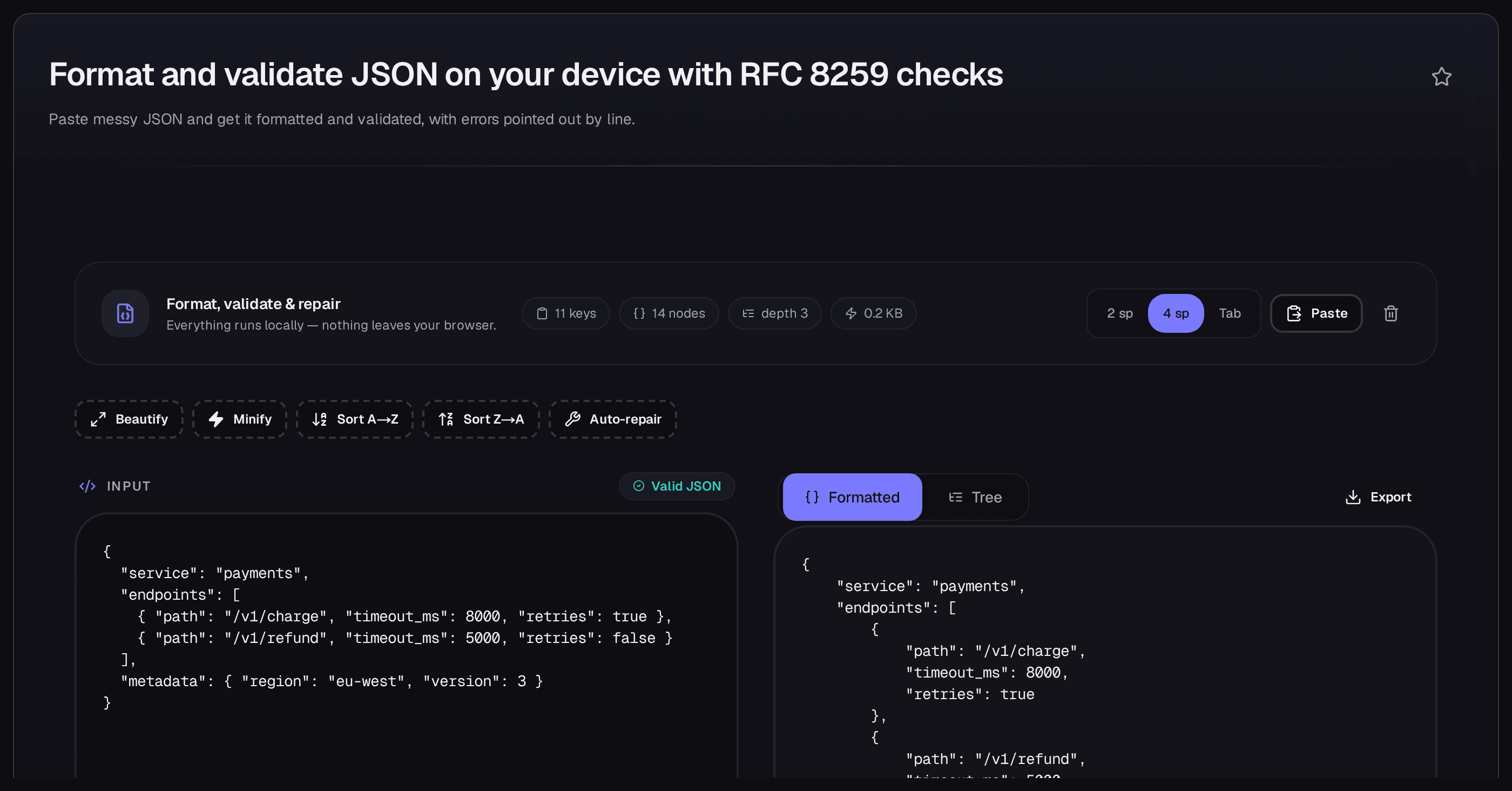
Sample payload formatted in the live tool, shown at 4-space indent (the tool default is 2-space).
Everything above runs locally: the formatter and validator execute in your browser against the native JSON.parse, with zero network calls in the component and engine source. If you are switching from a tool that uploads your data, the JSONFormatter alternative comparison covers that move. This post stays on the task itself.
How to validate JSON by reading the error, not the badge
When input breaks, the tool shows three things at once: a red Invalid JSON · Line L, Col C badge with a red editor border, a screen-reader status announcing the same position, and an alert titled Invalid JSON - line L, column C carrying the raw engine message in monospace. The part most guides skip: the message text is always the JavaScript engine's verbatim string, but the line and column are the tool's own computation from a custom scanner, because per a comment in the tool's own source, modern V8 no longer reports positions in JSON.parse errors. Read the badge for where, the monospace sentence for what, and never treat one engine's wording as universal. If nothing can be located, the position falls back to line 1, column 1. The tool is telling you it is lost, so bisect the file.
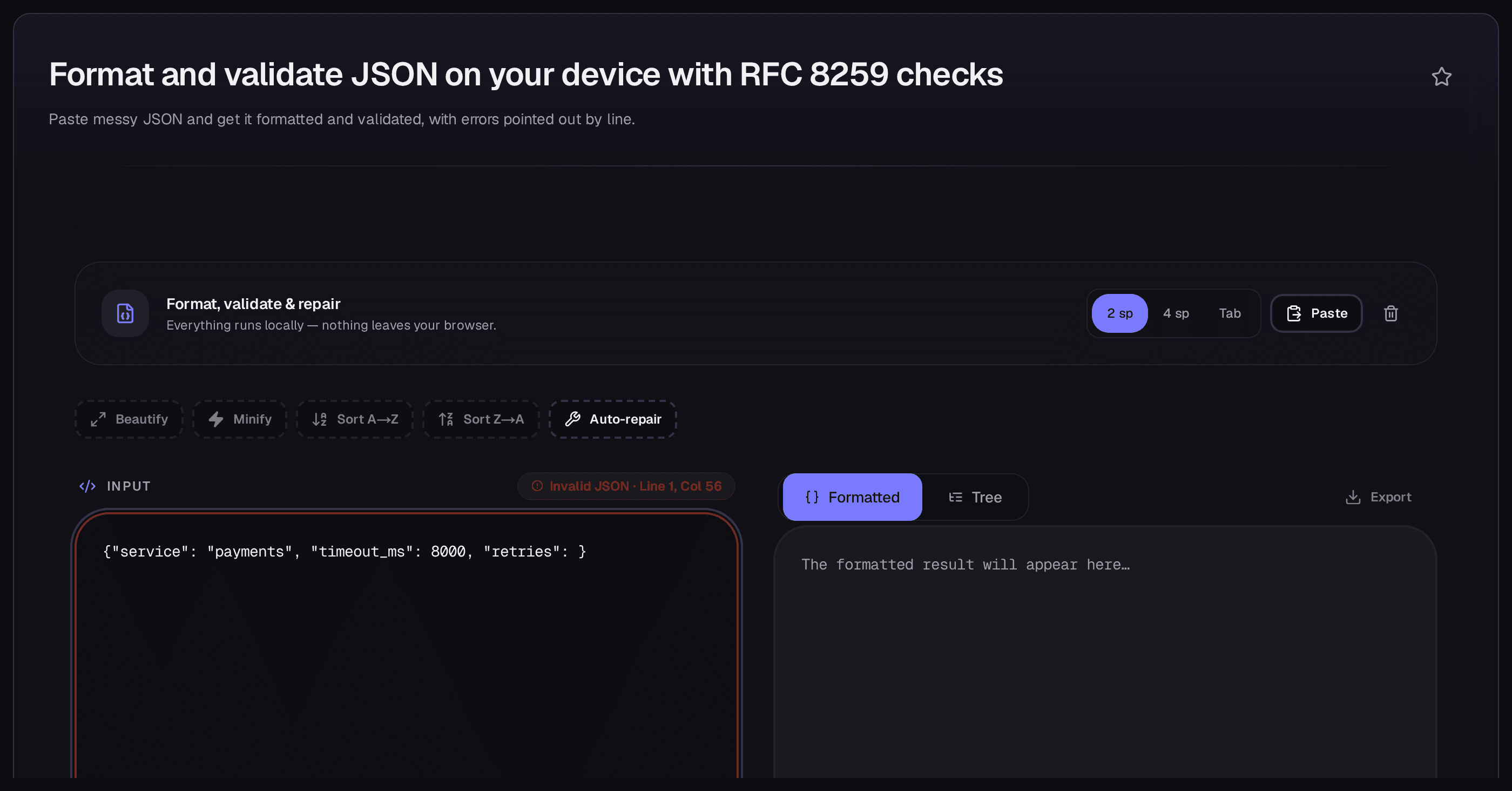
Error state in the live tool: badge position, red border, and the engine's verbatim message together.
The tool also ships a six-stage auto-repair behind its Fix button: (1) smart quotes normalised, (2) trailing commas removed, (3) trailing semicolons removed, (4) unquoted keys quoted, (5) Python literals converted (True/False/None), (6) single quotes converted (best-effort only, never safe: that last stage naively replaces every ', including quotes inside string values, so always check the diff). If repair gives up, the toast says the structure is too broken to fix safely. The five failures below follow these stages, each measured on the live tool on 2026-10-12.
1. Trailing commas
Input with the defect on its last array item ("tags": ["a", "b",], measured 2026-10-12) produced no Invalid badge at all: it validates clean, because auto-repair strips trailing commas (stage 2) before validation. Repaired-then-valid is the honest description. Strict JSON still forbids them: MDN's JSON.parse reference states that arrays and objects cannot have trailing commas, documenting the V8-style wording (SyntaxError: Unexpected token } in JSON at position 12 for {"foo": 1, }). V8 phrasing as documented on MDN; modern V8 omits positions and Firefox/SpiderMonkey wording is UNVERIFIED. The fix is deleting the comma; the lesson is that a green badge here means the tooling tolerated your input, not that the comma is legal.
2. Unquoted keys
{name: "ada"} with the defect on line 2, measured 2026-10-12, reports Invalid JSON · Line 2, Col 3, followed by the verbatim engine message. The full recorded text: Expected property name or '}' in JSON at position 4 (line 2 column 3). Attribution: recorded from the live tool on 2026-10-12; the badge position is the tool's own computation and the trailing sentence is the engine's verbatim string, V8-style wording (Firefox/SpiderMonkey wording UNVERIFIED). MDN's JSON reference states the rule: property names must be double-quoted strings. The fix is quoting the key, which the tool's stage 4 handles. A bare key has exactly one correct quoting.
3. Single-quoted strings
{'name': 'ada'} with the defect on line 2, measured 2026-10-12, reports Invalid JSON · Line 2, Col 3, followed by the engine's verbatim message. MDN documents the V8-style wording as SyntaxError: Unexpected token ' in JSON at position 1 for the minimal case. V8 phrasing as documented on MDN; same caveat: modern V8 omits positions, which is why the badge position comes from the tool, and SpiderMonkey wording is UNVERIFIED. JSON strings must be delimited by double, not single, quotes. Re-quote by hand for anything you care about, because stage 6 single-quote repair is best-effort, never safe: it replaces every ', including apostrophes inside values, so a repaired payload needs a value-by-value check.
4. Comments
A payload carrying // or /* */ with the defect on line 2, measured 2026-10-12, reports Invalid JSON · Line 2, Col 3, followed by the engine's verbatim message (exact wording not recorded; described via badge only, since an unattributed error string is a fabrication risk). MDN states the rule: JSON allows only double-quoted strings and has no support for undefined or comments. The fix is removing the comment. If it arrived from a config file, read the next section first, because the source format may never have been JSON.
5. JavaScript and Python literals that are not JSON
undefined, bare functions, NaN, Infinity, True, None: the debris of console output, log lines, and REPL sessions. MDN documents both halves: NaN and Infinity are unsupported, and there is no support for undefined. Exact engine strings for these inputs are UNVERIFIED. No wording is quoted, so navigate by the badge. The fix order follows the repair stages: normalise quotes, drop trailing commas and semicolons, quote bare keys, convert Python literals (True→true, False→false, None→null; stage 5 exists because this failure is that common), and hand-check anything single-quoted per the stage-6 caveat.
The trailing comma: why VS Code accepts what your API rejects
Three formats, three answers. Strict JSON forbids trailing commas. MDN's JSON.parse reference and its JSON object page agree. JSONC, the dialect of VS Code's settings.json, tasks.json, and launch.json, accepts them but discourages them with an editor warning, alongside // and /* */ comments, as documented in VS Code's JSON guide. JSON5 goes further: the specification allows a single trailing comma in objects and arrays, plus single-quoted strings, both comment styles, hexadecimal numbers, and Infinity/NaN. So the settings block that pasted cleanly into your editor was never strict JSON. It was JSONC wearing a .json filename, and the API that rejected it was the first strict parser in the chain. HJSON, YAML, MongoDB shell, and tsconfig tolerance details are UNVERIFIED here and deliberately unclaimed; the JSONC deep-dive covers the comment half of the story.
Valid is not correct: two traps no red badge catches
A green badge means parseable, and two classic bugs sail through it. First, duplicate keys: {"id": 1, "id": 2} validates cleanly, yet per RFC 8259 §4 names within an object SHOULD be unique, with behaviour on duplicates explicitly unpredictable ("many implementations report the last name/value pair"), which is what JSON.parse does. Validator VALID, data silently dropped. Second, precision: 9007199254740993 parses fine but arrives as 9007199254740992, because per RFC 8259 §6 implementations approximate numbers within float64 range, and MDN shows Number.MAX_SAFE_INTEGER + 1 and + 2 both evaluating to 9007199254740992. Validator green, money or ID wrong. The remedies are boring and effective: deduplicate keys at the source, and quote big IDs as strings. When "valid but wrong" becomes your problem class, syntax tooling is done. Conformance is the next gate, and What Is JSON Schema is where it lives.
What the tool will not do for you
Pasting megabytes into a browser tab has memory and time costs that grow with input size; for bulk, streaming, or file-shaping work, a command-line JSON processor belongs in your workflow. No thresholds are claimed here, since none were measured. Deeply nested payloads are a second boundary: parsers recurse, recursion is finite, and exact engine depth limits are UNVERIFIED. Payloads nested dozens deep can exhaust it, so flatten or stream. Character issues are the third: declare and agree UTF-8 end to end (the exact RFC 8259 §8 wording was not captured for this post and is not quoted). None of these argue against the browser tool. They fence the field where it wins: human-scale payloads, read closely, fixed precisely.
Two myths that waste an afternoon
Your formatter broke your JSON. It was never JSON. Formatting cannot corrupt data; it only re-emits whitespace around a successful parse. When output differs from input, the input held something outside strict JSON (a comment, a trailing comma, a single-quoted string), and the formatter is the messenger. Valid means correct. The duplicate-key and precision traps above are the counterexample: the parser answered the only question it was asked, and conformance (right keys, right types, right ranges) belongs to schema tooling, not a stricter validator setting.
Related Tools & Further Reading
- JSON Formatter and Validator — the do-it-now surface used for every measurement in this post: paste, validate, format, export, all local.
- JSON Guide: 21 tools and guides indexed by problem — the hub this post belongs to; for conversion, schema, or serving JSON rather than formatting it, the hub routes you onward.
- Best JSONFormatter Alternative — the product comparison for readers switching tools over privacy; this post teaches the task, that one compares the options.
- JSON Comments and JSONC — the deep-dive on the comment half of the "worked in my editor" problem.
- What Is JSON Schema — the conformance gate for payloads that parse cleanly but carry wrong data.
Format your next payload where this post measured everything: open the JSON formatter and validator, paste, read the badge before the output, and let the line number do the walking. For any other JSON problem (a schema to design, a conversion to run, a comment dialect to untangle), the JSON Guide hub indexes this post as its formatting spoke, with twenty other answers beside it.

Written by
Lucas Ferrari
My first point is that a JSON path is not a thing you can guess, because the syntax changed more than once and tools disagree about which version they implement. The current form separates the object keys, with a dot between them, from the array indices, with a bracket. That split is not cosmetic: a key containing a dot is indistinguishable from a nesting separator unless it is quoted, and a key containing a bracket breaks a path outright.
Keys with punctuation in them are common in data nobody designed, which is where a large share of these failures come from. Matching one of several values and matching by pattern are supported at different levels by different tools, and a query that works in one library is not portable. On large documents, the query method matters more than the query.
Reading the whole file into memory works on a small file and fails on one you cannot fit, so a streaming parser and a path evaluated per record is the architecture that holds. Comparing two structures is a separate problem from querying one.
Order matters in an array and ignoring it requires saying so, because two documents differing only in key order are equal in one sense and a change in the other. I also cover the JSON features a query tool may not implement, since a document containing them parses and then fails at the point of use. Every example here includes the document it runs against, because a path that looks wrong against one structure can be right against another and the failure is not self-evident.