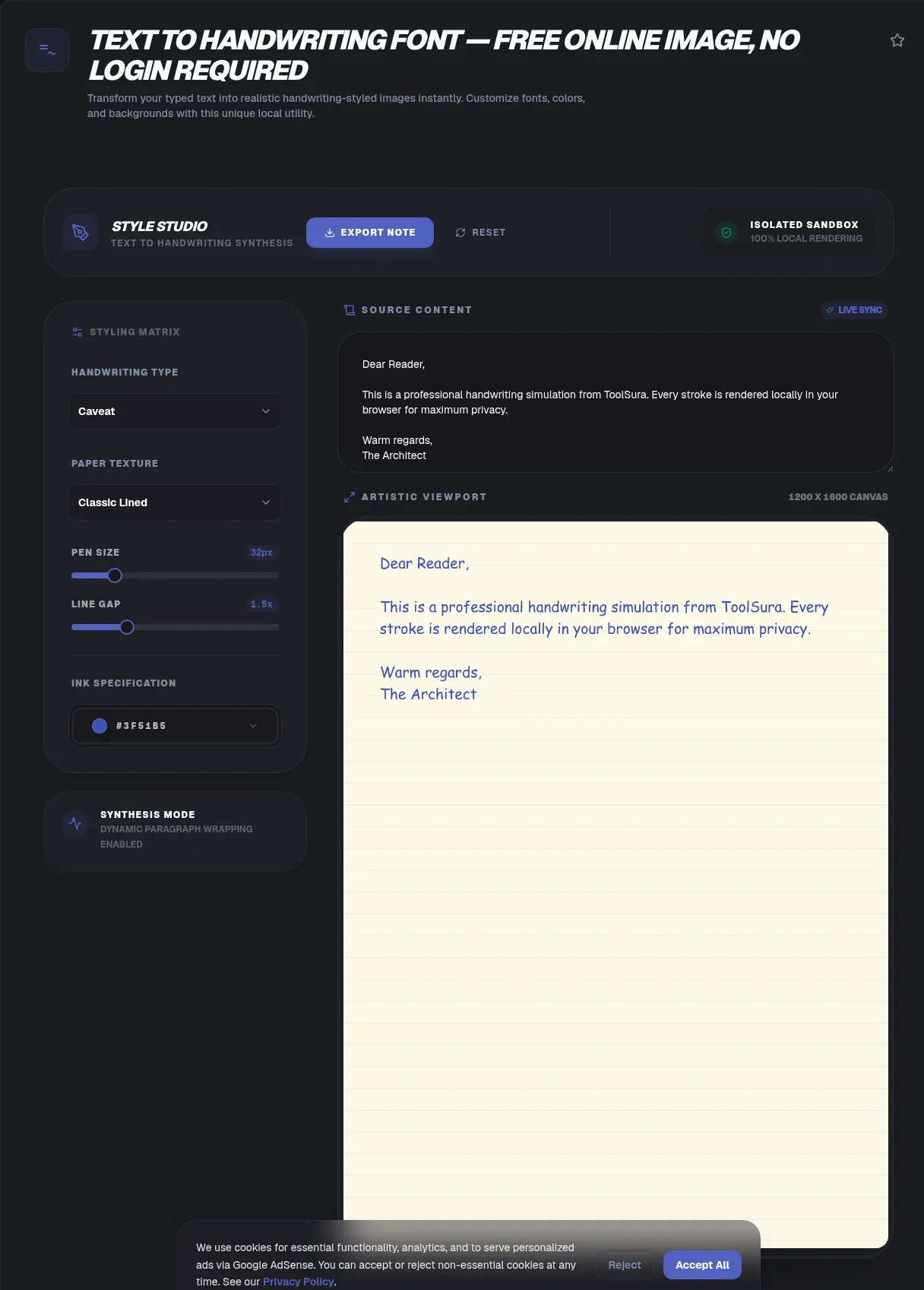
Paste an essay, a poem, or a set of notes into ToolSura's text to handwriting converter and a realistic handwritten page comes back in seconds, ready to download as a JPG or a multi-page PDF. Everything renders entirely in your browser: no account, no watermark, no upload button anywhere in the flow.
That local design is the point. Your text never leaves your device, because the page is drawn with the same canvas API browsers use for games and charts. The idea went viral for a reason: the original open-source tool hit roughly 5,000 GitHub stars and, by its author's count, about six million pageviews (GitHub).
Key Takeaways
- ToolSura converts typed text to handwriting entirely in your browser, with no uploads, sign-ups, or watermarks
- The category began in April 2020 as a 3-hour lockdown project and reached about 5,000 GitHub stars
- Forensic standards tie natural handwriting to pressure variation, tapered strokes, and baseline wobble
- The pen-versus-keyboard learning advantage shrank under replication; a 2022 meta-analysis of 77 effect sizes found near-zero effect
- Generated pages fit cards, posters, and props; submitting them as coursework breaks honor codes
How Did Text to Handwriting Tools Take Off?
The whole category traces back to one frustrated student. In April 2020, Saurabh Daware built the first viral text-to-handwriting tool in roughly a 3-hour sprint after his college began demanding photos of handwritten assignments during the COVID lockdown (dev.to, 2020). It solved a sudden, universal problem.
Distribution did the rest. The tool became the #1 Google result for “text to handwriting,” trended on GitHub, picked up a shoutout from Dan Abramov, and spread through college WhatsApp groups. One teacher reportedly demonstrated it to her own class without realizing what she was holding (GitHub).
Scale followed: about 5.0k stars, 1.2k forks, an MIT license, and a self-reported six million pageviews. The stack was html2canvas for rasterizing plus jsPDF for PDF export. On August 11, 2021, the repository was archived read-only, and its text-to-handwriting.in domain now fails DNS lookups entirely (GitHub).
Why a Maintained Alternative Matters
Archived code still runs until it doesn't. Browsers adjust canvas behavior, PDF libraries deprecate APIs, and nobody merges fixes. We've seen this pattern before: a beloved local tool freezes, and users drift to whatever loads and works that day. A maintained converter keeps the same client-side promise while actually receiving fixes.
What Makes Generated Handwriting Look Real?
Realism is a forensics problem before it is a design problem. Forensic document examiners judge natural writing by pressure variation, tapered stroke ends, smooth connections, and baseline behavior, and they flag unvaried pressure, hesitations, and tremor as signs of simulated or slowly drawn text (SWGDOC).
The biggest giveaway is repetition. A font draws an identical “e” every single time; a human never does. That's why glyph variants matter so much: Calligraphr built its font-creation business around multiple variants per character, two on the free plan and fifteen on Pro (Calligraphr).
The Forensic Checklist for Natural Writing
- Line quality: fluency produced by speed, skill, and pen pressure, with tapered stroke ends (ENFSI).
- Pressure: varied pressure signals rapid natural execution; unvaried pressure suggests drawing or simulation (ANSI/ASB 070).
- Baseline and slant: real lines wobble slightly; perfect alignment reads as mechanical drafting.
- Range of variation: the same letter should differ across a page, per examiner standards (SWGDOC).
ToolSura's renderer jitters position, size, and baseline per glyph within each style's tolerance. Small randomization applied on every draw call is what separates a handwritten look from a font sitting on a page. Turn it off, and the forensic tells come straight back.
How Do You Convert Typed Text to Handwriting Online?
The whole flow takes under a minute and never touches a server. Paste, style, generate, download: four moves, all executed inside your browser tab. No account, no queue, no upload spinner at any point.
- Paste your text: type or drop in a letter, notes, or a poem. Long input paginates automatically.
- Pick style, ink, and paper: cursive through block lettering, blue, black, or red ink, lined or plain sheets.
- Fine-tune the physics: font size, pen thickness, and line spacing control how dense the page reads.
- Generate and review: preview the page, tweak, regenerate. Nothing is final until you export.
- Download: a high-resolution JPG for one-pagers, or a multi-page PDF when the text runs long. No watermark.
Two practical notes. First, match the page count to the assignment: a two-page limit with five generated pages fools nobody. Second, keep a margin; text that starts at the paper's absolute edge breaks the illusion faster than any font choice.
Which Customization Options Matter Most?
Three controls do most of the visual work: style, ink, and paper. Set those well and the page reads as handwritten at arm's length. Everything else, spacing and margins included, is polish on top. Nail those three and most viewers stop analyzing the page at all.
Ink, Paper, and Margins
- Styles: the library spans flowing cursive to plain block lettering, so a lab report and a love letter should never share a style.
- Ink: blue, black, and red, each drawn with slight pressure variation so strokes thicken and thin instead of sitting at one uniform weight.
- Paper: lined or plain backgrounds; in ruled mode, text aligns to the printed lines the way real notebook writing does.
- Density: size, thickness, and spacing interact; raise the size without raising spacing and the page looks compressed.
One habit worth copying from print designers: pick the style last, after the text is final. Restyling after every edit wastes time, and late text changes are when alignment mistakes slip in.
Where Does Legitimate Use End?
Most uses are plainly fine: greeting cards, personal letters, posters, wedding signage, design mockups, and props for film or fiction. The line is representation, not the pixels. The moment a generated page is submitted as your own handwritten coursework, it becomes academic dishonesty at virtually every institution.
Some competitor blogs actively coach readers on dodging plagiarism and AI detectors. We won't. Forensic standards for simulated writing exist (SWGDOC), honor codes exist, and honest positioning beats a reputational landmine. If an instructor requires handwritten work, the requirement is the requirement.
Think of output as a format, not a claim. A birthday letter, a stylized quote for a slide deck, a prop note a camera will blur anyway: all fine. A lab submission you never wrote: not fine, and not worth the risk.
Does Handwriting Actually Help You Learn More Than Typing?
The famous 2014 finding says less today than the headlines suggested. Mueller and Oppenheimer reported laptop note-takers scored worse on conceptual-application questions (p = .03) and overlapped lecture transcripts verbatim 14.6% of the time versus 8.8% for longhand writers (Psychological Science, 2014).
Then the replications arrived. A 2019 replication and extension found trends favoring longhand but inconsistent group differences, calling it “premature” to pick a winner (Educational Psychology Review). A 2021 direct replication found typists wrote more words, more verbatim, with no quiz-performance difference (Psychological Science, 2021).
The 2022 meta-analysis closed the loop: 77 effect sizes across 36 articles, near-zero mean effect of note-taking method on academic performance, g = -0.008, not significant (Contemporary Educational Psychology, 2022). The literature corrected itself in public, which is how it should work.
Practical takeaway: don't outsource thinking to a printout you didn't write. Whether longhand beats a keyboard is contested; skipping the processing step entirely is not. If your notes run long, condense them first, then write the condensed version when a task truly requires your hand.
How Does Browser-Based Rendering Work Under the Hood?
No uploads means no server, and the mechanism is refreshingly simple. The canvas API's fillText() method draws each string directly onto an in-memory bitmap at given coordinates, styled by font, alignment, and baseline properties (MDN Web Docs). Your browser tab is the entire rendering engine.
After the page loads, conversion needs zero network round-trips. Kill your Wi-Fi and the tool keeps working; that's the practical test of client-side, and it's one worth running yourself. Export follows the same local pattern the original project used: rasterize the page, then bundle pages into a PDF (GitHub).
Server-based tools exist for a different job. Calligraphr turns scanned handwriting templates into installable TTF and OTF fonts, which requires uploading scans to its servers; the free tier caps fonts at 75 characters (Calligraphr). Instant generation and font creation are different products. ToolSura deliberately does the former without a single upload.
Why Machines Read Handwriting Better Now
Detection cuts both ways. MNIST, the dataset that taught machines to read digits, mixed 60,000 training images from Census Bureau employees and high school students into 28×28 grayscale cells back in 1998 (LeCun et al.). Today a phone transcribes a handwritten page in seconds. Assume any page can be read, and write accordingly.
Handwriting Fonts Worth Knowing
Google Fonts maintains an entire Handwriting category: Caveat, Shadows Into Light, Patrick Hand, Indie Flower, Dancing Script, and hundreds more families, all free under the SIL Open Font License (Google Fonts). If you want handwritten flavor inside design software rather than on paper, start there.
Those fonts excel at clean, decorative handwriting. A generator adds what raw fonts can't: ruled paper, ink color, per-glyph jitter, automatic pagination, and print-ready export in one pass. Test a few styles against your own text before committing to a full page.
What the SIL Open Font License Allows
SIL OFL permits commercial use, embedding, and modification, as long as reserved font names are respected. That's why the whole category is free: foundries and hobbyists release handwriting families under it deliberately. For cards you sell or client mockups, the license is not the obstacle people fear.
Common Mistakes When Generating Handwritten Pages
Almost all bad output traces to five fixable errors. None require design talent, and each takes seconds to correct once you know the tell. We've watched every one of these ship in otherwise good pages. Scan your preview for them before exporting.
- All-caps input: real handwriting mixes cases; fully capitalized text reads as a font specimen, not a person.
- Uniformity: maxed-out consistency is the top forensic tell of simulated writing (ANSI/ASB 070). Leave jitter on.
- Overstuffed pages: a timed study of 63 adults put handwriting near 24 words per minute (American Journal of Occupational Therapy); pages crammed edge to edge break that rhythm.
- Wrong export: screenshotting each page instead of using multi-page PDF, or shipping a heavy JPG an upload cap rejects.
- No preview pass: one regeneration with fresh eyes catches most alignment and spacing problems.
One more, subtle: mixing styles mid-document. A cursive page followed by a block-letter page reads like two different authors. Stick to one style per document unless the format calls for contrast, such as a poster headline over body text.
Related Tools
Handwritten output fits a wider browser-only workflow, and each of these tools runs client-side too:
- Font Previewer: preview handwriting fonts live against your own text before you commit to a full page.
- Word Counter: check your text meets the assignment's length requirement before you export anything.
- PNG/JPG Image Compressor: shrink a downloaded page below a learning platform's upload cap.
- HTML to Image Converter: export styled HTML cards as images, the same no-upload way.
- Text Summarizer: condense long notes first, then convert the shorter version by hand.
- WebP to PNG/JPG Converter: turn modern-format downloads into whichever format your platform accepts.
A 3-hour lockdown hack grew into a whole category because typed-to-handwritten output solves small, real problems: a card that feels personal, a poster with character, a prop that photographs well. ToolSura keeps the original's local-first promise and actually maintains it. Paste something short, pick an ink, and watch the page render before your Wi-Fi icon finishes blinking.