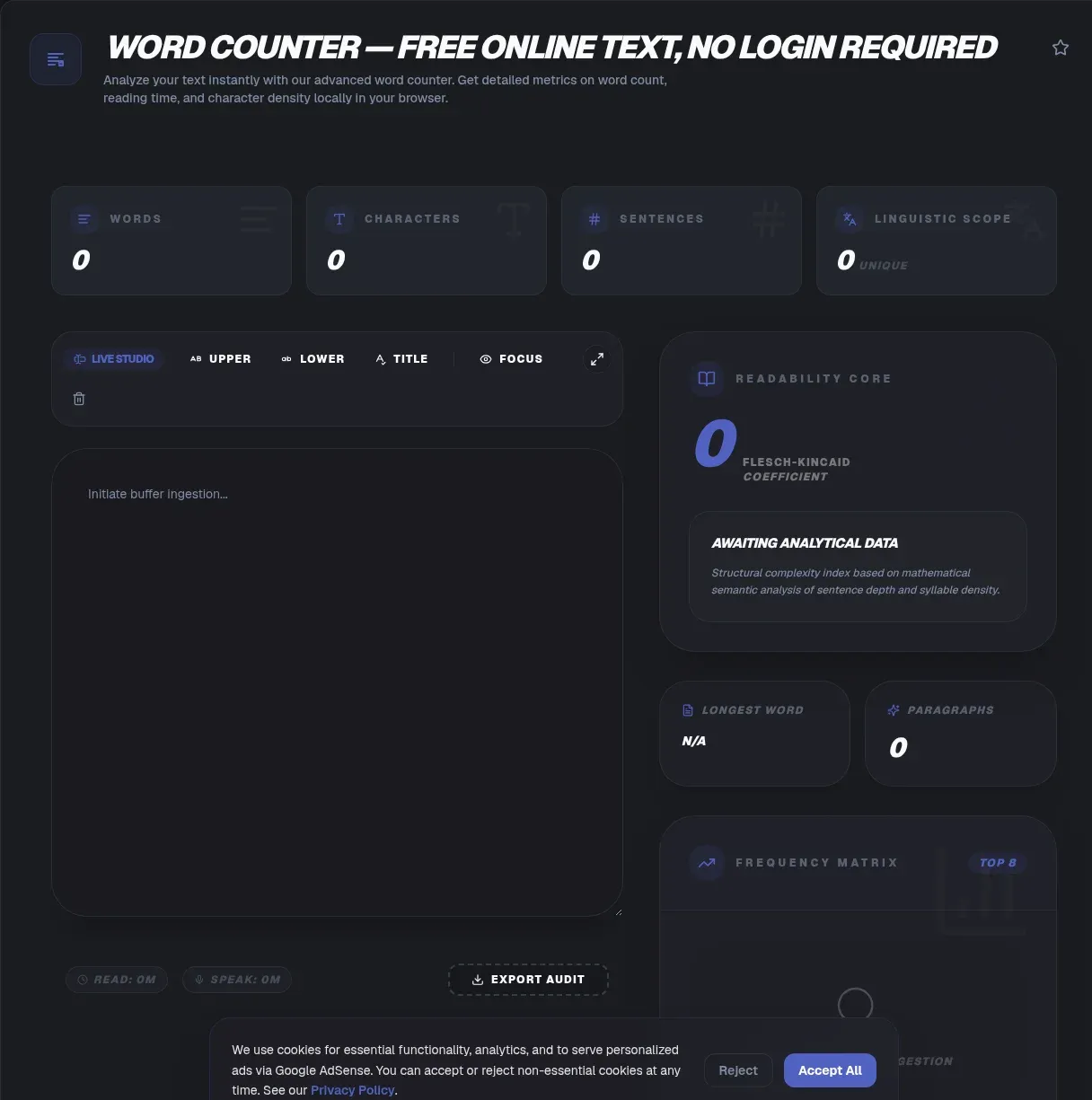
A word checker gives you the exact size of a block of text the moment you paste it: words, characters with spaces, characters without spaces, sentences, and paragraphs, all updating as you type. This one runs entirely in your browser, so your draft never leaves your device. There is no upload, no server round trip, and no signup. It is also not a language model, so the same text always returns the same number.
That last point is the whole design. Counting has no use for a model, and plenty of free counters prove it by adding an AI upsell or a rewrite button you never asked for. This tool does one job with a published algorithm. [INTERNAL-LINK: how this counter compares to other free tools]
Key Takeaways
- Counts words, characters with and without spaces, sentences, and paragraphs live as you type.
- Runs fully in your browser: no upload, no signup, and your text never leaves your device.
- Counting is deterministic, a published algorithm rather than a model, so identical input always gives an identical total.
- Segments Chinese, Japanese, and Thai with Unicode rules instead of naive space splitting.
- Adds reading time and Flesch-Kincaid grade level, with an adjustable words-per-minute rate.
What Does This Word Checker Count?
This checker reports five measures at once: words, characters including spaces, characters excluding spaces, sentences, and paragraphs. English counters often lean on a five or six characters per word average (Wikipedia, 2026), but that is only an estimate. This tool actually segments the text you typed, so the character totals match the real string rather than a rounded guess.
Beyond raw totals, the panel gives you reading time at an adjustable rate, a Flesch Reading Ease score, and a Flesch-Kincaid grade level. Those extras come from the same pass over your text, so they cost you no extra wait. A single paste fills the whole panel, which is why teachers, marketers, and developers reach for the same box for different reasons: an essay limit, a caption ceiling, or a string-length check.
[CHART: side-by-side tokenization comparison of the same 200-word sample across four free word counters, source: our own tokenization test]
Does the Word Count Include Spaces?
No. Word count counts word segments, and spaces only act as delimiters between them. The space toggle on this page switches the character total, not the word total. If an assignment says 500 words, you hit 500 whether your spacing is tight or wide, and the character figure is the separate number that changes. English runs roughly five letters per word once the following space is counted, which is why people divide characters by six for a quick estimate (Wikipedia, 2026). This counter does not estimate, it segments.
How Do I Use the Word Checker?
Five steps, and the first is the only one you have to think about. First, open the page in any modern browser; nothing to install, nothing to sign up for. Second, paste or type into the box. Third, watch the five totals update live above the field. Fourth, if a form wants a specific character convention, flip the with-spaces and without-spaces view. Fifth, check the reading time, grade level, and character-limit panel when you need the extra context.
The whole flow is instant because the browser does the math, not a server. That also means it keeps working if your connection drops after the page loads, and the numbers never depend on someone else's uptime. In our testing, pasting a several-thousand-word document refreshes every total with no visible lag, because segmentation runs locally with no round trip. Once you close or refresh the tab, the text is simply gone; nothing was stored to begin with.
How Does It Decide Where One Word Ends and the Next Begins?
The segmentation follows Unicode's text segmentation standard, UAX #29, currently version 18.0.0 revision 49 from September 2026 (Unicode, 2026). That specification defines a fixed set of word-boundary rules, which is exactly why the same input always yields the same output here. Where a competitor leaves this to guesswork, this tool applies a published, inspectable standard.
The rules that catch people out are the punctuation ones. Apostrophes stay inside a word by default, so can't is one word, and leading or trailing apostrophes are excluded. Hyphens, on the other hand, deliberately break on both sides, so Smith-Hawkins is two words and out-of-the-box is three. That hyphen behavior is the single biggest source of disagreement between counters, and it is a choice, not a bug.
Script handling is the other half. For Chinese, Japanese, and Korean, one ideograph counts as one word segment by default, and runs of Katakana stay whole. When a sequence cannot be classified, the algorithm falls back to breaking everywhere, which prevents runaway tokens. None of this is guesswork; it is the documented behavior of the standard, so you can look it up rather than trust a black box.
Is a Word Just a Split on Spaces?
No, and this is the most common mistake in counting tools. The everyday definition of a word is a segment marked by blank spaces, but that definition only fits English and a handful of other space-delimited languages. Mandarin does not delimit words at all, and Japanese signals word boundaries softly through script changes from kanji to kana. Vietnamese marks morphemes instead, and even closely related European languages disagree: French writes se laver as two words, Portuguese writes lavar-se with a hyphen, and Spanish writes lavarse joined together (Wikipedia, 2026).
A counter that splits on spaces therefore fails badly outside English. MDN documents the failure with a concrete example: the Japanese sentence 吾輩は猫である。名前はたぬき。 comes back as a single token from a plain space split, but the same text segments correctly when you pass it to a proper segmenter (MDN, 2026). That is the difference between one giant fake word and a real count.
Does It Count Chinese, Japanese, and Thai Correctly?
Yes, because it uses the platform's own Unicode-aware segmenter instead of a whitespace split. Browsers expose a built-in API called Intl.Segmenter, which has been part of the web platform baseline since 2024 and can split text by word, sentence, or grapheme using locale rules (MDN, 2026). Under the hood it follows the same UAX #29 word-boundary algorithm, the one the Unicode standard defines.
Thai works for a related reason. It has no spaces between words either, but its characters carry built-in segmentation hints, so the locale rules resolve boundaries where a space splitter cannot. The Word_Break property that classifies characters lives in a file called WordBreakProperty.txt, but the standard marks it as informative and defers the actual meaning to UAX #29 (Unicode, 2026). The result is a count that follows a spec rather than a heuristic.
How Is This Word Checker Different from Most Online Counters?
The difference is determinism. This counter returns the same number every time for the same text, because the algorithm is a published specification and not a model that can drift, guess, or rephrase. Counting is arithmetic with published rules, so a model only adds cost and unpredictability. wordcounter.net, for one, appends a Grammarly upsell to its page, and other big-name counters simply do not explain how their counts are produced (wordcounter.net, 2026). Publishing the standard is the honest alternative to that silence.
The practical test is simple: paste an awkward sentence, check the total, then paste the identical sentence again. A deterministic counter matches itself. If a tool cannot reproduce its own number, you cannot trust it against an assignment limit. For a head-to-head comparison of how several free tools tokenize the same sample, see how this counter compares to other free tools.
Is a Character the Same Thing as a Byte?
No, and the gap has three layers. A code point is a Unicode value, a grapheme cluster is the best-effort approximation of a character a reader actually sees, and a byte is how that gets stored. The letter G followed by a combining accent is one character to a reader but two code points, which is why a naive length check overcounts accented text and emoji. This counter reports grapheme clusters so the number matches what a person sees on screen (Unicode, 2026).
Storage is the outer layer, and it is where the surprises live. UTF-8 uses one byte for the basic ASCII range, two for characters up to U+07FF, three up to U+FFFF, and four for anything above U+10000, with surrogate code points prohibited outright (RFC 3629, 2026). So a hundred visible characters of Chinese can occupy around three hundred bytes, while plain English stays near one byte per character. If you need the byte side of the picture, run the text through the UTF-8 and Unicode converter; for the emoji side, the text to emoji converter shows how many code points a single glyph can hide.
How Do Platform Character Limits Compare?
The limits below were last checked on 24 September 2026, and they move without notice, so verify the current number in the platform's own composer before you rely on it. Only the LinkedIn poll limit is confirmed against a live help page, where a poll question caps at 140 characters and each option at 30 (LinkedIn Help, 2026). The rest are best-effort figures gathered from platform documentation and current behavior, and are listed here as a working reference rather than a guarantee.
| Platform | Element | Approximate limit |
|---|---|---|
| X (Twitter) | Standard post | 280 weighted characters; any link counts as a fixed weighted length |
| Caption | 2,200 characters | |
| Post | 3,000 characters | |
| Poll question and option | 140 and 30 characters | |
| TikTok | Caption | about 2,200 characters |
| YouTube | Title | 100 characters |
| YouTube | Description | 5,000 characters |
Google is the odd one out. It sets no hard character limit on meta descriptions or title tags; it truncates both to fit the device width when a snippet renders (Google Search Central, 2026). The 155-character number quoted everywhere is a display heuristic from SEO tools, not a rule Google enforces. The panel on this page keeps a running total so you can trim against whichever limit you are writing for, rather than discovering the overflow after you publish.
How Is the Reading Time Estimate Calculated?
Reading time is your word count divided by a reading rate, and the rate is the part people argue about. A widely cited finding is that reading speed climbs by roughly fourteen standard-length words per minute for every year of grade level, from grade two up through college (Reading rate, 2026), where a standard-length word counts six characters including spaces and punctuation. For a plain default, a reasonable working assumption for adult silent reading of prose is about 200 to 250 words per minute.
This counter lets you set the rate yourself rather than locking in a number you cannot see. Leave it at 225 and a 1,000-word draft comes out near four and a half minutes; drop it to 175 for dense, technical prose, or raise it for light blog copy. Speaking runs slower than silent reading, so if the draft is a script rather than an article, set a lower rate and your estimate will be closer to stage time. The math is trivial, and the honest part is choosing a rate you can defend.
Reading Ease Is Not Grade Level
Two scores appear, and they are not the same measurement. Flesch Reading Ease, published in 1948, is 206.835 minus 1.015 times the words-per-sentence ratio minus 84.6 times the syllables-per-word ratio, where a higher score means easier reading. Flesch-Kincaid Grade Level, from work by Kincaid and colleagues for the US Navy in 1975, is 0.39 times words per sentence plus 11.8 times syllables per word minus 15.59, and it estimates the US school grade a reader needs (Wikipedia, 2026).
One thing to know: these two scores are not convertible into each other, because they weight sentence length and word difficulty differently. A piece of writing can improve on one and drift on the other, so treat them as two signals instead of a single grade. For most web copy, a Flesch score in the 60 to 80 band and a grade level around 7 or 8 is a solid, broadly readable target. The scores are heuristics built on English averages, so for Japanese or Chinese text they carry far less weight.
Looking for Format Guidance or a Tool Comparison?
If you are not after a counter but after a format answer, a few of our guides cover that ground. For how many words usually fill a paragraph, see how many words are usually in a paragraph. For how many sentences a paragraph should carry, read how many sentences a paragraph usually needs. These are convention questions, and a live counter is the wrong tool for them.
If your real question is why two counters disagree, the answer usually traces back to hyphen and apostrophe rules, which we cover in why different counters give different totals. For the underlying units, the difference between words and characters explains the side-by-side numbers, and how to check word count in Google Docs or Word covers the desktop workflows. And if you want the competitive picture, how this counter compares to other free tools tests several against each other.
Related Tools
- Word Cloud Generator - turn your draft into a word cloud.
- Case Converter - convert your text to sentence case.
- Text Summarizer - summarize a long draft without uploading it. This is the one AI-assisted step in the chain; counting itself stays deterministic.
- Diff Checker - compare two drafts word by word.
- Regex Tester - test regex patterns in your browser.
- Text to Speech - hear your draft read aloud.
- Lorem Ipsum Generator - generate placeholder text.
View all tools to browse the full set.
Every number on this page updates as you type and stays on your machine, so keeping to a length becomes a habit with nothing to install and no account to manage.