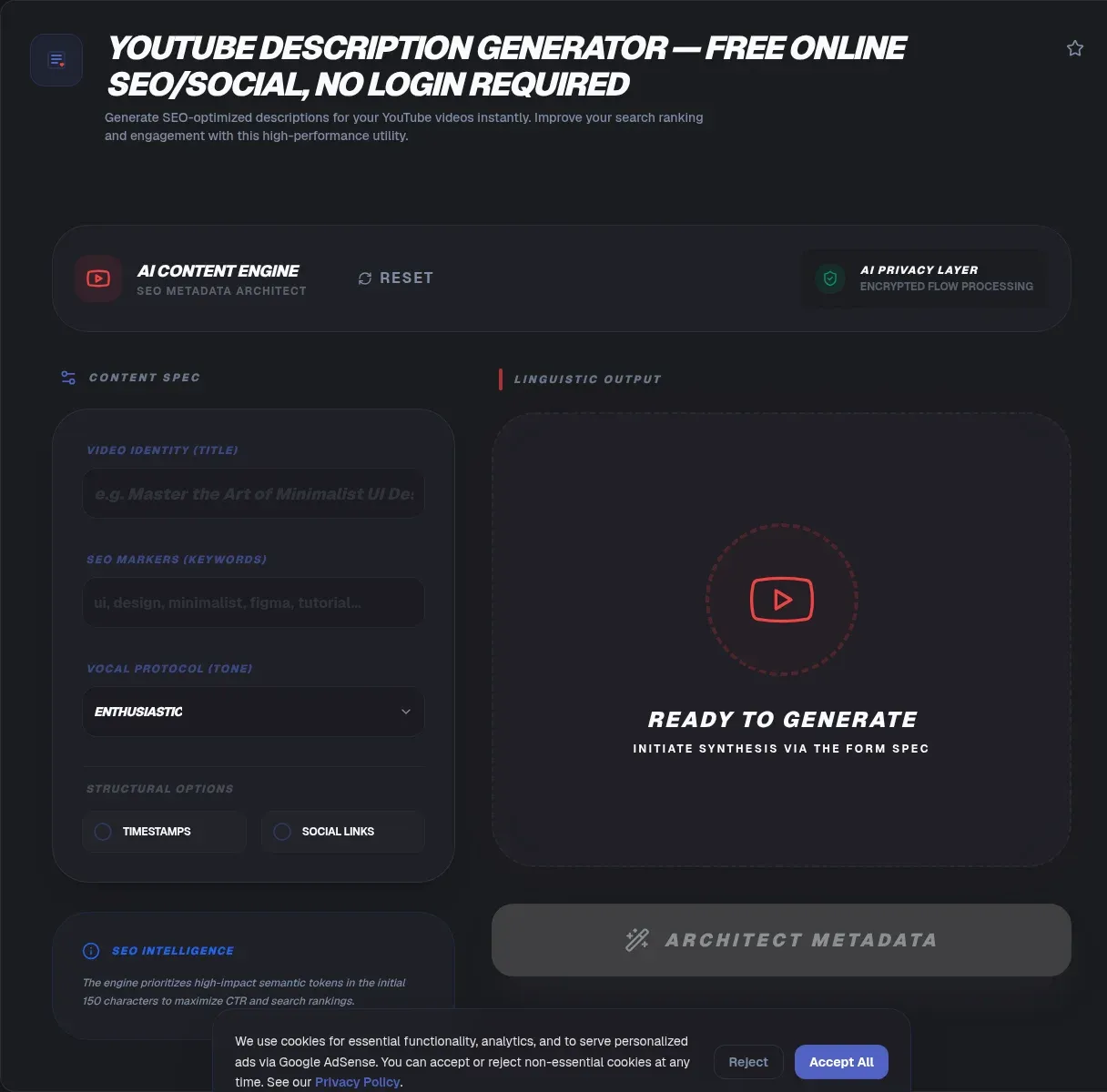
The ToolSura YouTube Description Generator turns a video topic and a few keywords into an SEO-oriented starting draft in your browser. Describe what the video covers, add audience and purpose details, and the page describes its AI-based engine analyzing that input to produce an instant description you can refine and publish Source.
The service documents fully local processing with no data transmission to its servers, and requires no login or subscription for generation; per usual practice, treat those as the operator's own descriptions of its architecture Source.
Why Descriptions Do Heavy Lifting
A video description wears three hats at once. For viewers, it sets expectations and delivers links. For YouTube's systems, it is readable text attached to otherwise opaque media, feeding the signals that decide suggestions and search placement. For search engines, it is often the only prose summary available at all.
That triple duty explains why thin, copy-pasted descriptions waste their slot. Two sentences plus a subscribe plea tells every audience nothing. A structured description with a hook, chapter list, context links, and calls to action works simultaneously on all three audiences without extra effort per view.
What This Generator Does
Per its documentation, the tool analyzes your topic and keywords to assemble a description draft covering the essentials: keyword integration, timestamp scaffolding, CTA placement, hashtag suggestions, and link slots Source. The page frames output explicitly as a starting point and instructs users to review, refine, and personalize before publishing.
That framing matters. Generated text handles structure and first-pass phrasing so you spend editing time on judgment calls instead of formatting. No model is named anywhere on the page, and none should be assumed; evaluate drafts by reading them, which takes seconds anyway.
The First Lines Rule
Compact views truncate descriptions early: search snippets, suggestion cards, and the collapsed view under players all reveal only the opening lines before a show-more click. The tool page puts numbers on this, advising front-loaded information and claiming keywords within roughly the first two hundred characters boost visibility Source.
Whatever the exact crawler weight, the human logic holds everywhere: the first sentence must say what the video delivers and to whom. Write it last if needed, but never bury it after boilerplate, disclaimers, or social links nobody scrolls to reach.
Chapters: The Timestamp Requirements
Timestamps deserve precision because YouTube enforces real rules for them. Per YouTube's own help documentation, creator-added chapters require the first timestamp listed to start at 00:00, at least three timestamps in ascending order, and each chapter lasting a minimum of ten seconds Source.
Meeting those requirements converts a flat wall of text into navigable sections with individual previews, letting viewers rewatch specific parts directly. The help page adds practical caveats worth knowing: manual timestamps override automatic chapters, not every channel qualifies for automatic features, and some creators need advanced-feature access before custom chapters appear Source.
Keywords Without Stuffing
The tool page itself carries the warning against keyword stuffing, recommending natural integration instead Source. That instinct matches how readable writing already works: one well-formed sentence can carry several relevant phrases without repetition gymnastics that read as spam to humans and filters alike.
Practical approach: list the five to eight terms a viewer would actually type, then ensure each appears once in natural prose. If a term needs awkward insertion to appear, it probably does not match the video anyway. Descriptions written primarily for humans age better under every algorithm revision.
CTAs and Link Placement
Every description needs exactly one primary next step: subscribe, download, enroll, follow. Place it early enough to be seen but after the hook establishes value, then repeat variants lower down for readers who scroll. Multiple competing asks split attention and convert worse than a single clear one.
Link hygiene compounds here. Long affiliate URLs and tracking-laden parameters bloat lines and look suspicious in preview truncation; shortening them keeps descriptions tidy, and encoding any parameter values properly prevents broken links when platforms mangle punctuation Source.
Hashtag Discipline
Hashtags in descriptions can aid topical association, but they reward restraint. A focused handful of truly descriptive tags outperforms walls of trending terms that dilute relevance and occasionally trigger policy attention when they misrepresent content.
Rule of thumb inherited from every discovery system: three specific beats thirty generic. Match hashtags to what the video truly covers rather than what trends today, since misleading tags convert poorly and erode channel credibility with both viewers and platform review systems.
A Review Checklist for Generated Drafts
Run every generated draft through six checks before publishing. Accuracy: claims and specifics match the actual footage. Voice: phrasing sounds like your channel, not a template. Links: every URL resolves and uses proper encoding. Timestamps: formatted correctly and honest about content. Keywords: present but invisible as optimization. Length: long enough to inform, short enough to respect readers.
The checklist exists because generation removes typing, not judgment. Drafts that pass all six checks publish confidently; failures take two minutes to fix while the context is fresh, versus discovering them from viewer comments later.
Batch creators benefit most from formalizing this pass. When publishing weekly, the checklist becomes muscle memory that catches the same recurring issues your niche produces: forgotten equipment links in tutorials, stale dates in announcements, mismatched thumbnails claims in reviews. Write your six checks down once and every future draft inherits the discipline for free Source.
Niche Adaptation
The page claims pattern coverage across gaming, tutorials, educational content, announcements, and product reviews, each with different structural instincts Source. Tutorials want timestamp-heavy layouts because viewers navigate to steps; reviews want verdicts and spec lists near the top; announcements want dates, prices, and availability stated plainly.
Feed the generator accurate purpose details during input, since that metadata drives adaptation quality. Then verify the draft against genre conventions you know from watching successful channels in your niche rather than trusting structure blindly.
Description Length Strategy
The tool page cites the platform's allowance of up to 5,000 characters and recommends front-loading essential information regardless of total length used Source. Treat the ceiling as room, not a target: most videos need several hundred well-chosen words, not thousands of padded ones.
Length serves navigation and completeness; brevity serves comprehension. A description that answers what, who, and why-now within its opening screen earns the scroll for everything deeper. Verify final counts with a word counter when templates grow unwieldy Source.
Workflow: Generate, Then Edit
The productive loop looks like this. Input accurate topic, audience, and purpose details so the draft starts close to correct. Generate, then edit for voice and accuracy using the checklist above. Insert timestamps matching your final edit, format them to chapter rules, place links, and read the whole thing aloud once for rhythm.
Total time from topic to publish-ready typically lands in minutes rather than the blank-page hour the tool page credits it with eliminating Source. Consistency across a catalog compounds the benefit, since uniform structure trains returning viewers where to find things.
Over a catalog, that consistency shows up in analytics rather than vibes: uniform sections let returning viewers skip straight to chapters they need, standardized link placement reduces support questions about where things live, and recognizable openings make your channel feel established in crowded subscription feeds. None of it requires extra per-video effort once the template exists.
Key Takeaways
- Descriptions serve viewers, platform systems, and search engines simultaneously; structure serves all three.
- Front-load the hook: compact views reveal only opening lines before truncation.
- Chapter timestamps must start at 00:00, number at least three ascending entries, and run ten seconds minimum.
- Generated drafts remove typing, not judgment: run every draft through an accuracy and voice check.
- Natural keyword integration beats stuffing, and focused hashtags beat walls of trending terms.
Frequently Asked Questions
What should a YouTube description include?
The essentials per the tool's own guidance: a concise summary stating what viewers get, naturally placed keywords, chapter timestamps, a clear call to action, social and resource links, and credits for tools or equipment mentioned. Order matters as much as contents: hook and summary first, navigation and links after, boilerplate last if at all.
How long should a description be?
YouTube allows up to 5,000 characters according to the tool page, which recommends front-loading key information whatever length you choose. Most videos need far less than the maximum: a few hundred words covering summary, chapters, links, and context. Write enough to inform completely, then stop before padding begins diluting the message.
Do keywords in descriptions actually help?
The tool page claims search visibility benefits from keywords, particularly early placement. Honest framing: descriptions are text that crawlers can read, so including actual topic terms helps systems categorize content. Write for humans first and include terms naturally; stuffed, unnatural repetition reads as spam to audiences and review systems alike.
What are the exact rules for YouTube chapters?
Per YouTube's help documentation: the first timestamp listed must start at 00:00, the video needs at least three timestamps in ascending order, and each chapter must run at least ten seconds. Manual timestamps override automatic chapters where available, and some channels need advanced-feature access before custom chapters function.
Are AI-generated descriptions safe to publish?
Treat any generated draft as scaffolding requiring review, exactly as the tool page advises. Check factual accuracy against your footage, confirm the tone matches your channel, verify every link, and adjust phrasing until nothing sounds templated. Published under those conditions, drafts are as safe as the review behind them.
How many hashtags should a description carry?
Keep it small and specific: a focused handful describing what the video truly covers beats long strings of trending terms that dilute relevance. Misleading hashtags risk policy attention alongside poor conversion. When unsure, skip extras entirely; a strong title and clear description carry discovery more reliably than tag volume.
Does pasting my video topic here leak anything?
The page documents local processing with zero data transmission to servers and requires no account, though such statements remain operator self-descriptions. Standard caution applies to any web form regardless: keep unreleased project details generic until announcements ship, and avoid pasting confidential material into tools whose handling you cannot personally audit.
Related Tools
Finish the publishing kit:
- Word Counter checks description length limits.
- Link Shortener tidies campaign URLs.
- URL Encoder/Decoder fixes parameter punctuation.
- Regex Tester validates timestamp formatting patterns.
- JSON Formatter & Validator checks metadata exports.
- Timestamp Converter decodes log times during audits.
Draft faster, publish smarter: the YouTube Description Generator handles the blank page so you can handle the judgment.
One final habit closes the loop: revisit descriptions quarterly. Links rot, prices change, and pinned announcements age out, so a scheduled pass keeps every published description as accurate as the day it shipped.