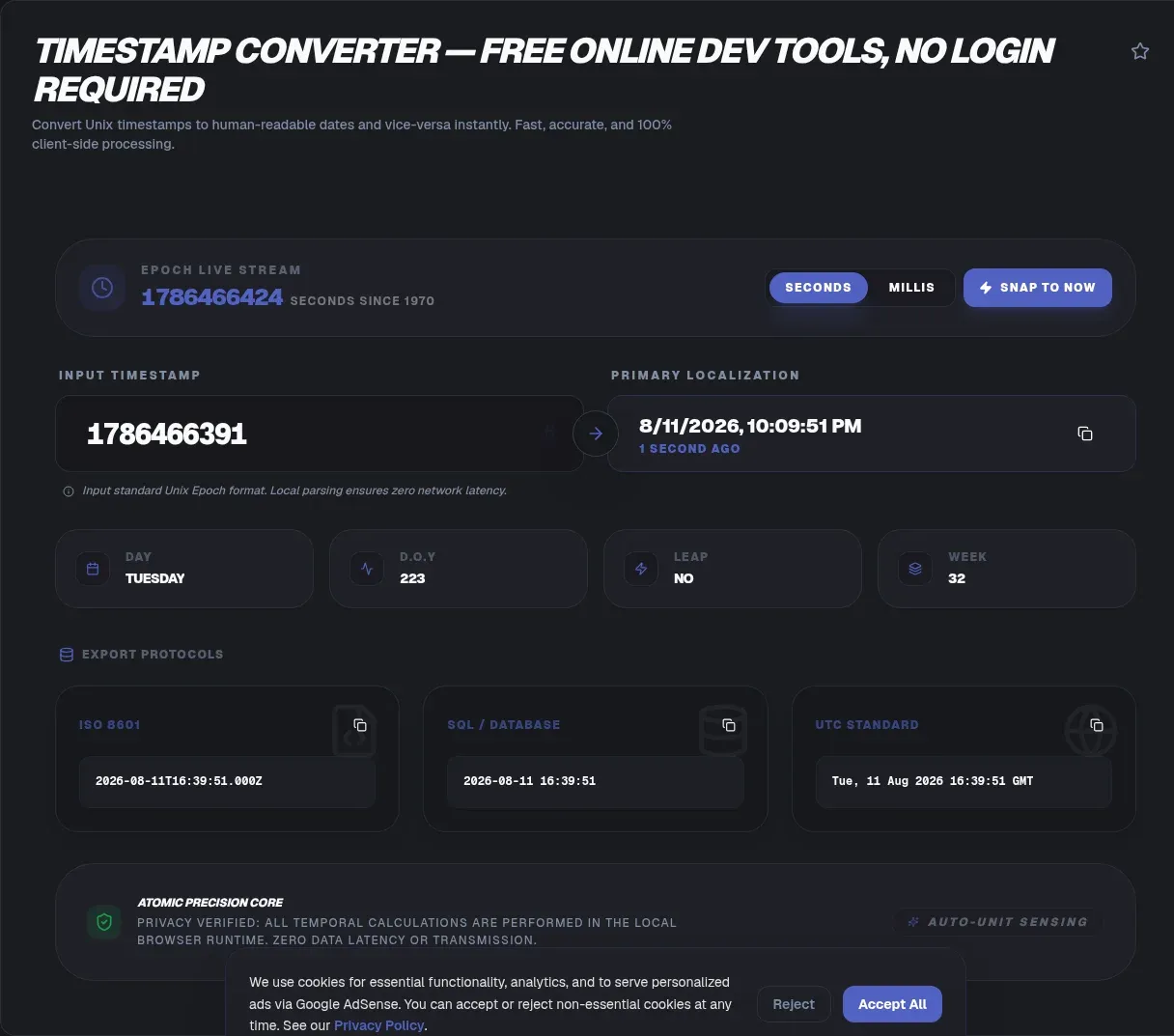
Paste a Unix timestamp into the ToolSura Timestamp Converter and the human-readable date appears instantly, right in your browser. The tool accepts ten-digit second values and thirteen-digit millisecond values, labels whichever unit it detects, renders the result in UTC or the time zone you pick, and produces a standards-compliant ISO 8601 string you can copy straight into configuration files, API payloads, and database migrations.
Everything runs locally. Your timestamps never leave your device: there is no upload endpoint, no processing queue, and no history stored anywhere. That architecture matters more than it sounds, because timestamps are quietly identifying. A precise log line ties an action to a session, a location, or an event that nobody involved agreed to share with a third-party service.
Key Takeaways
- A Unix timestamp counts seconds since 1970-01-01 00:00:00 UTC and represents the same instant everywhere on Earth.
- Ten-digit values are seconds and thirteen-digit values are milliseconds; the ToolSura converter detects the difference automatically.
- Timestamps never change with time zones; only the way software renders them does.
- The 32-bit ceiling of January 19, 2038 is a migration item for legacy systems, not an approaching global failure.
- Converting on-device keeps log lines, audit records, and telemetry off other people's servers.
What Is a Unix Timestamp?
A Unix timestamp is a plain integer counting the seconds elapsed since 1970-01-01 00:00:00 UTC, a reference point called the epoch. The definition comes from POSIX: the Open Group Base Specifications define Seconds Since the Epoch as a value approximating elapsed seconds from that instant, deliberately ignoring leap seconds. Because the count references UTC rather than any local clock, the same integer describes the same moment in every country at once. When a server in Frankfurt writes 1756000000 into a log and a client in Perth reads it, no negotiation is required: both sides resolve it to one absolute point on the timeline.
Why Everything Starts in 1970
The date was inherited from early Unix development, when engineers picked a round, recent origin for file-system clocks, and later standardization preserved the choice. The original POSIX definition only committed to years 1970 onward and non-negative values, which is why some very old utilities behave oddly with pre-1970 dates. Modern platforms dropped that restriction: JavaScript's Date type stores milliseconds relative to the same epoch and stays valid across a range of roughly plus or minus 273,000 years, from April 271821 BC to September 275760, according to the MDN Date reference. The epoch is a convention, not a physical boundary, and negative values simply count backward.
Seconds or Milliseconds? Reading the Digit Count
The most common failure mode with epoch values is unit confusion. A ten-digit number such as 1756000000 is seconds and remains useful until November 2286, when ten-digit second values finally run out of room. A thirteen-digit number such as 1756000000000 is milliseconds, the native unit of JavaScript's Date.now(). Feed a millisecond value to code expecting seconds and your dates land tens of thousands of years in the future; do the reverse and everything lands in January 1970. The ToolSura converter inspects input length automatically and reports the detected unit, so mixed inputs arriving from logs, APIs, and spreadsheets stop producing silently wrong answers.
One Number, Many Clocks: Time Zones Explained
A timestamp never changes with your time zone. The integer pins down one absolute instant; everything else is presentation. JavaScript calls its internal time value timezone-agnostic in the MDN Date documentation, and the same Date rendered through Intl.DateTimeFormat shows different hours in Kolkata and Sydney, complete with daylight-saving corrections drawn from the IANA zone database. This is why converting a timestamp never requires knowing where it was recorded. The converter includes a zone selector so you can preview the same instant the way a colleague in another region will see it on their screen.
Where String Parsing Goes Wrong
If raw integers are this reliable, why do date bugs fill issue trackers? Because strings sneak in between systems. The MDN Date.parse() documentation warns that only the ISO-derived ECMAScript format is guaranteed; anything else is implementation-defined and may differ across browsers. Its own examples include a February 30 input that rolls over to March 2 in some engines and is rejected in others. The practical rule: pass raw integers or strict ISO strings across boundaries, and treat locale-formatted dates as display-only. When something looks wrong, convert the number first and read its fields instead of eyeballing formatted prose.
The 2038 Problem, Without the Panic
On systems storing Unix time as a signed 32-bit integer, the counter tops out at 2,147,483,647 seconds: January 19, 2038, 03:14:07 UTC. That ceiling is not folklore. It is documented today as the upper bound of the MySQL TIMESTAMP column type, whose range ends at exactly that second according to the MySQL 8.4 manual, and Python's documentation notes that platform time functions have historically been restricted to years 1970 through 2038 on certain systems, per the Python datetime docs. Meanwhile 64-bit platforms already see much further ahead: MySQL's 64-bit functions reach toward the year 3001, and JavaScript's Date extends to 275760. Treat 2038 as a checklist item covering legacy firmware, old column types, and archived file formats, not as a countdown to a worldwide outage.
Leap Seconds: The Second Unix Time Ignores
Earth's rotation drifts against atomic time, so standards bodies occasionally insert a leap second into civil UTC. Unix time declines to count it. POSIX mandates that each and every day be accounted for by exactly 86400 seconds, so every timestamp assumes uniform days, as written in the Open Group Base Specifications. The text format defined by RFC 3339 can express a sixtieth second at the end of June 30 or December 31, but timestamps themselves never emit one. The mechanism is also winding down: Resolution 4 of the 27th CGPM, adopted in 2022, directs that the UT1-UTC difference be allowed to increase in or before 2035, retiring leap-second insertions, per BIPM Resolution 4.
ISO 8601 and RFC 3339: Dates That Travel Well
When you need a textual format rather than a bare integer, use ISO 8601 notation such as 2026-08-23T15:04:05Z. Internet protocols actually standardize a profile of it: RFC 3339 defines the date-time syntax used by HTTP headers, API payloads, and structured logs, allowing either a Z suffix or a numeric offset. Two habits prevent most confusion. First, always include the offset; an offset-less local string such as 2026-08-23 15:04 gets reinterpreted by every reader. Second, store Z-suffixed values and convert at the display edge. As a bonus, ISO strings sorted alphabetically are also sorted chronologically, which keeps filenames, cache keys, and query ranges behaving sensibly.
Common Timestamp Formats in the Wild
Beyond seconds, milliseconds, and ISO strings, you will meet a few relatives. RFC-style header dates appear in caches and email. Spreadsheet serial numbers count days since 1899, which is why copying a cell produces nonsense unless converted; the tool page documents the Excel formula that rescales a cell into epoch seconds before conversion. Sixteen-digit microsecond and nineteen-digit nanosecond values show up in high-resolution tracing systems. The shared habit is the same: identify the unit before interpreting the number. When a value arrives unlabeled from a vendor feed, compare its digit count and magnitude against known events rather than trusting the wrapper that delivered it.
Converting Timestamps in Real Code
JavaScript counts milliseconds, so scale before constructing: new Date(1756000000 * 1000) yields the correct instant for a second value, and Date.now() returns current time in that same unit. Python's datetime.fromtimestamp() defaults to your machine's local zone; pass an explicit utc timezone argument, which the Python documentation recommends now that the older utcfromtimestamp() helper is deprecated as of Python 3.12. In MySQL, UNIX_TIMESTAMP() and FROM_UNIXTIME() convert in both directions, but the manual cautions that round-tripping through non-UTC session zones loses information around daylight-saving transitions, per the MySQL function reference. Whatever the language, keep one canonical unit per system and encode it in the name, as in created_at_ms.
What the JavaScript Ecosystem Uses for Dates
Library adoption shows how teams sidestep these traps. For the week of August 16 to 22, 2026, the npm registry reported 100,558,354 weekly downloads for date-fns, 68,205,720 for dayjs, 37,725,578 for luxon, and 36,069,611 for moment, measured through the npm downloads API; registry counts include transitive installs, so they reflect ecosystem reach rather than developer headcounts. Moment occupies a specific niche: its own documentation describes the project as a legacy project in maintenance mode, steering new work toward modern alternatives, as stated on the Moment.js docs site. The lesson common to all of them: parse and persist in UTC, format locally at render time, and never hand-roll arithmetic across daylight-saving boundaries yourself.
Temporal: JavaScript's Date Redesign Arrives
The long-promised replacement for Date reached a milestone recently enough to deserve precise wording. As of August 2026, the TC39 Temporal proposal repository lists the specification as finished, with shipping recorded in Firefox 139 on May 27, 2025, Chrome 144 on January 13, 2026, and Node.js 26 on May 5, 2026. Safari has no ship date listed there yet, and MDN still carried a limited availability notice for the API as of its December 2025 revision, with polyfills recommended in the meantime. Temporal's design attacks exactly the traps described above: immutable value types, explicit calendar and zone handling, and separate objects for absolute instants versus wall-clock times. Until support is universal, a converter remains the dependable path for quick verification.
How Online Timestamp Converters Compare
Epoch conversion is a crowded category, and the real differences are architectural. epochconverter.com states plainly that its tools use JavaScript to convert times based on your computer's settings, and it offers a batch converter plus code snippets for many languages, per its homepage. unixtimestamp.com shows a live counter, several RFC-style output formats, and a 2038 explainer in its FAQ (unixtimestamp.com), while timestampconverter.com adds bidirectional batch tools and roughly a dozen named output formats (timestampconverter.com); neither of those two sites documents where conversion happens. Across all three, automatic seconds-versus-milliseconds detection, inline conversion into arbitrary IANA zones, and clear guidance for negative values go undocumented, which is precisely the gap a focused converter can close.
Why Client-Side Conversion Matters for Log Data
Log lines and audit events feel anonymous and rarely are. A precise timestamp joined with a request path, an IP address, or a user identifier describes someone's behavior, which is exactly the kind of data you should not hand to an unknown intermediary merely to read it. The ToolSura page documents its model as fully client-side with zero transmission to servers: conversion happens inside the page you already loaded, the way a pocket calculator works. The benefit runs in both directions. Confidential log excerpts stay on your machine during an incident, and nothing about your debugging session accumulates on somebody else's infrastructure awaiting a retention policy to expire.
Practical Tips for Working With Timestamps
Four habits prevent nearly all timestamp pain. Store everything in UTC and convert to local time only at display, so daylight-saving transitions never contaminate persisted rows. Name the unit in every field, because created_at and created_at_ms will eventually coexist in one codebase unless naming rules forbid it. Test the boundaries: epoch zero, negative values, leap-day midnights, and the 2038 constant are cheap fixtures in any suite. Finally, when a suspicious value surfaces in production, paste it into the converter before theorizing. Half of all impossible dates turn out to be milliseconds parsed as seconds, and most of the rest are time-zone assumptions that an immediate side-by-side rendering exposes in seconds.
Related Tools
Timestamp work rarely happens alone, so keep the rest of the ToolSura toolbox within reach:
- JSON Formatter & Validator to inspect API payloads full of created_at epochs before you convert them.
- Regex Tester to build patterns that pull ten-, thirteen-, and sixteen-digit stamps out of messy logs.
- Base62 Encoder/Decoder to pack timestamps into compact, sortable short IDs.
- Text Diff Checker to compare date columns before and after a migration.
- CSV to JSON Converter to turn exported logs into structured data ready for bulk conversion.
- URL Encoder/Decoder to pass ISO date strings safely through query parameters.
- Binary to Hex Converter — four bases, one converter
Next time an epoch value looks wrong, open the ToolSura Timestamp Converter, paste it, and let the detected unit settle the argument.