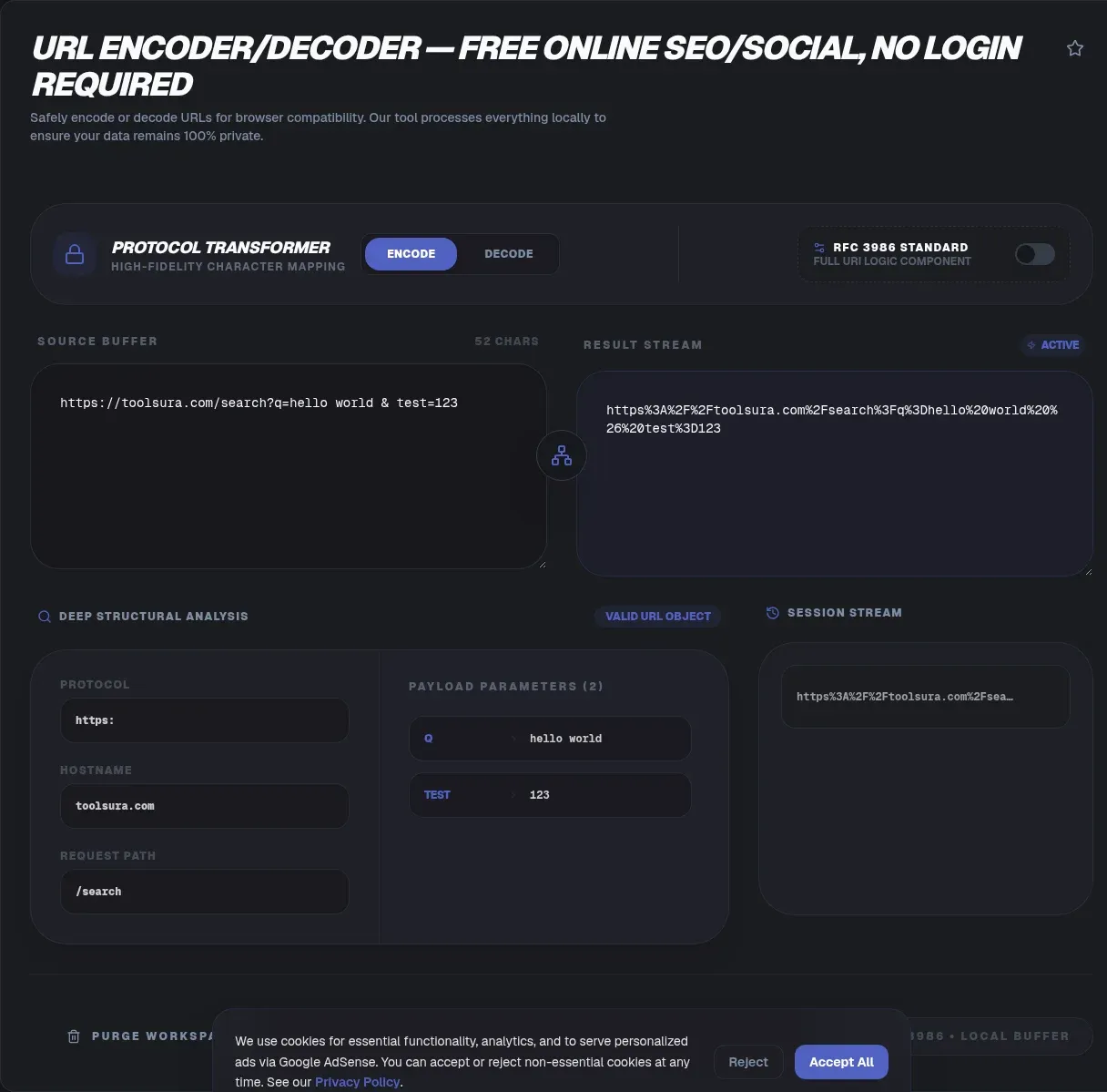
The ToolSura URL Encoder/Decoder converts text into transmission-safe percent-encoded form and back again, instantly and entirely in your browser. Paste your string, choose encode or decode, and the result appears in a separate output field ready to copy Source.
Processing stays local per the tool's documentation, with no storage, history, or session persistence of any kind described on its page Source.
Why URLs Cannot Hold Every Character
Uniform Resource Identifiers reserve a handful of characters as structural punctuation: question marks begin queries, ampersands separate parameters, equals signs bind values, slashes climb paths, and hashes jump fragments. Those characters carry meaning at the URI grammar level, so data containing them must be escaped before it can ride along safely.
Anything outside the permitted alphabet faces the same rule, including every non-ASCII letter and symbol. Encoding replaces each offending byte with a percent sign followed by its hexadecimal value, producing strings like %20 that any conforming parser reads identically. Without that step, a single stray space or ampersand quietly rewrites your link's meaning.
Reserved, Unreserved, and Everything Between
MDN documents exactly which characters percent-encoding leaves alone: uppercase and lowercase letters, digits, hyphen, underscore, period, tilde, plus a small set including exclamation, asterisk, apostrophe, and parentheses Source. This unreserved set travels verbatim; everything else gets escaped.
The tool page lists the same safe set from its own FAQ perspective: alphanumerics, hyphens, periods, underscores, and tildes pass through untouched while the remainder must be percent-encoded Source. Both descriptions agree in practice, and knowing the boundary by heart prevents most encoding surprises before they happen.
The Two Spaces Problem
Spaces deserve special mention because they have two valid encodings depending on context. RFC 3986 style, which governs paths, renders a space as %20. Query-string and form conventions historically use a literal plus sign instead, so hello world becomes either hello%20world or hello+world depending on where it travels.
The tool page addresses exactly this split, noting the path-versus-query distinction and stating that it handles both formats Source. Practical wisdom follows: match the convention your destination expects. Decoding is more forgiving since both forms convert back cleanly; encoding is where context discipline matters most.
Component Versus Whole-URI Encoding
JavaScript exposes two functions whose difference confuses a generation of developers, and MDN's framing resolves it: encodeURIComponent escapes aggressively, "including URI syntax itself," while encodeURI preserves the structural characters a complete address needs Source.
Use component-level encoding when embedding one value inside another URL, such as a redirect target inside a query parameter. Use whole-URI treatment only when sanitizing an already-assembled address you intend to keep structurally intact. Choosing wrongly produces either broken nesting or unescaped surprises, and recognizing which situation you face is half the skill.
Putting a URL Inside a URL
The classic exercise is the redirect parameter. A service wants to send users onward to https://example.com/path?a=1, but that address must travel inside another query string first. Every reserved character in the inner URL must become data: slashes turn into %2F, colons into %3A, question marks into %3F, so the outer parser never mistakes interior structure for its own.
The tool page calls out precisely this case, noting that reserved characters must be encoded so nested links survive intact Source. Paste the inner address, encode it once, and the resulting opaque string slots safely into any parameter position.
Decoding for Logs and APIs
Reading direction matters just as often. Server logs, analytics exports, and webhook payloads arrive stuffed with percent-encoded noise that resists human review: %2F-littered paths, double-encoded parameters, plus-signed spaces. Decoding restores readability so patterns jump out.
Bulk handling earns its keep here. The tool supports processing multiple pasted strings simultaneously, aimed at log debugging and multi-parameter API work per its FAQ Source. Triaging fifty encoded query strings one at a time is a morning wasted; pasting them together takes seconds.
Where URL Encoding Sits Among Encodings
Percent-encoding is one scheme among several, and confusing them causes subtle bugs. HTML entity encoding protects markup contexts, base64 packs binary into text safely, and percent-encoding serves URI contexts specifically. OWASP's prevention guidance treats them as distinct context schemes, each matching the injection surface it defends Source.
Applying the wrong scheme looks superficially similar and fails subtly: entity-encoded output still breaks parsers expecting percent-forms, and vice versa. When moving data across context boundaries, re-encode for each new context rather than assuming one transformation carries through universally.
Common Mistakes Worth Avoiding
Double encoding tops the list: running an already-encoded value through again turns %20 into %2520, because the percent sign itself is escapable. The fix is procedural discipline: decode once to establish ground truth, then encode exactly once at the final boundary before transport.
Two more recur constantly. Encoding a complete URL when only a component needed escaping leaves structural characters mangled, breaking otherwise-valid addresses. And inserting plus-sign spaces into path segments produces literal plus characters there, since the plus convention belongs to query strings alone. Each mistake traces back to ignoring which URI context you are writing for.
How This Tool Works
The documented workflow is four steps: paste input, select encode or decode, view instant results, copy the output Source. There is no account wall, no configuration surface to learn, and no history kept according to the page's own disclaimers.
That minimalism suits the tool's job. Encoding questions reward speed and certainty over options, and a single-purpose converter that always answers correctly beats a configurable one you must relearn each time. For scheme-specific needs beyond its scope, like IDN hosts or non-standard encodings, dedicated tooling remains appropriate.
A Note on Secrets
One caution deserves emphasis despite the tool's local-processing design: avoid pasting production credentials, tokens, or API keys into any web tool as routine practice. Local execution minimizes exposure, but credential hygiene rules are habits, not risk calculations performed per session.
For real secrets work, prefer local runtimes and scripting environments where nothing leaves your machine even in principle. Use online encoders freely for the everyday material URLs actually carry: tracking parameters, search queries, callback addresses, and log lines.
A Worked Example from Start to Finish
Concrete strings make the rules stick. Take a search link carrying a user query with awkward characters: https://shop.example/search?q=running shoes (wide). The spaces, parentheses, nothing about this value survives transport raw. Component-encode the query value and it becomes running%20shoes%20%28wide%29, safe to append after q=.
Now reverse roles: your application receives that parameter and must send users onward to an internal results page whose address itself carries parameters. Decode once to recover running shoes (wide), rebuild the inner URL, then encode that entire address when embedding it as a redirect parameter. Each transformation happened exactly once, at exactly the boundary where context changed.
Walk any real integration through these two paragraphs mentally before wiring code. Most encoding bugs reduce to skipping one of those boundary decisions, either transforming twice out of caution or not at all out of haste Source.
Non-ASCII text adds a final layer worth understanding. Characters outside plain English encode as multi-byte UTF-8 sequences first, then each byte becomes its own percent escape, which is why a single accented letter can expand into six or more encoded characters. Nothing has gone wrong; the mathematics of representing the character across systems simply demands it. Length limits on parameters therefore count encoded forms, not the friendly text you typed, and long multilingual values can exhaust query budgets faster than expected Source.
Key Takeaways
- URIs reserve characters for structure, so data must be percent-escaped before traveling inside them.
- Letters, digits, hyphen, period, underscore, and tilde stay untouched; everything else escapes.
- Paths want %20 spaces while query traditions accept plus signs; context decides.
- Component encoding wraps values inside URLs; whole-URI encoding preserves structure, and mixing them up breaks both.
- Decode once, encode exactly once at the final boundary, and double-encoding never happens.
Frequently Asked Questions
Why do URLs need encoding at all?
URIs reserve specific characters as structural punctuation: question marks start queries, ampersands join parameters, slashes navigate paths. Data containing those characters must be escaped, along with every non-ASCII byte, so parsers read your content as content rather than structure. Skipping the step produces broken links and request failures.
What is the difference between %20 and the plus sign?
Both represent spaces in different neighborhoods. Percent-twenty is the RFC 3986 form used in paths, while literal plus signs belong to query-string and form conventions. The tool page notes it handles both formats. Decode direction forgives either form; encode direction requires matching whichever convention your destination system expects.
Which characters survive URL encoding untouched?
The unreserved set: letters, digits, hyphen, period, underscore, and tilde, per both MDN's documentation of JavaScript encoding behavior and the tool's own FAQ. A handful of additional punctuation marks may pass depending on the encoder's strictness. Everything else, including reserved syntax characters, becomes a percent-encoded hexadecimal escape.
How do I put a complete URL inside a query parameter?
Encode the inner address so its structural characters become inert data: forward slashes become %2F, colons become %3A, question marks become %3F. The outer parser then sees one opaque value. Paste the inner URL into the encoder, transform once, and slot the output into your parameter without further edits.
What is double encoding and how do I fix it?
Double encoding happens when already-encoded text passes through again, turning percent-twenty into percent-two-five-two-zero because the percent sign itself is escapable. Fix it procedurally: decode once to reach original text, verify visually, then encode exactly once at the final transport boundary. Automation pipelines deserve explicit assertions against repeat encoding.
Is it safe to decode passwords or API keys here?
Prefer not to, as a matter of habit rather than this tool's specifics. Although the page describes fully local processing with no persistence, credential hygiene works best as an unconditional rule: secrets belong in local runtimes and scripting environments, not web forms. Use online decoders freely for ordinary URL material like parameters and paths.
When would I need bulk decoding?
Log triage and API debugging produce stacks of encoded strings at once: fifty query lines from an access log, batches of webhook payloads, campaign parameters across ad variants. The tool supports processing multiple pasted strings simultaneously per its FAQ, converting a tedious afternoon of copy-paste cycles into a single operation.
Related Tools
Round out the encoding toolkit:
- Base64 Encoder/Decoder handles binary-to-text packing.
- HTML Entity Encoder/Decoder covers markup contexts.
- JSON Formatter & Validator checks payloads carrying encoded values.
- Regex Tester parses decoded structures.
- Timestamp Converter decodes epoch values in logs.
- Word Counter sizes parameter values against limits.
Stop hand-editing percent signs: run the string through the URL Encoder/Decoder and ship the correct form first time.