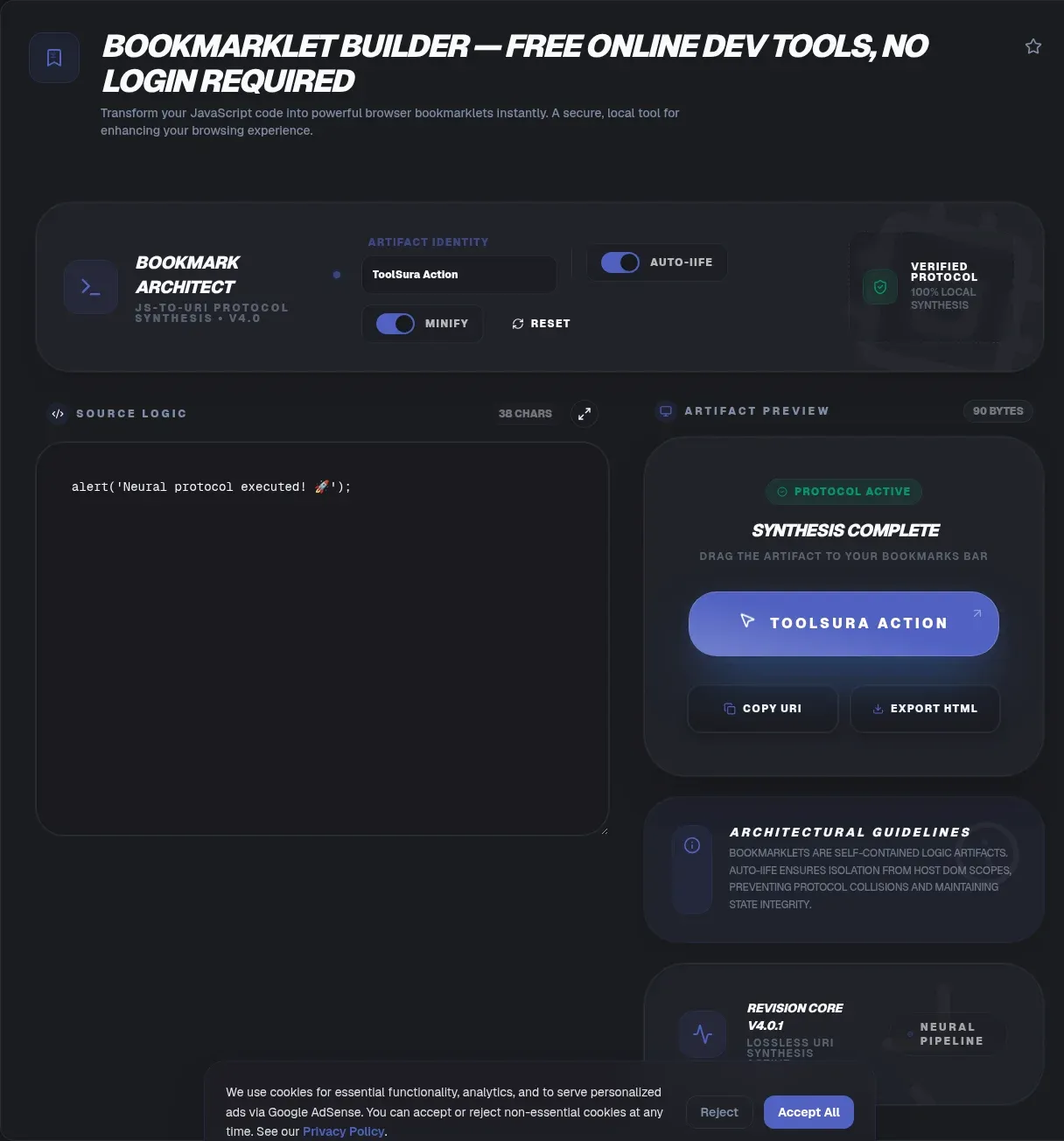
The bookmarklet builder turns any JavaScript snippet into a one-click bookmarklet: a normal bookmark you drag to your bookmarks bar and click on any page to run your code right there. Whether you arrived searching for a bookmarklet creator, bookmarklet generator, or bookmarklet maker, the tool and the job are identical. The whole pipeline runs in your browser. Your code never leaves your device. There is no upload and no signup.
Why reach for one? A bookmarklet is the smallest automation tool the web offers: no install, no permissions dialog, no store review, no update channel. You write plain JavaScript, drag a single link, and your script runs on the page you're already viewing. This page doubles as the manual: how the builder works, how javascript: URLs behave under the hood, why bookmarklets fail on certain sites, and when you should graduate to a userscript or an extension. For the rest of the toolbox, our developer tools guide maps out what each utility is for.
Key Takeaways
- A bookmarklet is a bookmark whose URL is a
javascript:URL; clicking it runs your JavaScript on the current page (MDN, 2025).- ToolSura's builder works entirely in your browser: no upload, no signup, and it keeps running offline once the page has loaded.
- It automates the two fiddly parts, IIFE wrapping and percent-encoding, including the single-quote case.
- Most failures have a known cause: CSP headers, encoding damage, or Internet Explorer's 2,083-character URL ceiling (Microsoft, 2019).
- Bookmarklets run in page context only, so they cannot call the tabs, storage, or cookies APIs that browser extensions get.
What is a bookmarklet?
A bookmarklet is a bookmark whose stored address is a javascript: URL instead of an http or https one. Clicking it doesn't take you anywhere; the browser executes that JavaScript against whatever page is open. MDN's javascript: scheme reference describes these as "fake navigation targets that execute JavaScript when the browser attempts to navigate," valid anywhere a URL acts as a navigation target: a link's href, a form action, an iframe src, window.location, and the address bar itself (MDN Web Docs, 2025).
The idea is older than most frameworks you use. Steve Kangas of bookmarklets.com coined the word, and that site has been online since December 14, 1998; the concept traces back to a suggestion in Netscape's 1997 JavaScript guide. Tantek Çelik was calling them "favelets" by September 2001, a nod to Internet Explorer's favorites menu (Wikipedia).
What do people actually build with them? Clutter strippers, form fillers, dark-mode injectors, data extractors that scrape visible text into JSON, quick CSS overrides for design tests. Anything that fits in a few kilobytes of page-context JavaScript is a candidate.
Three bookmarklet examples to adapt
Three short payloads cover the classic jobs, and each is deliberately compact. Small code keeps you comfortably below Internet Explorer's 2,083-character URL ceiling, the number Microsoft documented as INTERNET_MAX_URL_LENGTH (Eric Lawrence, 2019). Paste any of these into the builder as-is; the IIFE wrap and percent-encoding happen on the way out.
// 1. Count the visible words on the page
console.log(document.body.innerText.split(/\s+/).length);

// 2. Dump every external link into a table
const host = location.hostname;
console.table([...document.querySelectorAll('a[href^="http"]')]
  .map(a => a.href).filter(h => !h.includes(host)));

// 3. Temporary dark mode
const s = document.createElement('style');
s.textContent = 'body{background:#111;color:#eee}';
document.head.appendChild(s);
The first two print to the console, so keep DevTools open while you test. The third changes the page live and vanishes on reload. That last property, nothing persisted and nothing phoned home, is the whole appeal of the format.
Why ToolSura's bookmarklet builder is different
ToolSura's bookmarklet builder does every step client-side. Parsing, wrapping, encoding, and generating the draggable link all happen in your browser, so your code never leaves your device, nothing gets uploaded, and the tool keeps working offline once the page has loaded. Some bookmarklet generator sites take a different route: you paste your script into a form, a server builds the javascript: URL, and the result comes back over the wire. That round trip ships your code, sometimes carrying internal URLs, API tokens, or unreleased product logic, to a third party you know nothing about.
The builder also removes the two steps where hand-rolled bookmarklets usually go wrong:
- IIFE wrapping. Your code gets wrapped in an immediately invoked function expression, so its variables stay out of the host page's global namespace.
- Percent-encoding. The payload is encoded for a
javascript:URL correctly, including the single-quote edge case that trips up naive encoders.
You bring the JavaScript; the builder hands back a link. No account, no server round trip, no gate behind a paid tier.
How to use the bookmarklet builder
Start to finish, the workflow takes under a minute, five steps in all:
- Write or paste your JavaScript. If it manipulates the DOM, prototype it first: the HTML-CSS playground with live preview lets you iterate on selectors and styles before freezing them into a payload.
- Minify it if the script is long. Shorter payloads dodge URL length limits, which matter more than you'd expect. The JavaScript, CSS, and HTML minifier strips comments and whitespace without changing behavior.
- Click generate. The builder wraps your code in an IIFE, adds the
voidprefix, and percent-encodes everything into a singlejavascript:URL. - Drag the generated link to your bookmarks bar. Make sure the bar is visible first: Ctrl+Shift+B (Cmd+Shift+B on Mac) in Chrome, Edge, and Firefox; View, Show Favorites Bar in Safari.
- Click it on any page. Your code runs against that page's live DOM. If nothing happens, the troubleshooting section below names the usual suspects.
One habit worth keeping: test a fresh bookmarklet on a blank tab before the real thing. If it works there but dies on real sites, your code is fine and the site is the problem.
Installing in Chrome, Firefox, Edge, and Safari
Dragging the link is nearly universal, but each browser hides the bookmarks bar differently, and it's a fair bet yours is hidden right now. Chrome and Edge both respond to Ctrl+Shift+B, which toggles the bar, and Firefox accepts the same shortcut (Cmd+Shift+B on Mac across all three). Safari keeps its bar under View, Show Favorites Bar, or Shift+Cmd+B.
Can't drag at all? Right-click the bookmarks bar and choose Add Page (Chrome, Edge) or New Bookmark (Firefox), then paste the generated javascript: URL into the address field manually. A bookmark stores the same URL string the drag would have saved, and per MDN, javascript: is a legitimate URL wherever a URL can act as a navigation target, bookmarks included (2025).
Mobile is the exception. iOS and Android browser chrome swallows long-press and drag gestures for links, so installation generally needs a desktop sync of your bookmarks or a bookmark-editing workaround. Plan for desktop-first installation. In our experience, Chrome and Edge are the most drag-reliable, while Firefox occasionally needs the manual right-click, New Bookmark route on the first try.
How bookmarklets work under the hood
The javascript: URL, formally
The WHATWG HTML Standard, not any RFC, is what specifies javascript: URL processing today, and two of its rules explain most bookmarklet behavior. First, if your code's completion value is a string, that string replaces the entire page as a new HTML document. Second, in the spec's own words, "javascript: URLs are never stored in session history, and so can never be traversed to," which is why clicking a bookmarklet never creates a back-button entry (WHATWG HTML Standard).
Nor is the scheme IANA-registered. Wikipedia's list of URI schemes files it under "Unofficial but common URI schemes," and the attempt to standardize it, IETF draft-hoehrmann-javascript-scheme, expired in 2010 with no formal standing (IETF Datatracker).
Why void comes first
The void operator evaluates an expression and returns undefined. MDN explicitly recommends prefixing javascript: script calls with void so an accidental string result can't replace the page you're on. The operator exists partly for this job: JavaScript's creator, Brendan Eich, wrote that he "added the void operator to JS before Netscape 2 shipped" so scripts could discard a value (Wikipedia). That's why every generated bookmarklet starts with javascript:void.
The IIFE wrapper
A javascript: URL is one expression slot; your real script is many statements. The IIFE pattern bridges that gap. MDN notes it lets you "execute arbitrarily many statements in their own scope (and possibly return a value), in a location that requires a single expression." Scope isolation is the quiet win: your let and const declarations can't collide with the host page's variables.
Your input (plain JavaScript):

  const imgs = document.querySelectorAll('img');
  console.log(imgs.length);

The generated bookmarklet, before percent-encoding, shown formatted for readability:

  javascript:void(() => {
    const imgs = document.querySelectorAll('img');
    console.log(imgs.length);
  })()
Percent-encoding quirks
encodeURIComponent() escapes everything except A-Z a-z 0-9 - _ . ! ~ * ' ( ). The single quote is the trap: it never becomes %27 unless you add an extra replace pass, and a raw quote can truncate or corrupt a javascript: URL in certain attribute contexts (MDN). ToolSura's builder runs that pass for you. To see exactly what encoding did to your payload, paste the generated URL into the URL encoder and decoder.
Why your bookmarklet breaks on some sites (and the fixes)
Three causes cover nearly every failure report, and the big one is Content-Security-Policy. MDN is blunt about it: "By default, if a CSP contains a default-src or script-src directive, then inline JavaScript is not allowed to execute. This includes: inline <script> tags, inline event handler attributes, javascript: URLs." User preference is the counterweight: W3C CSP Level 2 notes that "User agents may allow users to modify or bypass policy enforcement through user preferences, bookmarklets, third-party additions to the user agent, and other such mechanisms" (2016). Translation: some browsers deliberately exempt user-initiated bookmarklets, so the outcome depends on the browser as much as on the site. Wikipedia documents CSP-driven bookmarklet breakage from 2013 through 2015 (Wikipedia).
Length is the second cause. Internet Explorer historically capped URLs at 2,083 characters, the INTERNET_MAX_URL_LENGTH constant, while Chromium "limits URLs to 2mb for most scenarios" and displays about 32 KB in its address bar (Microsoft's Eric Lawrence, 2019). Two megabytes is roomy; the legacy ceiling is not, and old corporate browsers still exist. Minify before you generate.
Third is the address bar itself. Browsers strip or neuter pasted javascript: URLs, treating the paste as a search query, which is why installation is always drag-to-bookmarks-bar, never copy-paste into the address bar. You'll often read that Firefox began stripping these with version 33 in 2014. We could not verify that attribution against an authoritative source, so we won't repeat it. The behavior is real; the version number is folklore.
One myth worth killing while we're at it: a bookmarklet is not a browser extension. Extensions are set apart by their privileged APIs, the tabs, storage, cookies, and webRequest surfaces that page-context code can never call (MDN WebExtensions). That limit is exactly why a bookmarklet needs no permissions dialog and no review process.
In our experience debugging dead bookmarklets, the diagnosis lands in one of the five rows below, and checking them in order takes minutes.
| Symptom | Likely cause | Fix |
|---|---|---|
| Runs on some sites, does nothing on others | CSP script-src or default-src blocks javascript: URLs | Browser-level; some browsers let users exempt bookmarklets. For that site, use a userscript or extension instead |
| Works in simple tests, breaks once quotes appear | Single quotes were never percent-encoded to %27 | Let the builder do the encoding; verify the payload with the URL encoder and decoder |
| Truncated code or syntax errors in legacy browsers | Internet Explorer's 2,083-character URL ceiling | Minify first, or load a small bootstrap script that pulls in the rest |
| Code runs but the page navigates away | The completion value is a string, which replaces the document | Prefix the expression with void so it returns undefined |
| Pasting into the address bar triggers a search | The browser strips pasted javascript: URLs | Install by dragging to the bookmarks bar instead |
Bookmarklet vs userscript vs browser extension
Scope decides it. A bookmarklet runs once, where you click it. A userscript runs automatically on every matching page view. An extension runs in the background with privileged APIs. Userscripts grew directly out of this lineage: Greasemonkey, the first userscript manager, launched on November 28, 2004, written by Aaron Boodman, and its scripts modify pages through the DOM just like bookmarklets, only automatically. Extensions sit a level above both: per MDN, they're built on WebExtensions and get "access to an extra set of JavaScript APIs," such as tabs, storage, cookies, and webRequest, that page-context code can't touch.
Sharing a bookmarklet is its own small art. You embed it as an ordinary anchor whose href holds the javascript: URL, exactly how the builder's output link works, and recipients drag it into their own bookmarks bar. Always show the source alongside the link: a bookmarklet is code a stranger runs on their logged-in sessions, so recipients should read it before dragging.
So pick the smallest tool that solves the problem. A bookmarklet is right when you want zero install, or when the job is a one-off fix to the page in front of you. A userscript fits when the same change should apply on every visit to specific sites, and modern managers like Tampermonkey keep that tradition alive. An extension earns its permissions dialog when you need cross-tab state, background work, or browser UI of your own.
The trade-offs side by side:
| Bookmarklet | Userscript | Extension | |
| Install | Drag one link, no restart | A userscript manager, then one click | Browser store download |
| When it runs | Once, on the page you click it | Automatically on every matching page view | In the background, across all pages |
| Privileged APIs | Page context only | Page context plus manager helpers | Tabs, storage, cookies, webRequest |
| State after reload | Gone until you click again | Rules persist per site | Persistent across sessions |
| Review before use | You read the source yourself | You read the script yourself | Permissions dialog and store review |
Related Tools
- Regex tester: debug the selection patterns your data-extraction bookmarklets rely on before they go into the payload.
- URL encoder and decoder: inspect what percent-encoding did to your generated
javascript:URL, quote by quote. - JSON formatter and validator: pretty-print and validate the JSON your fetch-based bookmarklets pull back from APIs.
- HTML-CSS playground with live preview: the fastest place to prototype DOM changes before turning them into a one-click tool.