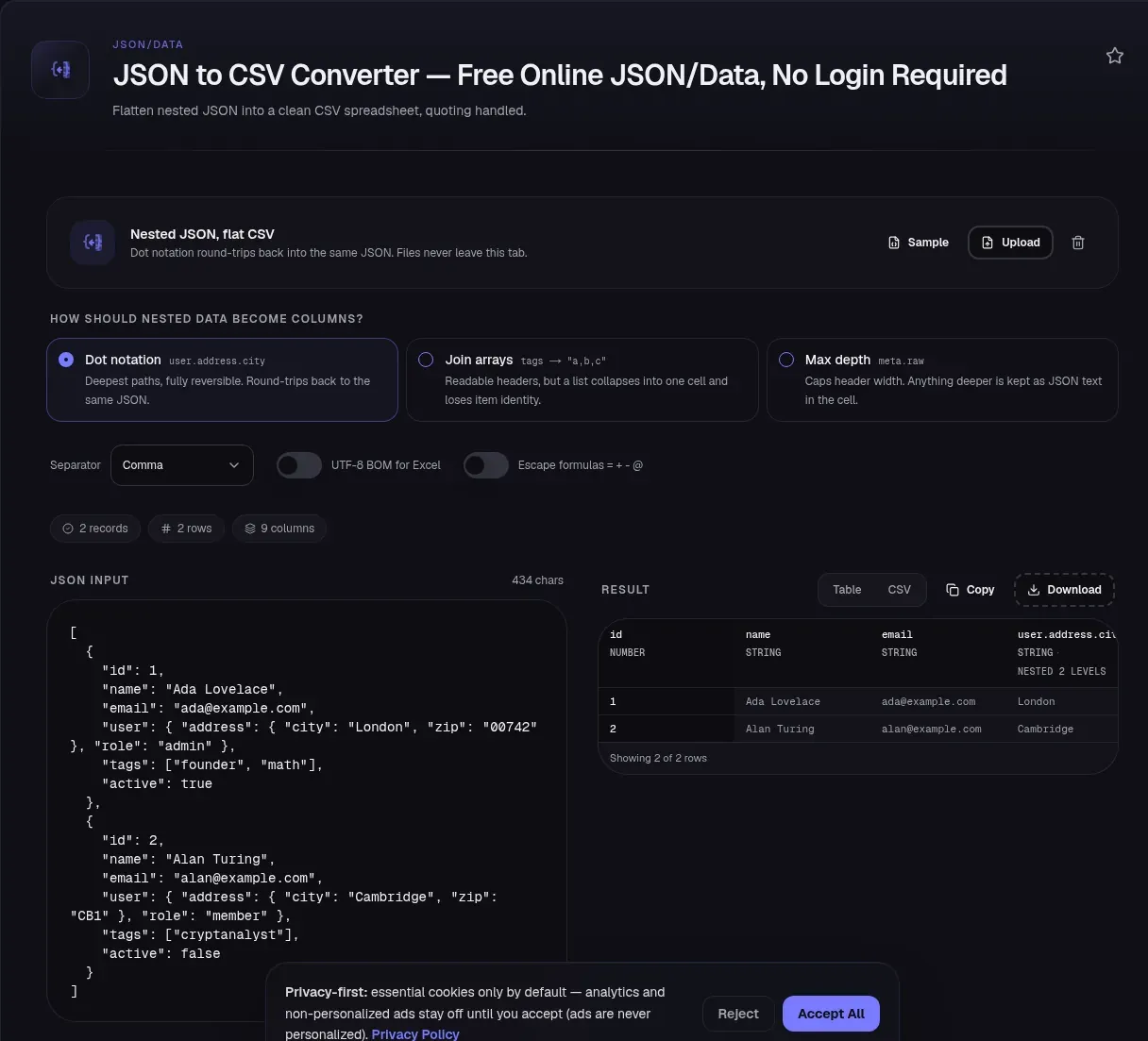
Every record you paste into this JSON to CSV converter is parsed, flattened and serialised in your browser tab. Your JSON is never uploaded, it never leaves your device, and nothing is sent anywhere: the component that renders this page contains no fetch, no axios, no XMLHttpRequest and no sendBeacon. To confirm that rather than take it on trust, open your browser's developer tools, switch to the Network tab, paste a payload containing a string you could search for afterwards, and convert. No request carries it.
That matters more here than it does for most tools, because the input is usually something you would rather not hand to a stranger: a customer list, an export from an internal system, an API response with account identifiers in it. So read the rest of this page as a description of a projection tool rather than a pipeline. It reads JSON, flattens the tree into columns, writes CSV, and reports how many records went in against how many rows came out. That second number is the one worth watching.
What this tool reads, and the one shape it refuses
RFC 8259 defines a JSON object as "an unordered collection of zero or more name/value pairs" and an array as "an ordered sequence of zero or more values". The "zero or more" in both definitions is the hinge of this page: {} is a well-formed object that holds nothing, not malformed input and not a null. The parser in your tab is JSON.parse(), which throws a SyntaxError when the text does not conform. It hands you the object or it fails loudly. There is no third outcome where it quietly returns fewer things than you sent.
Four input shapes are recognised, and the fifth is rejected on purpose.
| Input | Result |
|---|---|
| Array of objects | One row per record |
| A single object | One row, plus a warning that the file has one row |
| NDJSON, one JSON value per line | One row per line, with an "NDJSON detected" note |
| Array of bare scalars | Rejected, with the reason and a suggested fix |
| Anything else | Parse error reported with line and column |
The NDJSON path exists because the NDJSON specification makes the point bluntly: the format is unframed, a stream of JSON values separated by newlines, with no root object or array. Such a file is not valid JSON as a whole, so a tool that calls JSON.parse() once rejects a perfectly ordinary export.
The scalar-array rejection is the interesting one. An array of strings or numbers has no field names, so there is no header row to derive and no honest guess to make. Inventing column names would be worse than refusing.
Why the header says user.address.city
A JSON object has a shape; a CSV file has a rectangle. Something gives. This tool offers three strategies, because the right answer depends on whether you plan to convert the file back.
| Strategy | Headers it emits | Arrays | Round-trips? |
|---|---|---|---|
| Dot notation (default) | user.address.city, tags[0] |
One column per item | Yes |
| Join arrays | tags |
Collapsed into a,b,c |
No, item identity is gone |
| Max depth (default 2) | meta.raw |
Joined, deeper values written as compact JSON | No |
Columns are the union of every path any record produced, in first-seen order, so a record missing a field still gets a row with a blank cell rather than a ragged line. That is what RFC 4180 expects: file = [header CRLF] record *(CRLF record) [CRLF], with each line carrying the same number of fields.
Dot notation is the default because the header is not a display string, it is a contract. The grammar this tool writes is the exact grammar the CSV to JSON converter parses back. Feed the file to its sibling with dot notation selected and user.address.city becomes an object three levels deep again, tags[0] and tags[1] a two-element array. Choose Join arrays and that door closes permanently.
Six records in, four rows out
Everything above is theory until a record comes out empty. Here is a measured case, run through a flattener of the kind a developer writes in ten minutes: recurse into objects, index into arrays, write each scalar under its dotted path, and give an empty container no else branch.
[
  {"id":1,"name":"Ada Lovelace","user":{"address":{"city":"London"}},"tags":["founder","math"]},
  {"id":2,"name":"Grace Hopper","user":{"address":{"city":"New York"}},"tags":["navy","cobol"]},
  {},
  {"id":4,"name":"Alan Turing","user":{},"tags":[]},
  {"id":5,"name":"Katherine Johnson","user":{"address":{}},"tags":["nasa","orbit"]},
  {}
]
Six records in. The CSV that comes out is valid, opens anywhere, and has four rows:
id,name,user.address.city,tags[0],tags[1]
1,Ada Lovelace,London,founder,math
2,Grace Hopper,New York,navy,cobol
4,Alan Turing,,,
5,Katherine Johnson,,nasa,orbit
Two records are gone, and the file cannot tell you. Python's json documentation makes the neighbouring point: JSON is not a framed protocol, so writing several objects back to back into one stream "will result in an invalid JSON file". That is why the input is wrapped in an array: it gives you something countable to compare against.
Three records in, one row out
The same failure has a minimal reproduction, the version worth remembering:
[{}, {"a":1}, {}]
jq reads it as three records and says so:
$ echo '[{},{"a":1},{}]' | jq 'length'
3
Now apply the projection step, walking each record for the paths to its scalar leaves. The jq manual defines paths(f) as the filter that "outputs the paths to any values for which f is true", and scalars selects non-container values:
$ echo '[{},{"a":1},{}]' | jq -c '[.[] | [paths(scalars)]]'
[[],[["a"]],[]]
Records 0 and 2 flatten to []. Not to a null, not to an empty string. To nothing. Skip empty rows, as a row builder must, and the loss is complete:
$ echo '[{},{"a":1},{}]' | jq -c '[.[] | [paths(scalars)] | select(length>0)] | length'
1
Three in, one out, with nothing in that count saying a record was dropped. State it plainly, because the obvious write-up is wrong: jq is not at fault, and JSON is not at fault. Ask jq for the empty object the right way and it hands the record straight back. Under --stream the manual describes "outputting arrays of path and leaf values (scalars and empty arrays or empty objects)", and there it is, in the first two characters:
$ echo '[{},{"a":1}]' | jq -c --stream
[[0],{}]
[[1,"a"],1]
[[1,"a"]]
[[1]]
[[0],{}] is the empty object at path [0], emitted as its own leaf. The parser kept the record. The loss happens one step later, in the flatten-then-build-rows projection that tabulates scalar paths only. That distinction is the whole point: this is a bug in how trees become tables, not a bug in a parser.
Three ways a record disappears
Those six records contain three kinds of emptiness, and they do not fail alike.
| Record | Fate | Why |
|---|---|---|
{} (records 3 and 6) |
Row entirely gone | Flattens to zero cells |
{"id":4,"user":{},"tags":[]} |
Row kept, three cells blank | Nested empties contribute no paths, siblings survive |
{"id":5,"user":{"address":{}}} |
Row kept, user.address.city blank |
The column exists because records 1 and 2 populated it |
The third row costs an afternoon. Read 5,Katherine Johnson,,nasa,orbit and the empty city cell looks unremarkable, as though Katherine Johnson had an address field that was simply blank. She did not: her address is {}. The output cannot tell that from a record with no address key at all, and the column header is present only because the other two records populated it. Had every record held an empty address, that column would not exist and record 5 would have been dropped outright.
So: absence of a value is not evidence of absence of a field. A blank cell tells you a record held nothing under that path. It cannot tell you whether it held an empty container, was missing the key, or was never asked.
What the reconciliation bar is for
That is why this tool prints three numbers above the output rather than one: recordCount, the records the input held, rowCount, the rows the output has, and columnCount, the size of the union of paths. When the first two disagree, an amber banner appears with the delta spelled out, carrying both numbers and a warning icon rather than relying on colour alone.
Point it at the six-record fixture above and it reports six records, four rows, and names the two-record gap. You still have a data-loss problem, because a CSV row cannot represent a record with no fields at all. But you know it before the file reaches a spreadsheet, an import or a colleague. Both programs produce the same four rows; one starts from six and never mentions it. That is the whole difference between a converter and a silent data-loss bug.
The counters are also announced to screen readers on a debounced live region, in the shape "2 records, 2 rows, 6 columns", so the reconciliation is not a visual-only signal.
Column badges, and why a ZIP code is a string
Each column carries a lineage badge: the dominant value type across the records that populated it (string, number, boolean or mixed) plus its nesting depth, which counts key segments below the record root. name is depth 0, user.name is 1, user.address.city is 2. A bracketed array index belongs to its key and adds no level, so tags[0] stays at 0.
Leading zeros force the string classification. A ZIP code of 00742 is never filed as a number, because a spreadsheet that sees a number may reformat it, and 742 is a different ZIP code.
Quoting, delimiters and the formula guard
A value containing the delimiter, a double quote, a carriage return or a line feed is quoted, and embedded quotes are doubled, which is RFC 4180 verbatim:
name,note
"Doe, John","say ""hi"""
Line endings are CRLF with a trailing newline. The delimiter switches between comma, semicolon, tab and pipe, which matters in locales where the comma is a decimal separator. The UTF-8 BOM switch prepends a byte-order mark so Excel opens the file as UTF-8 rather than guessing.
The escape-formulas switch prefixes a cell with an apostrophe when it begins with =, +, -, @, a tab or a carriage return. That list is not this tool's invention: the OWASP CSV injection guidance names those characters as the vector and explains the attack they enable, where a spreadsheet such as Excel or LibreOffice Calc reads the cell as a formula rather than as text. It is off by default, because a cell starting with - is far more often a negative number than an attack, and silently rewriting your data is its own kind of damage.
Read that switch as a mitigation, not a guarantee. OWASP's own page warns that Excel may strip quotes or escape characters when a file is saved and reopened, that full-width variants such as = can be read as formulas in some locales, and that no universal sanitisation strategy is safe for every spreadsheet and every downstream consumer.
What this tool does not do
| It is | It is not |
|---|---|
| A projection from records to rows | A JSON validator — that is the JSON formatter and validator |
| A schema mapper | A type-preserving serializer — CSV has no types, so 1 and "1" land in the same cell |
| A lossless round trip | Total losslessness — null, "" and a missing key all become an empty cell and stay indistinguishable |
| A preview | The whole file — the table caps at 20 rows |
| A desktop file handler | A big-file processor — uploads stop at 5 MB, and there is no worker or streaming path |
Three of those deserve a sentence each. On types: the badges tell you what the source values looked like, but the file carries no type information, so a CSV cell cannot tell 1 from "1". On round-tripping: the header grammar is a real contract and the round trip holds for records with at least one scalar leaf, but null, "" and a missing key collapse into one empty cell. On limits: the 5 MB ceiling is deliberate, since conversion is synchronous in your tab with no worker thread and that cap is what keeps typing fluid. Past it the file is refused rather than passed elsewhere. The download is always data.csv, and there is no transpose mode or .xlsx export.
If the file is destined for a spreadsheet rather than a parser, the IANA registration for text/csv says that due to the lack of a single specification, "there are considerable differences among implementations", and that "there is no single 'master' specification for this format". A file that is valid here is not guaranteed to read the way you expect everywhere.
Related tools
- CSV to JSON converter — the inverse direction, and the other half of the header-grammar contract. Dot notation in, original structure out.
- JSON formatter and validator — sort this out first, when the problem is that your input is not valid JSON at all.
- JSON to YAML converter — the same tree, different question, when the destination is configuration rather than a spreadsheet.
- HTML table generator from CSV — when you want the CSV rendered as a pasteable table instead of downloaded.