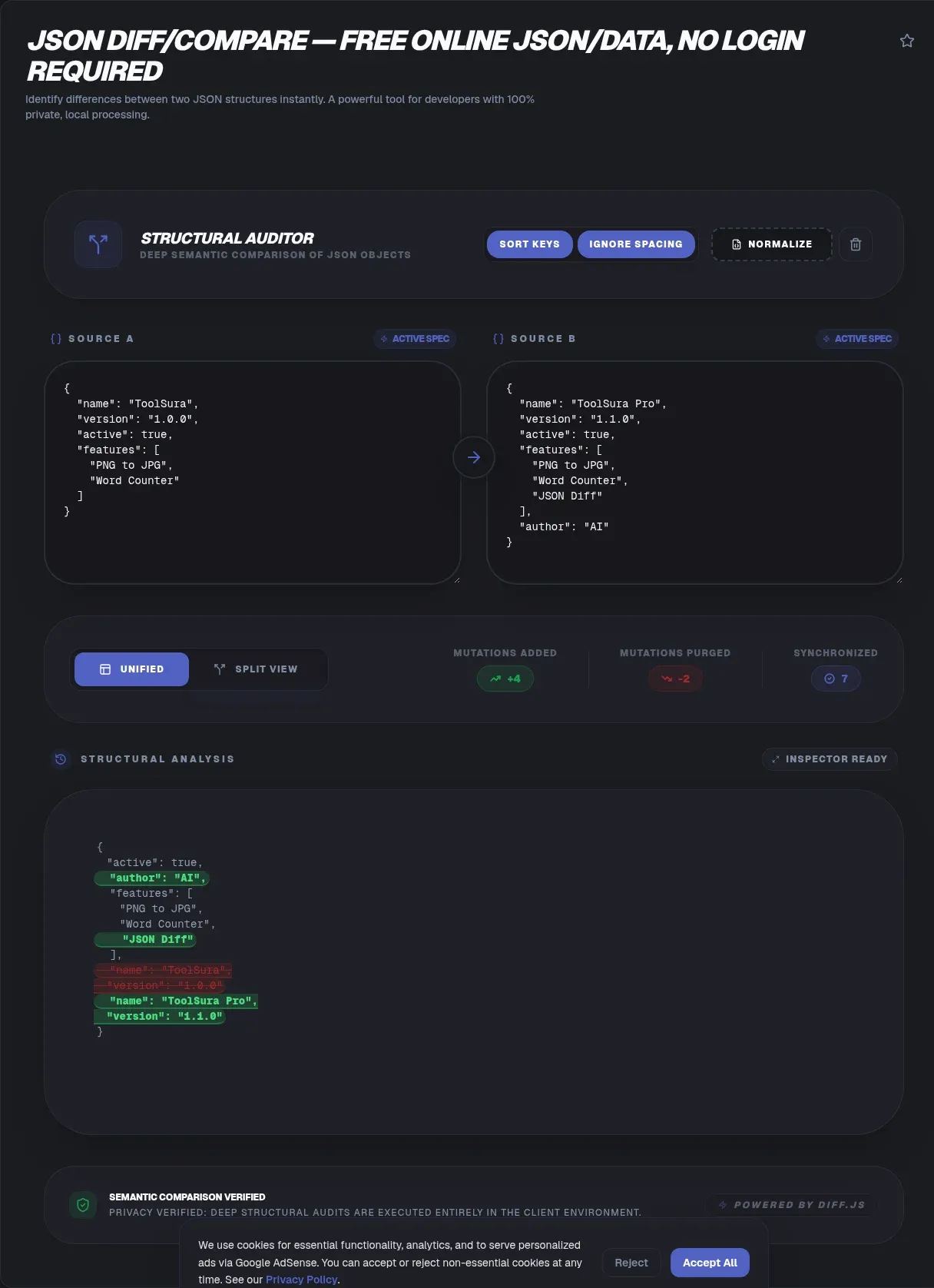
Comparing two JSON documents sounds trivial until reformatting hides the one value you actually changed. A structural JSON diff compare workflow fixes that by parsing both payloads, normalizing them against RFC 8259 rules, and reporting only real changes, all in your browser. The four most-depended-on JavaScript diff libraries were downloaded about 13.4 million times in a single week (npm, August 2026), so this problem touches nearly every team that ships an API.
This guide explains what a structural diff actually does, why standards like RFC 6902 matter, and where server-side alternatives create risk. ToolSura's implementation runs entirely client-side, which means your JSON never leaves your device: paste, compare, fix, copy the result, done. No account, no upload queue, and no retention policy to read before you start.
Key Takeaways
- Structural diffs beat line diffs because RFC 8259 treats key order and whitespace as meaningless.
- Array matching strategy decides whether an insertion reads as one change or a full rewrite.
- RFC 6902 JSON Patch expresses any difference as six executable operations.
- The average breach cost reached USD 4.44M globally in 2025 (IBM), so payload handling matters.
- ToolSura compares JSON entirely client-side: nothing is uploaded, ever.
What Is a JSON Diff and Why Do Developers Use One?
A JSON diff is a structural comparison: it parses two documents into trees, walks them in parallel, and reports added, removed, or changed values. Demand is measurable. just-diff alone recorded 5,933,569 downloads in the week of August 15 to 21, 2026, a figure that includes transitive installs (just-diff on npm).
Text editors cannot do this job because they see characters, not parsed data. Dedicated utilities fill the gap: jsondiffpatch (2,834,535 downloads that same week) documents smart array handling and patch output (jsondiffpatch on GitHub), while json-diff brings colorized structural output to terminals and CI scripts (json-diff on GitHub). A browser version simply moves the tree walk onto your own machine.
Why Do Line Diffs Fail on JSON Documents?
Line diffs fail because they compare text, and JSON permits the same data to be written countless ways. The current standard, published in December 2017, declares whitespace between tokens insignificant and predicts interoperability for implementations whose behavior does not depend on member ordering (RFC 8259: why JSON object order doesn't matter). Reformat a file, and a naive diff paints every line red.
History backs the point: the format began as RFC 4627 in July 2006 and was refreshed as RFC 7159 in March 2014 before settling as RFC 8259. Pretty-printed and minified inputs describe identical information. Only a parser-driven comparison, which normalizes both documents before walking them, separates cosmetic noise from change your application can feel.
Does Key Order Matter When You Compare JSON Files?
Key order does not matter, and the specification says so plainly: "An object is an unordered collection of zero or more name/value pairs" (RFC 8259). A comparison tool that flags reordered keys as differences is reporting parser artifacts, not real changes.
Formal canon exists too. The JSON Canonicalization Scheme (June 2020) requires that whitespace between JSON tokens must not be emitted and that object properties be sorted recursively, producing a stable form designed for reliably repeatable hashing and signing (JSON Canonicalization Scheme (RFC 8785)). Sorting keys inside a diff applies the same principle: normalize first, compare second, report last.
How Are Arrays Matched During a JSON Diff?
Arrays are ordered, so matching strategy changes everything. Positional pairing treats one insert-at-top as a rewrite of every element. jsondiffpatch documents smart array diffing using LCS, plus an objectHash function for identity matching, and warns that without it a dumb match by position is used (jsondiffpatch: LCS array diffing).
A concrete example helps: 200 customer records gain one new entry at the top. Positional matching reports 201 modifications; identity matching reports a single addition. Standards mandate no approach, so implementations differ widely. Ask which method your tool applies before trusting any array-heavy result, especially auto-generated lists where stable IDs exist.
What Is JSON Patch (RFC 6902)?
JSON Patch is the IETF standard for expressing a sequence of operations to apply to a target JSON document. Every op must be one of add, remove, replace, move, copy, or test, each targeting a JSON Pointer path (JSON Patch (RFC 6902)). Operations run in order, and any failure aborts the entire patch (The six JSON Patch operations explained).
The payoff is efficiency and intent: patches exist to avoid sending a whole document when only a part has changed, which is why HTTP PATCH endpoints embrace them. Picture exporting a computed difference as RFC 6902 output. Colored highlights become a scriptable change set your pipeline can replay, review, and archive.
Merge Patch vs Full Diff: Which Standard Fits Your Change?
Merge patch (October 2014) describes changes using a syntax that closely mirrors the structure of the document, and null values carry special meaning: they indicate removal of existing values in the target (JSON Merge Patch (RFC 7386)). Elegant, but constrained: merges cannot express moves, and you cannot set a field to null, because null always deletes.
Choose merge patch when you hold a partial document and want simple overwrite semantics. Choose a full diff expressed as RFC 6902 operations when you need explicit steps, move support, or auditable ordering. Knowing which artifact sits in your hand prevents subtle bugs in API clients and automation scripts alike.
Is It Safe to Paste API Responses Into Online Tools?
Safety depends entirely on where processing happens. IBM priced the global average data breach at USD 4.44M in 2025, down 9% and the first decline in five years, while the US average set a record at USD 10.22M (IBM Cost of a Data Breach Report 2025). API responses routinely carry bearer tokens, customer records, and internal identifiers.
Regulation points the same direction: personal data must be "adequate, relevant and limited to what is necessary" under Article 5(1)(c) (GDPR Art. 5(1)(c) data minimisation). Sending full production payloads to a server-side website creates exactly the unnecessary exposure that principle targets (general information, not legal advice). Industry breach precedents illustrate upload-model risk broadly; none of the publicly documented incidents involve the vendors compared above, yet the vector follows payloads wherever servers receive them.
Which Popular Web Diff Tools Keep Processing Local?
Processing models vary more than landing pages admit. jdd, the open-source engine behind jsondiff.com, runs as client-side JavaScript with roughly 1.2k GitHub stars (jdd: open-source semantic JSON compare). By contrast, jsoncompare.org and jsonformatter.org make no privacy claim on their pages, so their processing models remain unstated.
Diffchecker frames its promise, "your diffs never leave your computer!", as a benefit of the paid desktop app rather than the web tool. Read claims literally and the contrast sharpens. A tool built as pure client-side JavaScript needs no footnote because the comparison executes on your hardware by construction, which lets it make a privacy claim through architecture instead of policy.
How Do Test Suites Depend on JSON Diffing?
Every snapshot test is a diff wearing a different label. Jest's guide explains that snapshot testing serializes values, stores them in text files, and compares them using a diff algorithm (Jest snapshot testing guide). The jest package logged 46,110,791 weekly downloads (npm, August 15 to 21, 2026), a measure of the package rather than snapshot-test adoption specifically.
Partial matching leans on identical machinery: toMatchObject verifies that an object matches a subset of the properties of an expected object (Jest toMatchObject subset assertions). Contract testing stretches the idea across service boundaries. Pact's documentation calls contract testing "the killer app for microservice development and deployment," and @pact-foundation/pact-core logged 628,182 downloads that same week (npm registry API), a hedged proxy for adoption.
Why Do DevOps Teams Diff Terraform Plans and Kubernetes Manifests?
Infrastructure drift hides in JSON whether teams notice or not. Terraform's show -json command generates a JSON representation of a plan or state file, with resource_changes entries carrying before and after values (Terraform plan JSON format (show -json)). Comparing those objects reviews exactly what an upcoming apply will touch.
Kubernetes speaks JSON natively: the API defaults to JSON for encoding HTTP message bodies and returns objects in JSON serialization, while also accepting application/yaml (Kubernetes API: JSON by default). Diff live cluster state against intended manifests to catch drift before rollouts. Convert YAML first, and the identical structural comparison covers both representations.
What Happens When a Core Diff Library Loses Support?
Download counts do not guarantee maintenance. deep-diff pulled 3,474,222 weekly downloads (week of August 15 to 21, 2026) while deprecated on npm, carrying the registry notice "Package no longer supported" (deep-diff npm (deprecated, still widely installed)). Most installs arrive transitively, bundled inside applications whose owners never picked it directly.
Builders should read that chart as popularity, not health: pin versions, audit dependency trees, and upgrade deliberately. Engineers who occasionally compare two documents face no such burden with a hosted client-side tool. There is nothing to install, nothing to inherit, and nothing to patch when an upstream library changes hands.
What Should You Check Before Trusting Any Diff Result?
Three checks separate signal from noise. Normalization comes first: keys should be sorted or canonicalized before comparison (JSON Canonicalization Scheme (RFC 8785)). Second is array strategy: positional, LCS, and identity matching each tell a different story. Third are exclusions: timestamps and request IDs legitimately differ between environments, so mature tools let you ignore chosen paths.
Ignore-field behavior is implementation-specific, and no standard governs it. Verify any tool with a known pair: reorder keys, add whitespace, then insert one array element at the top. A correct structural comparison reports exactly one change. Anything broader is describing the tool's parser rather than your data.
How Do You Compare Two JSON Documents Step by Step?
The whole loop takes about a minute. Format and validate both documents first, because dirty JSON produces noisy or failed comparisons, and trailing commas love to masquerade as differences. Decode wrapped fields next: JWT bodies and Base64 payload chunks become comparable only after decoding.
Paste the left document and the right document, review additions, removals, and value changes, then fix the source or copy findings into a ticket. Starting from spreadsheets instead? Convert rows to JSON before comparing, and split oversized datasets so a single pass stays comfortably within browser memory.
Can You Diff Large Files or Work Offline in a Browser?
Yes to both, within reason. Because parsing happens locally, the practical ceiling is device memory rather than a server quota, though multi-megabyte documents can slow older machines. Once the page has loaded, comparison keeps working without a connection, which suits restricted networks where pasting into external services is blocked by policy.
For exceptionally large inputs, split the dataset or diff a filtered subtree instead of wrestling a frozen tab. Sequence matters too: validate, compare, then convert the output for whichever pipeline comes next. Small habits keep comparisons fast and results defensible during incident reviews.
Related Tools
A comparison rarely stands alone, so keep these companions bookmarked:
- JSON Formatter & Validator: clean up and validate both documents before diffing.
- JSON to YAML Converter: flip configurations between formats for Kubernetes workflows.
- JSON Schema Generator: compare structure contracts, not just values.
- CSV to JSON Converter: turn spreadsheet exports into comparable documents.
- CSV Splitter & Merger: right-size datasets before conversion and comparison.
- Base64 Encoder/Decoder: decode encoded payload fields before comparing.
For the comparison step itself, open the JSON Diff/Compare tool and see only what truly changed.
The Bottom Line
Structural comparison is settled science: RFC 8259 tells us what to ignore, RFC 8785 shows how to normalize, and RFC 6902 defines how to express the result. The open question is where processing runs, and that choice now carries measurable stakes, from USD 4.44M average breach costs to data minimisation duties. Running the diff in your browser closes the question cleanly: payloads stay on your machine, and the report shows only what changed.