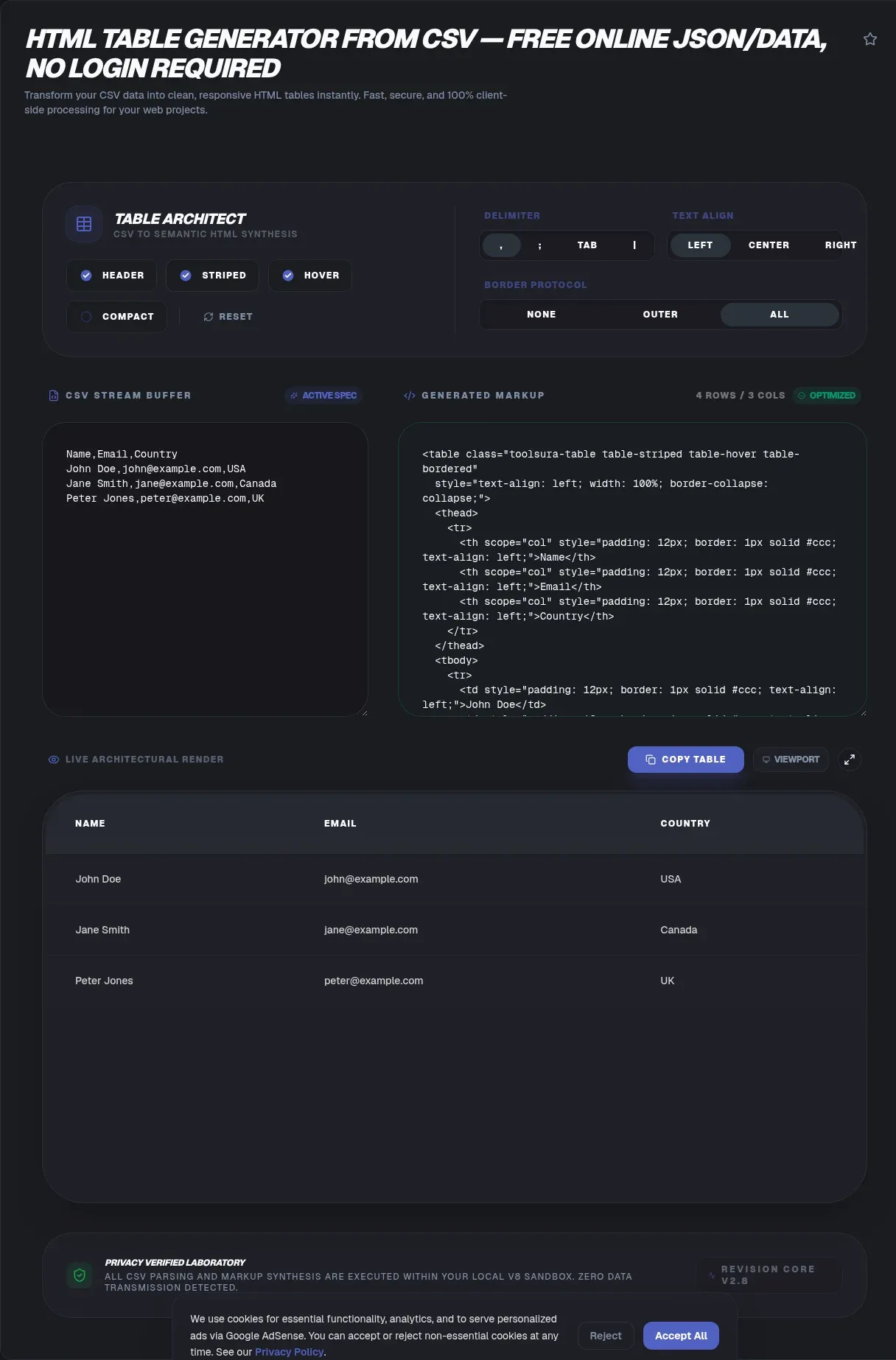
A spreadsheet becomes a working web table in about thirty seconds once you know the workflow: paste comma separated text into an HTML table generator from CSV, review the preview, and copy standards-based markup. The whole conversion happens in your browser, which changes the privacy math completely. This guide walks through the markup rules, accessibility requirements, styling options, and publishing destinations that turn raw exports into tables readers actually understand.
The stakes are higher than they look. Revenue figures, payroll rows, and customer email addresses live in spreadsheets, and pasting them into the wrong web tool hands that data to unknown servers. Here, nothing is uploaded: your file never leaves your device, because the parsing code runs inside the page itself. Privacy regulators call this principle data minimisation, and the sections below explain why it matters and how to get excellent results.
Key Takeaways
- ToolSura's generator converts CSV into clean table markup entirely in your browser, with zero uploads.
- Semantic table, th, td, and caption markup supports WCAG 1.3.1 accessibility techniques.
- Correct parsing follows RFC 4180 quoting rules, codified in October 2005.
- Mobile took 52.57 percent of worldwide page views in July 2026 (StatCounter), so wrap wide tables in scroll containers.
- Bootstrap and Tailwind classes drop straight into the generated tags.
What Does an HTML Table Generator from CSV Actually Do?
It converts plain comma separated text into the HTML elements browsers use to render data grids. The HTML Living Standard defines the table element as representing data with more than one dimension, and it states plainly that tables must not be used as layout aids. A quality generator honors that contract: genuine header cells, genuine data cells, and nothing decorative.
Under the hood, three things happen: a parser splits your text into rows and cells while respecting quotation marks, your chosen header row maps to th elements, and everything serializes into markup ready to paste. Quality lives in the details, including a caption element describing the table, a thead wrapping header cells, and tbody grouping data rows. The standard permits table children only in strict order: optional caption, then column groups, then optional thead, then body rows, then optional tfoot (WHATWG HTML Living Standard).
Why Should Your CSV Never Leave Your Device?
Because uploaded spreadsheets create obligations you never agreed to. GDPR Article 5(1)(c) requires personal data to be adequate, relevant, and limited to what is necessary for processing (EUR-Lex, Regulation (EU) 2016/679). Pasting a customer list into a server-side converter copies that data onto someone else's infrastructure. Keeping files local reduces that exposure to zero, which is risk reduction rather than legal compliance advice.
Client-side parsing is mainstream engineering, not a novelty. Papa Parse, the most widely used dedicated browser CSV parser library, recorded 14,893,528 downloads in the week of August 16 to 22, 2026 (api.npmjs.org) (npm registry). Millions of projects already crunch CSV inside pages, which is exactly what this tool does with your paste.
There is a practical bonus too: once the page loads, you can disconnect from the internet and keep converting. HR rosters, patient lists, and unreleased financials never cross a network connection. The approach also suits shared or locked-down machines where installing software is impossible.
What Makes CSV Parsing Harder Than Splitting on Commas?
Quoted fields defeat naive code. RFC 4180, the Informational specification published October 2005 that defines the de facto common CSV format, requires fields containing commas, line breaks, or double quotes to be enclosed in quotes, with embedded quotes escaped by doubling (RFC Editor). A cell holding Smith, Jr. must survive as one cell, and a quoted address spanning two physical lines must stay in one row.
Get this wrong and the corruption is silent: columns shift by one, totals land under the wrong headers, and nobody notices until a reader complains. This failure mode explains why developers rely on hardened parsing libraries instead of five lines of split code. The Node csv project's parser recorded 18,329,142 downloads in the week of August 16 to 22, 2026 (api.npmjs.org), evidence that RFC-aware parsing is a solved-but-specialized problem (npm registry).
Make it a habit: test any converter with a hostile little file containing a quoted comma, a quoted newline, and doubled quotes. Inspect the preview cell by cell. Three survivors mean the parser respects the specification; any casualty means walk away.
Which Markup Do Accessible Tables Need?
Structure, headers, and captions, applied consistently. The WebAIM Million 2026 edition (February 2026 crawls) found detected WCAG 2 failures on 95.9 percent of one million home pages, up from 94.8 percent in the 2025 edition, and the survey itself cautions that automated detection undercounts true non-conformance (WebAIM Million). Sloppy table markup feeds statistics like these.
The W3C's official tutorial sets the baseline: mark header cells with th, data cells with td, and set scope to col or row whenever header direction is unclear (W3C WAI Tables Tutorial). Those practices map to WCAG Success Criterion 1.3.1, Info and Relationships, at Level A (Understanding SC 1.3.1), and technique H63 recognizes scope values of row, col, rowgroup, and colgroup (WCAG Technique H63).
Captions deserve attention too. A caption element supplies the table's accessible name so screen reader users can decide whether to engage, and WAI calls it useful in most situations (Captions and Summary). MDN adds a subtlety: scope is usually inferred in simple tables, yet some assistive technologies infer incorrectly, so specifying it improves reliability (MDN table element).
One honest boundary: the tool emits markup that supports WCAG techniques, and it does not certify conformance, which depends on the whole page and the publisher's evaluation. Treat the output as a foundation, then validate the finished page yourself.
How Do You Convert CSV to an HTML Table in ToolSura?
Three steps: paste or upload, configure, copy.
- Open the HTML table generator and paste CSV text or upload the file; parsing starts locally the moment content lands.
- Flag the first row as the header when it holds column names; the documented configuration generates the matching thead structure with proper th cells.
- Add custom CSS classes if you want framework styling, check the preview, then copy the generated markup.
The page badges the process as verified 100 percent client-side, with processing sandboxed in the browser. The tool's own notes say large files parse nearly instantly, though very big previews depend on your browser's memory. Expect practical ceilings in the tens of thousands of rows, comparable to documented competitor caps of 10MB on TableConvert's free tier (TableConvert) and 10 MiB on CSVTool.io (CSVTool.io).
Can You Style Generated Tables With Bootstrap or Tailwind?
Yes, through the class attribute. The documented workflow injects custom classes into the generated tags, and the tool's FAQ specifically names Bootstrap and Tailwind as compatible. Put class="table table-striped" on the table element for Bootstrap's striped look, or apply Tailwind utilities for borders, padding, and hover states.
How Do You Make Wide Tables Work on Mobile?
Wrap them in a horizontally scrollable container. Mobile devices took 52.57 percent of worldwide page views in July 2026, versus 45.93 percent desktop and 1.50 percent tablet, figures from a page-view tracking aggregator (StatCounter Global Stats). Most readers meet your table on a screen narrower than your column count.
The fix costs one wrapper. Enclose the table in a div styled with overflow-x auto, or use Bootstrap's .table-responsive class, and phones get a swipeable region instead of a squeezed grid. MDN demonstrates position sticky for keeping headers visible across long scrollable regions (MDN table element); pair that with generous cell padding for small screens.
Where Should You Paste the Generated HTML?
Any surface that accepts raw HTML, and WordPress leads the list. WordPress runs on 58.9 percent of websites with a known CMS, equal to 40.7 percent of all sites surveyed (monthly survey labeled 23 August 2026) (W3Techs). Its Custom HTML block takes your snippet with no plugin required.
Static site templates, wikis, documentation platforms, and admin dashboards consume the markup directly, and developers often use it as scaffolding for JavaScript sorting layers. Email is the exception: many clients ignore or strip embedded CSS, so critical campaigns need inline styles and testing across major providers.
How Does This Converter Compare With Other CSV to HTML Tools?
Privacy posture is the sharpest difference. TableConvert, CSVShift, and CSVTool.io all document client-side processing, and they deserve credit for it (TableConvert; CSVShift; CSVTool.io). ConvertCSV.com's page leaves its processing model unstated and makes no privacy claim there, and Tableizer matches that pattern, processing model unstated with no privacy claim (ConvertCSV.com; Tableizer).
Features vary. TableConvert bundles transpose editing, an Escape HTML Characters toggle, and a DIV Table output mode, though DIV output abandons table semantics, the opposite of accessibility guidance. CSVShift ships five style presets, a live iframe preview, and entity escaping framed as XSS-safe encoding. CSVTool.io badges that files stay on the device and wraps output in a responsive scroll container. Tableizer handles quick pastes with basic font options.
Gaps remain everywhere. None of the five documents scope attribute emission, the canonical WCAG technique for header association, and none frames parsing explicitly against RFC 4180 quoting rules. TableConvert's self-reported 800M+ tables converted is vendor marketing, so weigh it accordingly. Verified client-side architecture plus standards-focused markup is ToolSura's clearest edge here.
What Should You Verify Before Publishing?
Three checks catch nearly every bad embed. First, escaping: HTML entity escaping is not documented on the tool's page, so test a cell containing bold tags and confirm it renders as literal text; if raw angle brackets pass through, sanitize the source data before converting.
Second, delimiters: the page documents comma separated input and lists no delimiter selector. Semicolon exports, common in European Excel locales, and tab exports need normalizing first; re-export as true CSV or preprocess with a splitting and merging utility, then convert.
Third, scale: no hard size limit is documented, and very large previews strain browser memory. Split oversized exports, convert the chunks separately, and spot-check row counts against your source. Two minutes of verification beats explaining broken cells to readers later.
Who Benefits Most From a Client-Side Converter?
Teams handling sensitive spreadsheets gain most: analysts circulating revenue breakdowns, agencies managing client metrics, and education or healthcare staff moving roster data all work with files they cannot responsibly scatter across third-party servers. Publishers gain semantic, captioned, responsive tables that survive theme changes and read correctly in archives. The common thread is ownership: your data stays yours, and your output meets written public standards.
How Do You Keep Table Data Accurate Before Publishing?
Why Does My Converted Table Look Wrong?
Usually one of five culprits:
- Columns shifted by one: a quoted comma was split, meaning quoting rules were ignored; check the source file's quotation marks.
- Everything lands in one column: the file is semicolon or tab separated; normalize delimiters, then reconvert.
- Garbled characters: an encoding mismatch; save the source as UTF-8 before pasting.
- Header rendered as data: the first-row-as-header option was left off.
- Broken spacing after embedding: surrounding CSS reset border-collapse or padding; scope your styles to the new table.
Ready to Convert Your First Spreadsheet?
Grab any export gathering dust, paste it in, flip the header switch, and add a caption. Wrap the table in a scroll container, then paste the result into your platform of choice. The loop runs faster than drafting an email, and nothing sensitive travels anywhere.
Tables are where data earns trust or loses it. Standard-compliant markup, headers assistive technology can announce, and a preview that respects your privacy give every table a fair chance. Start with the HTML table generator from CSV and keep the verification checklist handy for publication day.
Frequently Asked Questions
Seven questions cover the issues readers raise most often about turning spreadsheets into publishable markup, from privacy mechanics to framework styling and publishing targets.
Related Tools
Round out the workflow with the rest of ToolSura's free, browser-based toolkit:
- CSV to JSON converter turns the same spreadsheet into API-ready JSON.
- CSV splitter and merger normalizes odd delimiters and tames oversized files before conversion.
- JSON formatter and validator keeps structured payloads readable while you build both formats.
- JSON diff and compare catches changed rows between dataset versions before publication.
- Color picker and palette generator supplies exact hex codes for headers and zebra stripes.
- Base64 encoder and decoder encodes data snippets safely for embeds and email payloads.
When the data is ready, the HTML table generator from CSV converts it into clean, private, standards-based markup in seconds.