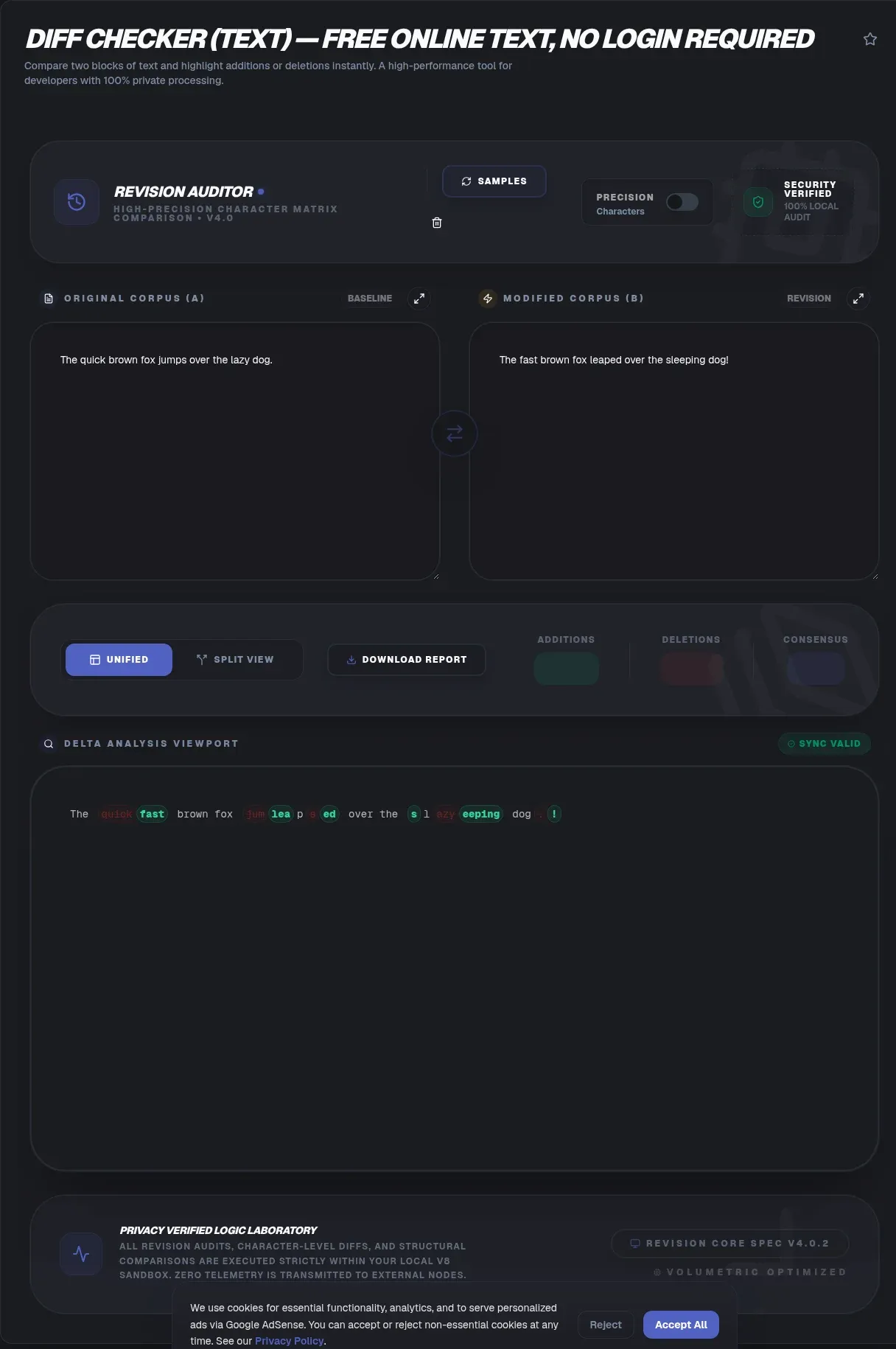
A text diff checker compares two blocks of text and shows exactly which characters, words, or lines changed between them. ToolSura's free diff checker runs in your browser, so your text never leaves your device. There is no upload, no server, and no signup, and it works offline once the page loads.
People use a compare text tool when they need proof of what moved. Writers check a revised paragraph against the draft. When the difference is typos rather than edits, the fuzzy text search tool scores how close the near-misses are instead. Developers spot a stray edit in a config file. Reviewers confirm a contract clause changed before sign off. A good diff checker answers one question fast, what is different between these two versions, and where?
What Is a Diff?
A diff is the list of changes that turn one text into another. The word comes from the Unix diff utility built at Bell Labs and shipped with Unix 5th Edition in 1974, which compared files line by line Wikipedia Diff. A diff solves the longest common subsequence problem, the dual of finding the shortest edit script Longest common subsequence.
The math behind a modern compare text tool is the O(ND) algorithm. Myers proved in 1986 that the longest common subsequence and shortest edit script problems are two views of the same task, and gave a greedy method that runs in O(ND) time and space, where N is the combined length and D is the edit distance Myers O(ND). That paper still underpins most diff engines today.
The classic pre-Myers method, the Hunt and McIlroy algorithm, runs in O(n squared log n) worst case and was described in their 1976 Bell Labs report Hunt Szymanski. Myers' version later reimplemented Unix diff and ran two to four times faster than the older System V build. The point for users is simple, a fast, exact diff of large text is a solved problem, not a guess.
Imagine two sentences on screen. The engine builds a grid of matches, then walks back through it to find the longest run both share. Everything outside that run is a change. The longest common subsequence problem for two sequences of length n and m takes O(n times m) with plain dynamic programming, which is fine for documents but grows fast on huge files Longest common subsequence.
Why ToolSura's Text Diff Checker Is Different
ToolSura's diff checker runs entirely on your device, which means the text you paste is processed in your browser and never transmitted to a server. Most comparison sites upload your content to their machines to compute the result, creating a copy they may log or store. ToolSura avoids that by doing the work locally, with no account and no network call.
This client-side design follows a recognized privacy principle. EU GDPR Article 5(1)(c) requires personal data be adequate, relevant, and limited to what is necessary, a rule known as data minimization GDPR Article 5. Article 25 adds data protection by design and by default. Processing sensitive drafts locally serves both ideas by skipping unnecessary transmission entirely EU data collection guidance.
The practical upside is that the tool keeps working without a connection. Load the page once, then compare text on a plane, in a locked-down office, or on a machine with no internet. Privacy is not a setting you toggle here. It is the architecture, so there is nothing to leak and nothing to delete after the fact.
Local processing also means no retention policy to read. Server-based tools often keep your text in logs for debugging or training, and you must trust their deletion promises. On your device, the data exists only in the open tab and vanishes when you close it. That is the cleanest possible privacy story for sensitive drafts.
How to Use the Text Diff Checker
- Open the ToolSura diff checker page in any modern browser. No signup is required and no file is uploaded.
- Paste your older text into the left pane and your newer text into the right pane.
- Pick a side-by-side view to see both versions, or a unified view to see one combined list of changes.
- Toggle ignore whitespace or ignore case if formatting noise is hiding the real edits.
- Review the colored highlights, where green marks additions and red marks deletions, then copy or export the result.
That is the whole flow. There is no install and no account, and the comparison happens the moment you paste. If you paste a long document, the highlights appear instantly because the browser, not a remote server, does the computation. You can switch views or change ignore options without losing your text.
Line, Word, and Character-Level Diff
A diff can measure change at three levels, whole lines, individual words, or single characters. Classic diff tools compare line by line because that was cheap on 1970s hardware, but a line-level diff misses edits inside a line GNU diffutils manual. Word and character granularity catch the partial-line and typo fixes that line view hides.
Word-level diffing splits each changed line into tokens and shows only the replaced words. Character-level diffing goes further and highlights a single mistyped letter. A common myth says a diff is only whole-line changes. It is not. Modern compare text tools report the smallest unit that actually changed, which is what makes them useful for prose as well as code.
The right granularity depends on the job. Code reviews usually want line and word views, where a moved brace is obvious but a rewritten sentence is not noise. Editing prose benefits from character view, where one wrong letter stands out. ToolSura lets you shift between these without repasting, so you can inspect a change at the zoom that fits.
Granularity also changes performance. Character-level comparison builds a bigger table than line-level, but modern browsers handle documents of thousands of lines without a hiccup. ToolSura picks the smallest practical unit per view, so the highlight stays responsive even on a long paste.
Unified Diff vs Side-by-Side View
A unified diff shows old and new together in one stream, while a side-by-side view places the two versions in parallel columns. The unified format was created by Wayne Davison in 1990 and added to GNU diff 1.15 in 1991, and it is now the standard way developers exchange changes Wikipedia Diff. GNU's unified format shows three lines of context around each edit by default GNU diffutils manual.
The side-by-side format, invoked with diff -y, lays both files across roughly 130 columns and truncates long lines, which is great for human reading but awkward to paste into a chat. The unified format uses compact hunk headers like @@ -1,4 +1,5 @@ to mark where a change starts and how many lines it spans. Each line then carries a space, plus, or minus prefix.
Git builds on this. Its patch output begins with a header that names both files as a/file and b/file, and reuses the @@ -l,s +l,s @@ hunk markers, with plus for added lines, minus for removed, and space for unchanged Git diff format. When you want a machine to apply your change, the unified format is the one to export. For eyeballing, side-by-side wins.
Context lines matter when you apply a patch by hand. The three lines GNU shows around each change give you anchor text to confirm position, which prevents a patch from failing on a file that drifted slightly. More context means a safer apply but a longer diff to read.
Ignoring Whitespace, Case, and Accents
You can strip noise from a comparison by telling the diff checker to ignore whitespace, case, or accents before it highlights. Whitespace and case toggles matter most in code review, where a formatter reindents a file or a linter changes quotes, producing hundreds of fake differences that hide one real edit GNU diffutils manual.
Turning on ignore whitespace collapses those cosmetic shifts so only meaningful lines stand out. Ignore case helps when two copies differ only by capitalization, such as a title normalized in one draft. Accent-insensitive comparison finds that cafe and cafe are the same word despite the mark, which is handy for translated or multilingual text where diacritics drift between versions.
These options are switches, not permanent settings. You can run a strict diff first to catch everything, then flip on ignore whitespace to see whether the remaining marks are real. ToolSura keeps both panes intact, so toggling is instant and you never wonder whether a difference was a true edit or just a styling artifact.
Be careful not to over-ignore. If you silence case on a password or a case-sensitive identifier, a real difference disappears. Use ignore options to read the noise, then turn them off for a final strict pass before you trust the result in code or a contract.
Diffing Code, Config, and JSON (and Exporting a Patch)
A diff checker is a code review workhorse. Paste the old config or JSON on the left and the new version on the right, then read exactly which keys or values shifted. This beats scrolling two files by eye, especially for long JSON where a single nested value changed three screens down. The result is the same engine that compares prose, applied to structured text.
When the change is ready to share, export a git-compatible unified patch. Copy the unified diff, save it as a .patch file, and run git apply from your repo root to replay the edit on another machine Git diff format. The hunk headers and plus-minus prefixes match what Git expects, so the patch applies cleanly without manual editing.
A real config diff looks like this, where the only meaningful edit is one raised timeout:
--- a/config/nginx.conf
+++ b/config/nginx.conf
@@ -12,7 +12,7 @@ server {
     listen 80;
-    client_max_body_size 8m;
+    client_max_body_size 64m;
     server_name toolsura.com;
 }
That is exactly the kind of one-line change a line diff surfaces instantly and a manual eyeball misses.
Config files gain the most. A diff of two nginx or environment files shows the one timeout that broke a deploy, instead of a wall of identical lines. JSON diffing surfaces a flipped boolean or a renamed field that a reviewer would otherwise miss. Exporting the patch turns a visual check into a portable, reviewable change set your team can apply on command.
JSON deserves a special note. Because it is line oriented in most editors, a reformatted file looks fully changed to a line diff even when only one value moved. Word or character view, plus ignore whitespace, collapses the formatting noise and shows the one value that actually changed.
Diff Checker vs Word's Compare Documents
A browser diff checker and Word's Compare Documents solve the same problem from different seats. Word's feature lives under Review then Compare and merges two .docx files inside the desktop app, keeping track changes and comments. ToolSura's compare text tool needs no install, runs in your browser, and never uploads the document to a server Wikipedia Diff.
Acrobat offers a similar Compare Files button for PDFs, again tied to a paid desktop program. The browser tool wins on reach and privacy, anyone with a link can compare two pasted texts in seconds, on any operating system, with no license. Word wins on rich formatting, because it understands styles, tables, and tracked edits that plain text cannot represent.
Pick the browser diff checker when the content is plain text, code, or JSON and you care about speed and privacy. Pick Word or Acrobat when the file's structure, such as headings and comments, is part of what changed. A clear line to draw, a diff checker is not a full document merger. It shows differences, it does not reconcile conflicting edits into one approved file.
Cost is another split. Word and Acrobat sit behind licenses many people do not have, while a browser diff checker is free and link-shareable. For a quick check of two pasted snippets during a call, the browser tool is simply faster to reach.
Key Takeaways
- Diff checking reduces to longest common subsequence, and Myers O(ND) still underpins most engines today.
- Line, word, and character granularity switch without repasting, so buried typos never hide.
- Ignore toggles strip whitespace, case, and accent noise; run a strict diff first, then relax deliberately.
- Export a git-compatible unified patch with @@ hunk headers and replay it through git apply.
- Comparison runs entirely client side with no upload, no signup, and offline use once loaded.
Related Tools
- JSON Diff Compare - compare two JSON objects field by field when your text diff is actually structured data.
- Word Counter - count words and characters in each version before and after you compare text, to confirm a trim held.
- Case Converter - normalize title or sentence case across drafts so case differences do not show up as fake edits.
- Markdown Linter - check markdown style on the revised copy after you review the diff, keeping docs clean.
- JSON Formatter & Validator - validate structured files before you diff them, so syntax errors stop masquerading as real content changes.
- Markdown to HTML Converter - preview reviewed markdown as rendered pages once your revisions settle. Whenever two versions of anything disagree, ToolSura's Diff Checker settles the question in seconds without a single byte leaving your device.