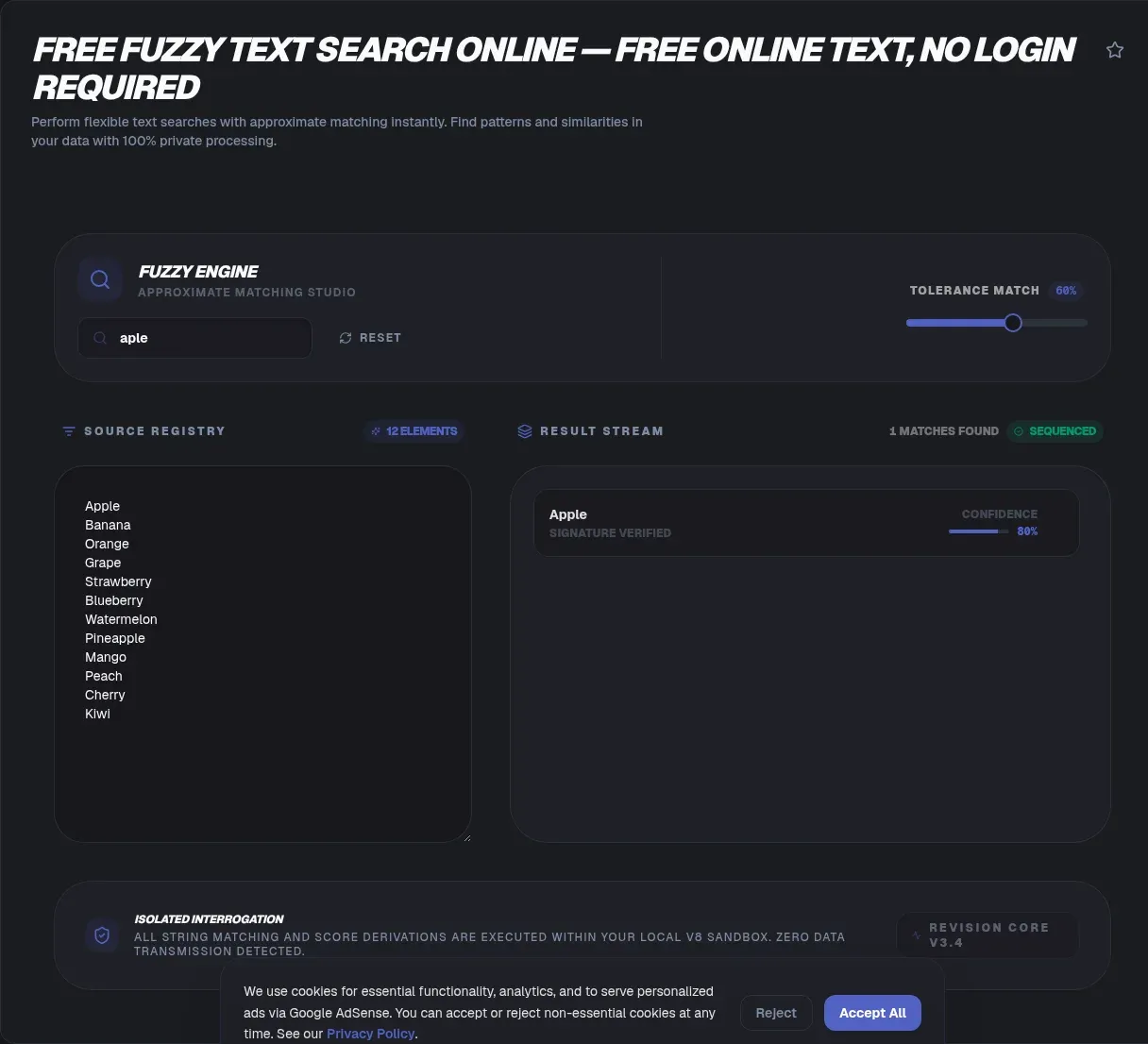
Fuzzy search finds approximate matches between strings, tolerating typos, misspellings, and near-misses that an exact comparison would reject. Paste your text, type a query, and the tool scores every candidate by similarity, ranking the closest hits first. Everything runs in your browser: your text never leaves your device, and there is no upload, no signup, and no server-side processing step anywhere in the pipeline.
That privacy guarantee is architecture, not marketing copy. Many fuzzy-matching tools POST your text to a backend before scoring it, which is a non-starter when the corpus holds customer names or internal records. This tool scores locally, so it behaves identically with the wifi switched off.
Key Takeaways
- Fuzzy search returns approximate matches within a tolerance instead of demanding exact strings; Damerau's 1964 study found more than 80% of misspellings are single-edit errors.
- The tool runs entirely in your browser: no upload, no signup, and your text never leaves your device.
- Fuzzy matching compares characters, not meaning, so 'cat' never fuzzy-matches 'dog'.
What is fuzzy search?
Fuzzy search is approximate string matching: it finds strings within a tolerance, expressed as an edit distance or a similarity score, instead of requiring every character to match. The formal field is called approximate string matching, and it splits into online techniques that scan text directly and offline techniques that lean on prebuilt indexes. Norvig's spelling-corrector data shows why tolerance wins in practice: only 23 of 400 final-test misspellings and just 3 of 270 development-set misspellings fell beyond edit distance 2, so roughly 94-99% of real typos sit within two edits of the intended word (Peter Norvig's spelling corrector, 2007).
The tolerance usually takes one of two shapes. An edit distance counts the minimum single-character changes needed to turn one string into another. A similarity score returns a normalized value from 0 to 1, where 1 means identical. The canonical edit metric is Levenshtein distance, first published by Vladimir Levenshtein in his 1966 paper 'Binary codes capable of correcting deletions, insertions, and reversals' in Soviet Physics Doklady. It counts insertions, deletions, and substitutions, so turning 'kitten' into 'sitting' costs 3 edits.
Fuzzy search is not semantic search. This is the mix-up worth killing early. Fuzzy matching scores character similarity; semantic search scores meaning. 'cat' and 'dog' are near neighbors in meaning yet share almost no characters, so no edit distance or n-gram score will ever link them, and no threshold setting changes that. If you want typo tolerance, fuzzy search is the right tool. If you want concept-level recall, you need embeddings, not edit distance.
Why ToolSura's fuzzy text search is different
Two properties separate this fuzzy text matching tool from the typical server-based option: privacy and offline support. A quieter third difference shows up in the defaults, which follow industry convention instead of inventing new rules. The matching engine runs client-side, in your browser, with no upload step anywhere. Your text never leaves your device, which removes the entire question of data retention, because nothing is ever retained. Load the page once and it keeps working with your connection off, which makes it a genuinely private fuzzy matching option for sensitive lists.
Case handling follows industry convention rather than inventing its own rules. Search is case-insensitive by default, so 'Hello' and 'hello' score as the same string. That matches Fuse.js, the popular zero-dependency browser fuzzy-search library, which ships with isCaseSensitive set to false unless you deliberately flip the option. Most people want capitalization differences ignored, and the tool agrees.
In our experience testing online fuzzy string matchers, the deciding factor is rarely the algorithm, it is what happens to your data. Server-side tools add latency, rate limits, and a privacy question you must answer before pasting anything real. A client-side matcher gives none of that up, and the scoring cost for typical corpora is trivial for a modern browser.
How to use the fuzzy text search tool
The whole workflow takes under a minute, and every run happens locally. The tool doubles as an edit distance calculator and similarity score calculator, because each result arrives with its score attached.
- Paste your text: drop your corpus into the input area: a list of names, a document, log lines, or one item per line. Each line becomes a candidate for matching.
- Enter your query: type the string you are looking for, typo included. If you are hunting 'receive' but keep typing 'recieve', enter the typo you actually have.
- Set your tolerance: start strict and loosen gradually. A smaller allowed distance, or a higher similarity floor, means fewer and better matches, and the tool updates results the moment you change it.
- Review the scored matches: every hit carries a similarity score, so you can see how close it sits and where the borderline falls.
- Tighten or loosen, then rerun. Matching is iterative. Adjust the threshold until the results include everything you expect and nothing you do not.
How fuzzy matching works: the algorithms
Every fuzzy matcher picks its own way to quantify 'close'. Four families cover most of what you will meet in the wild, and knowing which one you are looking at makes threshold choices far less mysterious.
Levenshtein and Damerau-Levenshtein distance count single-character edits. Levenshtein allows insertions, deletions, and substitutions. Damerau-Levenshtein distance adds a fourth operation, transposition of two adjacent characters, which is why it scores 'teh' against 'the' at cost 1 instead of 2. The addition matters: Damerau's 1964 paper in Communications of the ACM found that more than 80% of spelling errors in an information-retrieval system were a single error of one of those four types. Adjacent-character swaps are among the most common typos humans actually make.
Jaro-Winkler similarity scores matches between shorter strings, especially names. Matthew A. Jaro created the measure in 1989 during record-linkage work on the 1985 Tampa, Florida census, and William E. Winkler proposed the prefix-boost variant in 1990, giving strings that share a common prefix of up to 4 characters a higher score at a prefix scale of 0.1. It is a favorite for name matching, but Jaro-Winkler is not a true metric, because it violates the triangle inequality.
N-gram (trigram) similarity slices each string into overlapping pieces. PostgreSQL's pg_trgm extension defines a trigram as 'a group of three consecutive characters taken from a string' and calls the approach very effective for measuring the similarity of words across many natural languages. Its similarity() function returns a value from 0 to 1, and the % operator defaults to a 0.3 threshold.
The Jaccard index measures set similarity as intersection over union: J(A,B) = |A∩B| / |A∪B|, ranging from 0 to 1. Applied to character or n-gram sets, it yields a simple overlap score. The measure was developed independently by Paul Jaccard as his 'coefficient de communauté'.
One more deserves a mention: Bitap, described in the literature as the heart of the Unix search utility agrep, uses bitwise shifting to test many pattern positions at once.
| Algorithm | What it measures | Typical threshold |
|---|---|---|
| Levenshtein | Insertions, deletions, substitutions | Distance 1-2 for short queries |
| Damerau-Levenshtein | Same, plus adjacent transpositions | Distance 1-2; Lucene caps at 2 |
| Jaro-Winkler | Character overlap with a prefix boost | No universal default; prefix scale 0.1, prefix counted up to 4 characters |
| Trigram (pg_trgm) | Shared 3-character slices | 0.3 default for the % operator |
| Jaccard index | Set intersection over union | Context-dependent on a 0-1 scale |
Why search engines cap fuzzy matching at 2 edits
Because term expansion explodes, and almost no real typo needs more room. Apache Lucene's FuzzyQuery matches terms at most 2 edits away, scoring them with Damerau-Levenshtein optimal string alignment, and its javadoc warns that higher distances are 'generally not useful and will match a significant amount of the term dictionary'. Elasticsearch accepts only 0, 1, 2, or AUTO for its fuzziness parameter, with AUTO defaulting to AUTO:3,6: terms of 0-2 characters must match exactly, terms of 3-5 characters allow one edit, and anything longer allows two. Elastic recommends AUTO as the preferred value.
The mechanics explain why the cap exists at all. An Elasticsearch fuzzy query works by expanding every possible variation of the search term within the edit distance, then returning exact matches for each expansion, with max_expansions defaulting to 50 to keep that explosion bounded. Every extra edit multiplies the candidate set, and so does every extra character. So why not allow three edits? Because the results stop being useful long before the expansion stops being expensive.
Norvig's data shows the cap costs almost nothing in recall. Only 3 of 270 development-set misspellings and 23 of 400 final-test misspellings in his corpus were beyond edit distance 2 (Norvig, 2007). Stopping at 2 edits therefore catches roughly 94-99% of what real users actually type, while keeping the term dictionary from flooding your results with noise. That trade is why the industry settled on 2 nearly everywhere, from Lucene to Elasticsearch to the defaults you will reach for here.
Fuzzy name matching: matching people, not words
Name matching is the highest-stakes fuzzy use case, and it needs its own toolkit. Jaro-Winkler was purpose-built for record linkage: William Winkler introduced it in 1990 as part of the Fellegi-Sunter model, and its prefix boost rewards a shared common start with a standard scale of p = 0.1 applied across at most 4 leading characters (Jaro-Winkler distance). Human names have exactly that shape, which is why the metric caught on.
There is no single accepted cut-off for Jaro-Winkler, and any page quoting one without naming its source is guessing. Trust the design instead: it boosts shared prefixes, so 'Roberts' and 'Robert Smith' score above names carrying the same letters in a different order. Tune the line on your own data, not on a borrowed number.
Here is where plain edit distance breaks down. 'Robert A. Smith Jr.' and 'Bob Smith' differ wildly in length, so character scoring punishes the middle initial and the nickname at once. Fix it with a preprocessing layer: expand nicknames, strip honorifics and punctuation, then compare token sets. Once you compare tokens instead of characters, the records line up.
Token order matters less than you think. Jaccard measures set overlap, so 'Smith, John' and 'John Smith' score the same, a property you want when a source flips name order. The approximate string matching literature treats token-set and n-gram scoring as a family distinct from plain edit distance for this reason.
A workable pipeline layers three passes: Jaro-Winkler for the base comparison, a token-set pass for reordering and initials, and a nickname dictionary for the rest. Starting from a spreadsheet? Prepare your CSV for record matching first, then bring each record here to see where the score boundary should sit.
How do you choose a fuzzy matching threshold?
The most common mistake is treating an edit count and a similarity score as the same knob. They are not. Elasticsearch's AUTO:3,6 allows 1 edit for 3 to 5 character terms and 2 edits for longer ones, an edit count. PostgreSQL's pg_trgm uses a 0.3 similarity floor for its % operator, a score. A limit of '2 edits' and a floor of '0.85' answer different questions.
Edit-count thresholds stay length-aware because the count is anchored to a fixed number of single-character changes. 'Allow 2 edits' means the same on every string: substitute, insert, delete, or swap twice. Easy to bound, which is why Lucene and Elasticsearch use it.
Similarity scores are normalized, usually 0 to 1 or 0 to 100, and that is where confusion creeps in. The same score maps to different edit counts by length: two edits on a 3-character word is a near-total rewrite that scores low, while two edits on a 20-character name barely dents the score. A flat '0.85' means something different for a short SKU than a long full name.
This is the myth to kill: a similarity score is not an edit count, and Levenshtein alone is not enough. Plain Levenshtein scores 'teh' to 'the' as 2 edits, while Damerau-Levenshtein counts the adjacent swap as 1. Lucene's FuzzyQuery defaults to Damerau-Levenshtein for that reason, since transpositions are common. Choose the algorithm first.
Pick the algorithm, then calibrate against examples you already know. Run a few true matches and true non-matches, find where the scores separate, and set the line there. To see how two lists diverge before cutting, compare two datasets first.
| Threshold style | Where you see it | What a value means | | Edit count | Elasticsearch AUTO:3,6; Lucene up to 2 | A fixed number of single-character changes | | Normalized score | pg_trgm 0.3 (% operator), 0.6 word similarity | Overlap fraction that shifts with string length | | Scaled ratio | Python difflib, over 0.6 is a close match | 2*M/T, also length-dependent |
Calibrating against real systems helps: Python's difflib calls a ratio() above 0.6 a close match, Fuse.js exposes the same 0-to-1 scale per search, and PostgreSQL's pg_trgm uses 0.3 for the % operator with word-similarity at 0.6. Start strict, confirm the matches you expect are present, then loosen toward 0.6 if real near-misses are missing.
Where fuzzy matching shows up
Spell checkers are the classic case. Norvig's toy corrector, trained on a corpus of 1,115,504 word instances covering 32,192 distinct words, hit 75% accuracy at 41 words per second on its development set (Norvig, 2007), all built on edit distance over a word-frequency table.
Command-line finders bring fuzzy matching to your shell. fzf, described by its author as 'a general-purpose command-line fuzzy finder', implements a modified Smith-Waterman algorithm in its FuzzyMatchV2 engine to find the highest-scoring match, the same algorithm family used for biological sequence alignment.
Database search leans on similarity operators. PostgreSQL's pg_trgm supports GiST and GIN indexes so trigram similarity queries stay fast at scale. On the SQL Server side, the SSIS Fuzzy Lookup transformation matches input rows against a reference table for data cleaning, with similarity thresholds from 0 to 1 at both component and join levels, returning _Similarity and _Confidence scores and building on tokens and q-grams in an inverted index.
Record linkage and deduplication is where Jaro-Winkler was born, on the 1985 Tampa census, and it still powers fuzzy name matching in data-quality pipelines. The approximate-matching literature also lists bioinformatics nucleotide matching among common applications (Wikipedia). If you are deduplicating a messy customer list, that is fuzzy text matching doing the heavy lifting. Before you match, convert your CSV to JSON so the records share one shape, and compare the two datasets side by side to see exactly which pairs the threshold split apart.
Related tools
- Diff checker: when you need exact, character-for-character comparison between two texts rather than scored near-matches, this is the complement to fuzzy search.
- Case converter: normalize casing across your corpus before matching. Search here is case-insensitive, but consistent input makes scores easier to read.
- Regex tester: when you know the exact shape of what you want, a pattern beats a similarity score.
- Word counter: size up a corpus and its vocabulary before you paste it in.
- Text summarizer: condense a long corpus to its key passages before matching against it.