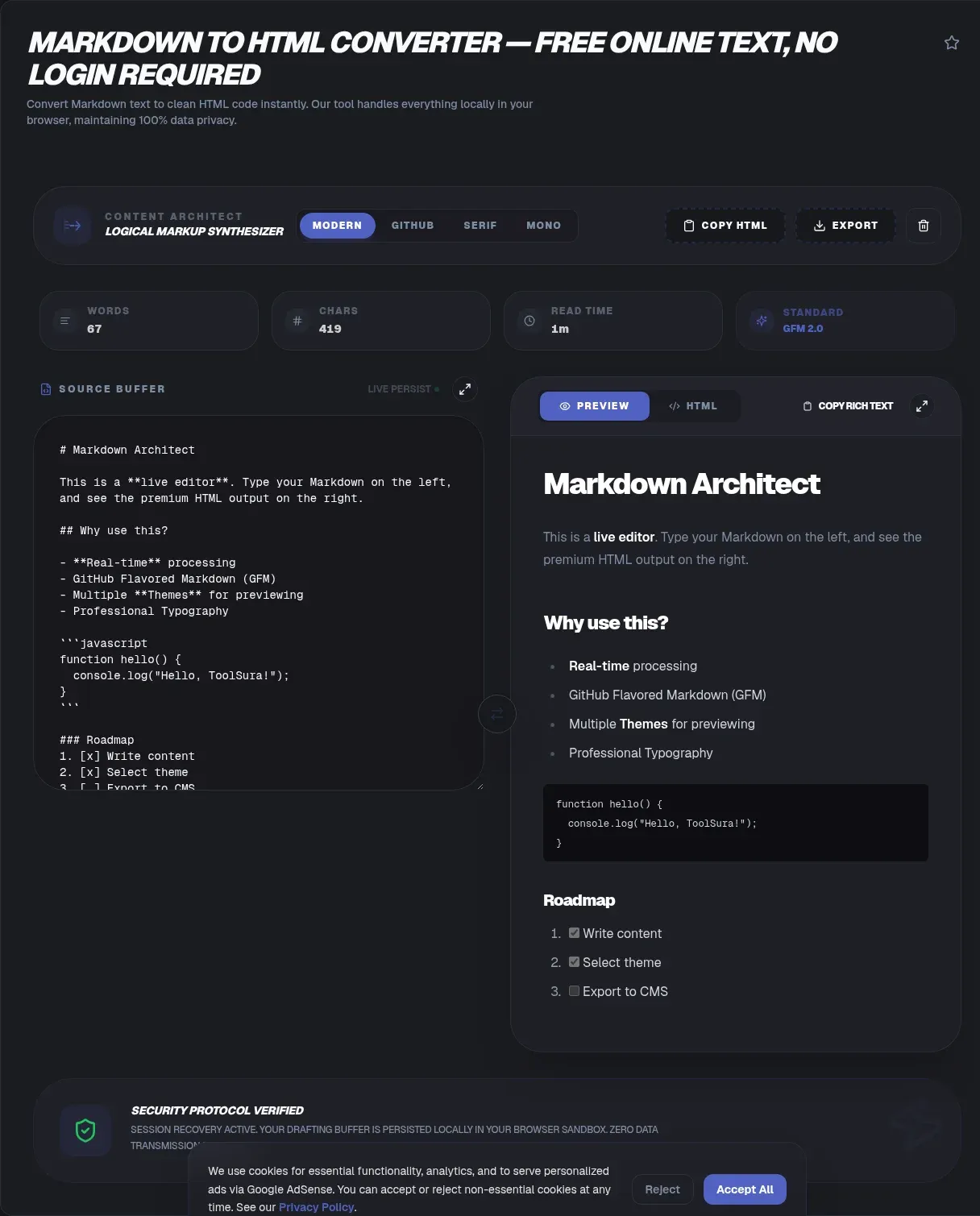
ToolSura's free markdown to html converter turns plain-text Markdown into clean HTML right in your browser. You type on one side and get valid HTML on the other, with no account and no waiting. The whole job runs on your device, so your draft never leaves your device and there is no upload to any server. You keep full control of the text at every step, which matters when the content is a draft you are not ready to share.
People pick a client-side converter because it is fast and because private notes stay private. Markdown itself is everywhere now. In the 2025 Stack Overflow Developer Survey, 34.8% of respondents used a Markdown file, making it the most-admired documentation tool (Stack Overflow, 2025). This converter is built for that reality.
Key Takeaways
- ToolSura converts markdown to html entirely in your browser, with no upload and nothing sent to a server.
- The tool supports GitHub Flavored Markdown, including tables, task lists, and fenced code blocks.
- Every parse result is sanitized with DOMPurify before it reaches the page, which blocks XSS from raw HTML passthrough.
- Stack Overflow's 2025 survey found 34.8% of developers rely on Markdown files (Stack Overflow, 2025).
What Is Markdown?
Markdown is a plain-text writing format that converts to HTML, created by John Gruber in 2004 with Aaron Swartz (Wikipedia, 2024). It uses simple symbols such as # for headings and * for emphasis, so writers focus on words instead of tags. The format was designed to read well as raw text and still produce valid HTML.
The original 2004 spec was loose, which let parsers drift apart over time. The CommonMark specification later fixed that by defining an unambiguous grammar with over 500 conformance-test examples (CommonMark, 2024). CommonMark is now the baseline dialect that GitHub, GitLab, Reddit, and Stack Overflow all build on.
For the full syntax in one place, see the Markdown syntax cheat sheet. For where CommonMark ends and GFM begins, CommonMark vs GitHub Flavored Markdown covers the boundary.
The format caught on because it is portable. A .md file opens in any text editor and survives decades of tool changes. That longevity is why it became the default for README files, documentation sites, and note-taking apps.
Why ToolSura's Markdown to HTML Converter Is Different
ToolSura's converter runs 100% on the client side, so your text never reaches a server and the page keeps working offline. Many converters upload your draft to a remote API for processing, which means a copy of sensitive content lives on someone else's machine. We take the opposite approach: the parser and sanitizer run in your tab.
Because nothing is sent, there is no account to create and no usage cap to hit. You can paste a private diary entry or a confidential spec and know it stays local. This is why people look for a privacy-first markdown to html converter instead of a hosted service that keeps their text.
Offline use is the other half of the promise. Once the page loads, the converter needs no network at all, so a flaky connection never blocks your work. That sets it apart from hosted tools that call home on every keystroke. Client-side also means no API quota to manage. Hosted converters often throttle free tiers or bill by volume, while a local parser handles any document size without a meter running.
If sanitizing pasted HTML is your main goal, our HTML Sanitizer / XSS Filter does that job directly.
How to Use the Converter
The interface is plain, and the steps map to what you see on screen. Here is the full flow from empty page to finished HTML.
- Open the converter and type or paste your Markdown into the left input pane.
- Watch the right pane fill with converted HTML as you type, thanks to the live preview.
- Review the rendered output for tables, code blocks, and task lists before exporting.
- Click Copy to grab the HTML fragment, or choose Download to save a full standalone document.
- Switch the Preview theme, or maximize either pane, to check the result at full size.
Each step happens locally, so the only bottleneck is your own device. There is no spinner waiting on a network call, which is why the tool feels instant even on large documents.
Your work is saved in the browser, not on a server. The buffer and your chosen theme persist in local storage, so a reload or an accidental tab close does not lose a draft. Use the Clear button in the header to wipe both when you are done with sensitive text.
GitHub Flavored Markdown Support
GitHub Flavored Markdown (GFM) is a strict superset of CommonMark that adds tables, strikethrough, task list items, and extended autolinks (GitHub, 2025). ToolSura's markdown to html converter supports these four extensions plus fenced code blocks, so GitHub-style docs render the same here as they do on the site.
Tables are written with pipe characters and a separator row, then become real <table> markup. Task lists become checkboxes, and strikethrough becomes <del>. Fenced code blocks keep their language hint so downstream highlighters can color the syntax. This matters because most teams write docs in GFM, not bare Markdown, and they expect matching output. GFM also tightens details the base spec leaves open, such as how autolinks handle bare www addresses and how reference links resolve. Supporting GFM means the markdown to html output matches what your readers already see on GitHub, so there is no surprise when the same file moves between the two.
Here is a GFM table and the HTML ToolSura produces from it:
| Tool      | In browser |
| --------- | ---------- |
| Converter | Yes        |

<table>
  <tr><th>Tool</th><th>In browser</th></tr>
  <tr><td>Converter</td><td>Yes</td></tr>
</table>
Autolinks are the fourth GFM extra, turning bare URLs into clickable links without bracket syntax. Combined with the other three extensions, GFM covers almost everything a technical writer needs without leaving the plain-text comfort of Markdown.
Why the Output Stays Safe
Most Markdown parsers pass raw inline HTML through unchanged, which creates a direct XSS vector (Python-Markdown, 2025). The Python-Markdown docs state plainly that the library does not sanitize output and that cleaning untrusted input is the developer's job. A converter that forgets this step can emit attacker-controlled scripts into a page.
The myth "Markdown is automatically safe HTML" is false. Markdown is not safe HTML by default because most parsers forward raw tags without question, and OWASP's guidance is to encode output for its context (OWASP Rule #1).
ToolSura's order is parse, then sanitize. We convert Markdown to HTML with marked, then run that HTML through DOMPurify before it reaches the page. Sanitizing the Markdown source first would miss HTML the parser itself generates, so the sequence matters. Sanitizing once at the source, rather than at each render site, is what lets both the preview and the exported file rely on the same guarantee.
Markdown vs CommonMark vs GFM
Markdown is the original 2004 syntax from John Gruber, light on rules and open to interpretation. CommonMark is the formal spec that removed the ambiguity with a tested grammar and 500-plus examples. GFM is CommonMark plus GitHub's extras like tables and task lists. Pick the converter that handles all three and your files will render anywhere.
The practical gap shows up in edge cases. A heading that parses one way on a blog may break on a forum if the engine differs. ToolSura targets CommonMark as the base and layers GFM on top, so the markdown to html result is predictable across platforms instead of guesswork.
Knowing the difference saves debugging time. If a file renders oddly, check whether the source used a GFM feature your target engine lacks. A converter that speaks all three dialects, like ToolSura, removes most of that friction before it starts.
Converting HTML Back to Markdown
ToolSura's converter runs one direction only: Markdown in, HTML out. If you landed here hoping to paste HTML and get Markdown back, that is not what this tool does.
The reverse trip exists, and it is genuinely lossy. Markdown has no syntax for classes, IDs, inline styles, or elements like <figure> and <details>, so a reverse converter has to drop that presentation or smuggle it through as raw HTML. Turndown is the de facto client-side library for the job, and most in-browser reverse converters are built on it (Turndown, 2025).
Expect clean-up either way. A styled card comes back as a plain paragraph with leftover tags, and complex layouts will not survive the trip. Treat reverse conversion as a starting point for editing rather than a clean round trip whenever the source carries presentation details.
If you only need the prose, the loss rarely matters. Headings, lists, and links come back intact. When you do need to move content out of a CMS and into a Markdown repository, run it through a dedicated reverse converter first, then bring the result here to render.
Live Preview and Export
The live preview updates the HTML pane as you type, so you catch formatting mistakes before exporting. This is the feature people mention most when they compare a markdown to html converter, because waiting for a manual render button breaks flow. ToolSura keeps the preview on by default with no toggle to forget.
Export gives you two shapes. Copy sends a fragment, the bare tags you drop into an existing page. Download builds a full standalone document with a proper <!DOCTYPE> wrapper so the file opens correctly on its own. Choose the fragment for CMS pastes and the full document for saving or emailing clean HTML.
Both export modes keep your data local. The fragment and the full document are built in memory and handed to your clipboard or download without a server in the loop. You get clean, portable HTML you can drop anywhere. For teams, the fragment pairs well with a component library, since you can drop just the body tags into a styled container. The full document helps when a teammate needs a self-contained file they can open without your tooling. Neither option changes the HTML itself, only how much wrapping ships with it.
When to Reach for a Markdown to HTML Converter
A markdown to html converter earns its place wherever plain text needs to become web-ready. Documentation teams use it to turn README files into published pages, and bloggers use it to draft posts in a calm editor before pasting the HTML into a CMS. Because the output is clean and standards-based, it drops into almost any template without a cleanup pass.
Email is another strong fit. Many mail tools accept HTML but reject Markdown, so converting first lets you keep a readable source and still send formatted newsletters. The same holds for note apps and knowledge bases that store Markdown but render HTML in their viewer.
Pick the converter when you want predictable output without installing a build step. For one-off pastes, a hosted API works too, but a client-side tool like ToolSura keeps the content on your machine and needs no setup. That balance of speed and privacy is why it fits both quick edits and recurring documentation work.
Related Tools
These other ToolSura tools pair well with the converter and follow the same no-upload, in-browser rule.
- HTML Sanitizer / XSS Filter strips dangerous tags from pasted HTML before you publish it.
- Markdown Linter checks your source for style and structure problems the converter cannot fix.
- Word Counter tallies characters and words when you need length limits for the rendered page.
- Case Converter reshapes headings and labels to a consistent casing scheme.
- HTML Entity Encoder/Decoder escapes characters your rendered output must display literally.
- Text Summarizer condenses long drafts before you convert them for the web.
- Favicon Generator: once the converted HTML becomes a real site, make every icon size from one image.
- Markdown syntax cheat sheet — every core rule, with the HTML each produces
- CommonMark vs GitHub Flavored Markdown — where the dialect boundary sits
- Markdown tables guide — the four rules that break them silently
- Sanitizing Markdown output against XSS — why the parser alone is not enough
- HTML escaping vs sanitizing — when each one applies
- Linting Markdown in CI — catching broken docs before readers do
- Markdown to PDF — a pipeline that handles pagination
- Rendering a README on GitHub and GitLab — three portability bugs
- Converting HTML back to Markdown — what you lose and why
- Markdown vs HTML: When to Use Each
- Converting Markdown to HTML Email