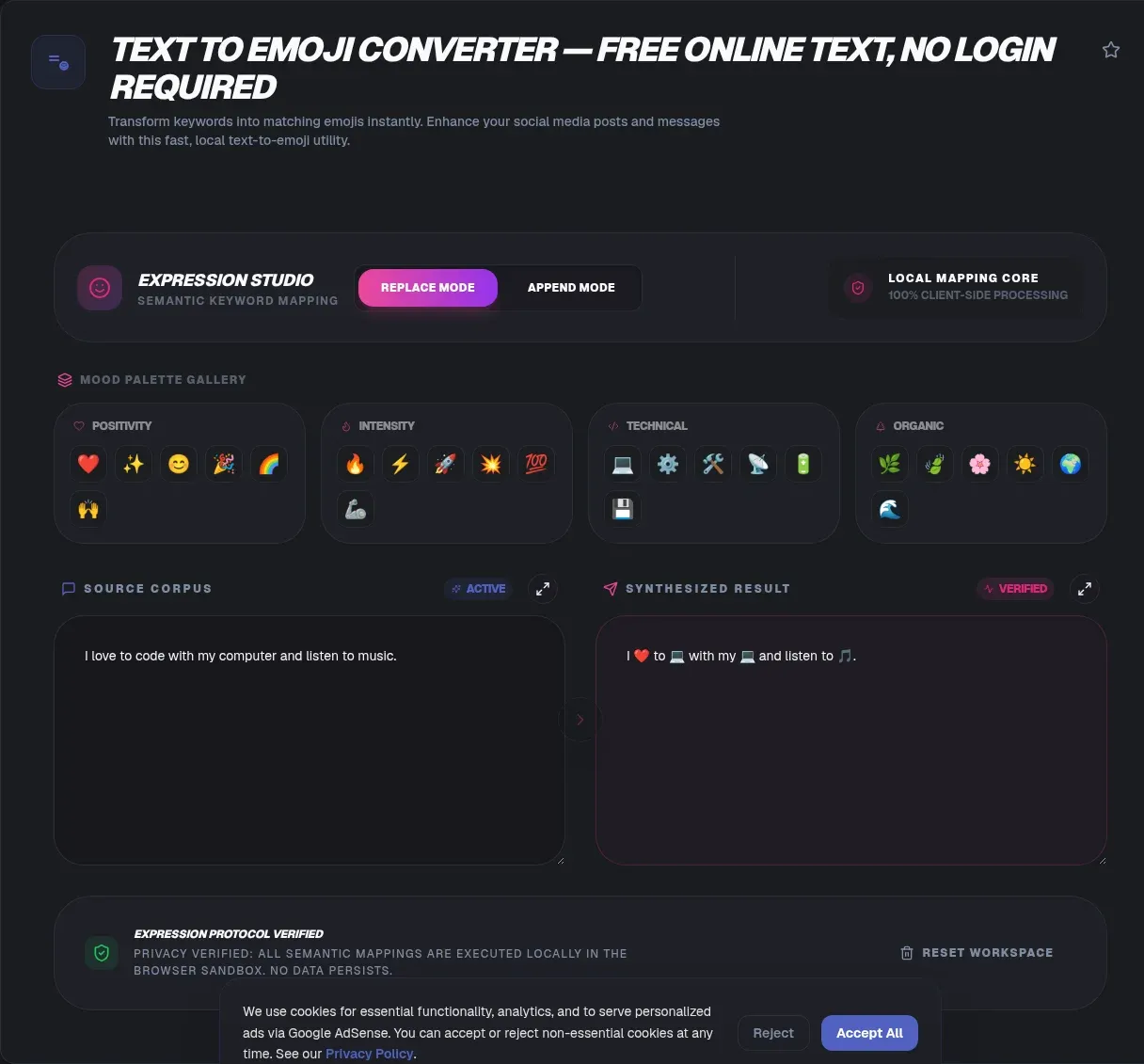
ToolSura's text to emoji converter maps the words in a sentence to matching Unicode emoji, and the whole job runs in your browser. Your text is never uploaded and never leaves your device, and there is no account to create, so the tool behaves the same on a locked-down office network as it does on a phone with no signal. Paste a line, choose how much of it to replace, and the emoji appear as you type.
Unicode shipped emoji version 18.0 on 2026-09-15, which brought the fully qualified set to 3,972 characters (Unicode Emoji 18.0, emoji counts chart). That is the pool this generator draws from, and it is more than five times the 722 pictographs first encoded in Unicode 6.0 in 2010 (Emoji). About three fifths of the set is people and body, which is why "coffee" and "headphones" resolve cleanly while "process" and "deadline" have nowhere to go.
Key Takeaways
- The Unicode set is 3,972 emoji as of Emoji 18.0, released 2026-09-15.
- Matching runs on your device. Nothing is uploaded, no signup, and it works offline.
- Emoji are Unicode characters, not a font. Each vendor draws its own artwork.
- Flags cost about 8 bytes in UTF-8. Most other emoji cost 4.
What Is a Text to Emoji Converter?
A text to emoji converter scans a sentence, matches individual words against a keyword table, and rewrites the sentence with the matching emoji in place. The table comes from the Unicode Common Locale Data Repository, where every emoji carries a short name and a list of keywords (CLDR emoji names and keywords). "dog" finds the dog face. "coffee" finds the cup. Everything in between stays readable.
The keyword set is the entire mechanism, and it is deliberately small. The current stable CLDR release is version 48.2, dated 2026-03-17, with 49 sitting in beta as of 2026-09-25 (Unicode CLDR). Those releases refresh names and keywords across languages, which is why a converter pinned to an old snapshot slowly falls behind what people actually type.
This is a text substitution tool, not an image generator. It produces characters rather than pictures, and the pictures you end up seeing are drawn by whichever company made your operating system. That distinction matters, because plenty of what ranks for "text to emoji generator" is doing something else.
You can browse the full emoji list with CLDR keywords to see exactly what is matchable. If a word you want is not in that table, no converter drawing from CLDR will find it.
Why ToolSura's Text to Emoji Generator Is Different
The difference is where the work happens. ToolSura's converter ships its emoji table to your browser as static data and matches against it locally, so there is no request to make and no server to wait on. The page you already loaded is the whole program.
Most "text to emoji generator" results are server tools. You paste, the text travels to a backend, a script returns characters, and you find out later, if at all, whether anything was kept. The interface looks identical from the outside. The difference only shows up in your network tab, or in the moment the connection drops halfway through a paste.
Running locally has three practical effects. Results are instant because there is no round trip. The tool keeps working when the network does not, which is exactly when a server-backed tool leaves you staring at a spinner. And your text has no route off the device, so there is nothing that could be logged.
We are not promising to avoid storing your text while quietly storing it. The architecture simply has no request that would carry it. Open the network panel while you type and you will see nothing leave.
How to Use the Text to Emoji Converter
Five steps, no submit button, and live output as you go.
- Paste or type your sentence. A single line converts far better than a paragraph, because a paragraph turns into a wall of emoji.
- Choose a mode. Replace swaps matched words out for their emoji. Append keeps your words and adds the emoji after them.
- Set how much of the text to convert. Turning it up catches more words and raises the odds of an odd match. Turning it down leaves the sentence mostly intact.
- Browse the palette groups. The grouped palettes let you spot a better match than the automatic pick, which helps when a word landed on something almost right.
- Copy the result. It goes straight to your clipboard, ready for a post, a message, or a commit.
When Append Beats Replace
Append is the better choice when the words still matter. A product announcement, a support reply, or a bug report usually needs to stay legible to the person reading it, and appending keeps the sentence intact while adding the visual beat. Replace suits short decorative lines where the sentence is not carrying information, such as a title card or a group chat opener.
Short text converts better than long text, and not by a small margin. Six words convert well. Sixty words turn into noise. If you want the effect inside a paragraph, convert one line at a time and place it where you want it.
An Emoji Is Not a Font
An emoji is a Unicode character, not a typeface. It has a code point, a number, and a permanent spot in the standard, and that number is the same on every platform. What you see is artwork that Apple, Google, Microsoft, Samsung, and each social platform draws for itself (Unicode Emoji 18.0).
The same character therefore renders as a yellow dog face, a flat outlined one, or something closer to a puppy illustration depending on where you paste it. Miller and colleagues documented exactly this at ACM CHI 2018: the code point stays constant while vendor artwork diverges, and readers on different platforms read the same message differently (Miller et al., 2018).
This is the whole difference between an emoji and an "emoji font". A font changes how existing characters are drawn. An emoji inserts a character that was not in the text. The two get confused constantly, and the confusion has a cost: app store searches for emoji are crowded with photo filters that stretch cartoon faces across a picture, which is a different category of tool entirely.
It also means a converter gives you no styling controls. There is no weight, no color, and no size at the character level. Skin tone modifiers are separate encoded characters, and so are flag sequences. You get the characters the standard defines, and the platform decides how they look.
Emoji vs Emoticon vs Kaomoji
An emoji is a single Unicode character, an emoticon is a short run of punctuation, and a kaomoji is a face assembled from text characters that reads sideways. Emoji started as 722 pictographs in Unicode 6.0 in 2010 and now number 3,972 as of Emoji 18.0 (emoji counts). People and body accounts for 2,430 of them, flags for 270, and components for 9.
Emoticons predate all of it. :-) and :D are pure punctuation, they work in a plain text email from 1994, and they render everywhere because ASCII always does. Emoji traded ASCII's reach for a far larger expressive range, and that trade is why they won.
Kaomoji sit in the middle. They are built from characters that exist in ordinary fonts, so they survive any paste, and they stayed popular for profile text long after emoji took over everywhere else. The cost is legibility. A kaomoji is hard to parse at a glance and it wraps badly on a narrow phone screen.
Why Some Words Don't Turn Into Emoji
The keyword set is fixed and small, so misses are ordinary rather than a bug. A word with no CLDR keyword behind it has no target to land on. "Deadline", "process", "quickly", and most abstract nouns have no emoji equivalent, because emoji describe pictures and abstractions are not pictures.
Ambiguity causes the second kind of surprise. "Bass" is a fish and an instrument. "Cloud" is weather and storage. A converter has to pick one sense, and it may not pick the one you meant. Turning the conversion amount down fixes it when the wrong match is the problem. Rewording fixes it when the meaning is the problem.
Multi-word keywords behave differently again. Some CLDR entries cover short phrases rather than single words, and a converter that only inspects one token at a time will skip them. Longer input gives the matcher more to work with, which is one of the few cases where a full sentence converts better than a fragment.
What Emoji Cost You in Bytes
Most emoji cost 4 bytes in UTF-8, four times the cost of a plain ASCII letter, because nearly all of them sit above the Basic Multilingual Plane in the U+10000 to U+10FFFF range (UTF-8). In append mode, where your words stay and the emoji land after them, a 60-byte sentence can pass 200 bytes once enough matches land on multi-character sequences. The family emoji alone runs about 25 bytes in UTF-8.
Flags are the outlier, because a flag is two regional indicator code points and costs about 8 bytes. ZWJ sequences cost more still. The family emoji is several characters joined by a zero-width joiner, so it behaves like a small paragraph inside a database column.
The same behavior bites in JavaScript. Many emoji live outside the BMP, which means JavaScript counts each one as two UTF-16 code units, so a string of ten emoji reports a length of 20 (MDN: String.prototype.length). If you validate input length against a database column or a form limit, emoji-heavy text can exceed a ceiling you never expected.
Emoji, Screen Readers, and WCAG 2.2
Screen readers announce emoji by their CLDR short name, so the dog face is read aloud as "dog" rather than skipped or announced as a stray graphic. That is helpful behavior, with one catch: under WCAG 2.2 Success Criterion 1.1.1, non-text content still needs a text alternative (W3C technique H86).
H86 gives worked examples for the two cases. A decorative emoji sitting beside words that already carry the same meaning should be hidden from assistive technology. A meaningful emoji that says something the surrounding words do not should sit inside an element with an accessible name, or be paired with visually hidden text.
There is a good argument for restraint. A screen reader calling out "dog", "coffee", and "party" between the actual sentences adds noise rather than clarity, and a run of emoji in the middle of a paragraph gets read one name at a time.
The practical rule is short. Use emoji to decorate, not to communicate. Never let an emoji alone carry a warning, a status, or a direction, because an emoji that fails to render becomes a blank box with no fallback text. If something matters, write it in words.
Where Text to Emoji Helps Most
The format earns its keep where tone matters more than precision: chat replies, social captions, slide bullets, commit and issue titles, and teaching material for young readers. In each of those an emoji does work an adjective would have to spend a whole sentence on.
It also works as a memory aid. A checklist with a mark beside each item gets scanned faster than a plain list, which is why emoji show up in productivity apps with no use for decoration at all.
Where it does not help is anywhere a character limit is tight, a formal register is required, or a reader may need assistive technology to follow along. In those places the same emoji that saved you a sentence becomes a liability.
Related Tools
The text to emoji converter sits well with the rest of the ToolSura text suite. Track how much text you are converting with the Word Counter, and normalize odd capitalization first with the Case Converter. When you need to know exactly what a string contains at the byte level, the UTF-8 Unicode Converter shows the encoding behind the characters.
For longer drafts that need trimming before they get decorated, the Text Summarizer cuts the length first. When special characters need escaping for the web, the HTML Entity Encoder/Decoder handles that, and the Word Cloud Generator turns the same text into a visual of the words that actually repeat. If you want text turned into a visual object rather than a line of characters, the Text to Handwriting Font is the other direction of the same idea.