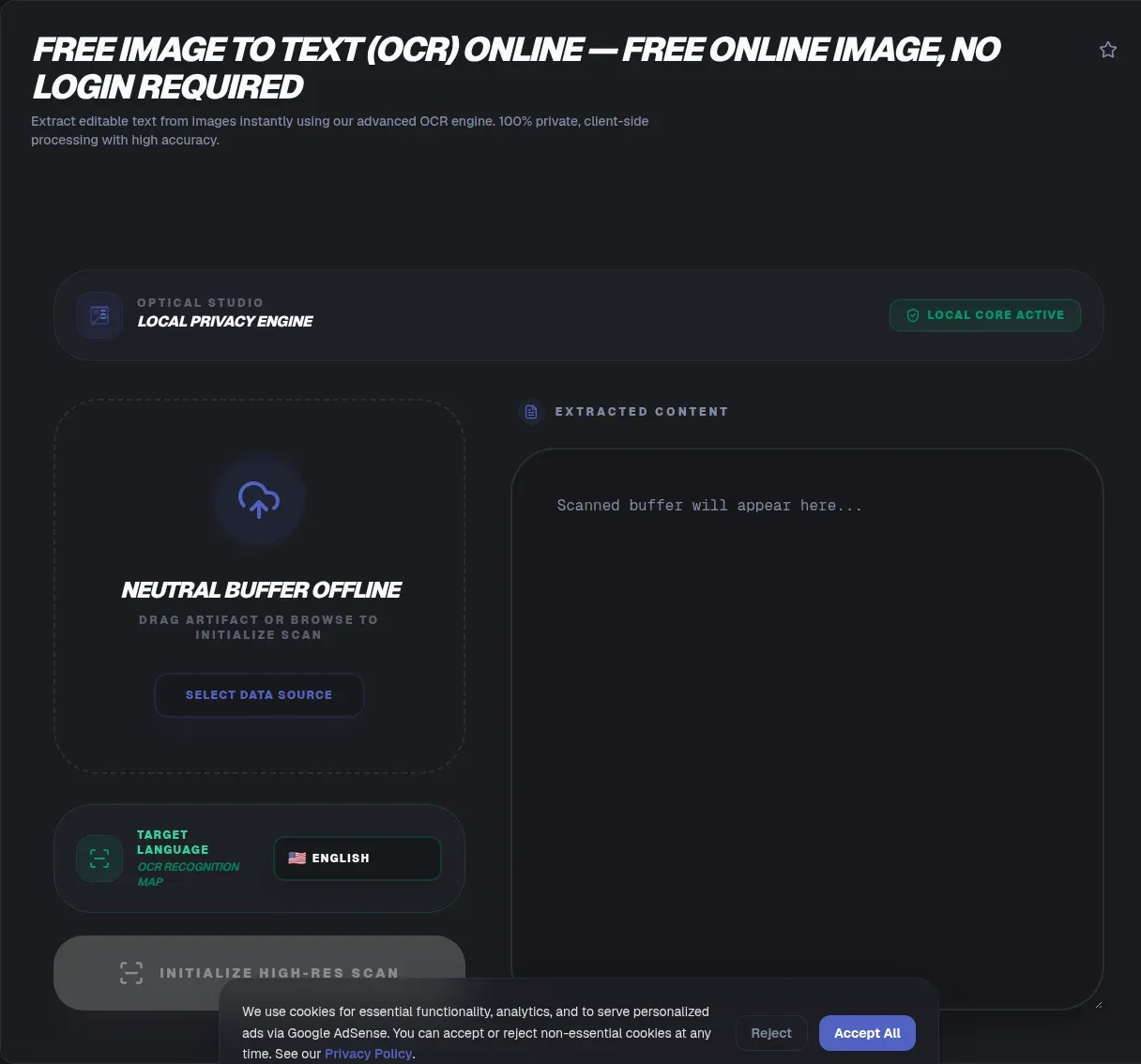
ToolSura's Image to Text tool is a free image to text converter that reads text out of photos, screenshots, scans, and PDFs, right in your browser. The recognition engine is a WebAssembly build of Tesseract that runs on your device, so your image never leaves your device and there's no upload to any server. Drop in a file, get editable text out, and copy it wherever you need it.
People turn to an OCR online free tool for real reasons: digitizing a scanned page, pulling a quote from a screenshot, turning a photo of a receipt into numbers, or copying a caption out of a slide deck. Cloud tools ask you to hand over the image first, which is a hard no for anything sensitive. ToolSura inverts that model, so the engine ships to your browser, works offline, and you keep the file while getting the text.
TL;DR: ToolSura's OCR reads text out of JPG, PNG, and TIFF images entirely in your browser, via a WebAssembly build of Tesseract. Nothing is uploaded, it works offline, it covers 100+ languages, and clean scans typically land in the 81% to 98.7% per-character accuracy range. Read on for how it works, where it falls short, and how to get the best results.
What Is OCR (Optical Character Recognition)?
OCR, optical character recognition, converts images of typed, handwritten, or printed text into machine-encoded text, the definition Wikipedia uses. A scanned page is just a picture to a computer. OCR turns that picture into letters and numbers you can search, edit, and copy, by combining pattern recognition, AI, and computer vision.
The modern pipeline runs in three stages. Layout analysis finds text regions and splits them into lines and words. Character recognition maps each glyph to candidate letters, using shape matching backed by neural networks trained on millions of samples. A language model then resolves ambiguity between near-identical shapes. The Tesseract OCR engine, born at HP Labs in the 1980s, open-sourced by HP in 2005, and stewarded by Google for a decade, now ships its LSTM-based v5 engine as an open-source project. That's the engine under the hood here, running in your browser.
Why ToolSura's Image to Text Tool Is Different
Most free OCR sites are cloud OCR wearing a friendly front end. You upload a file, the site base64-encodes it and POSTs it to a server, and the text comes back after a round trip. That's exactly how Google Cloud Vision OCR is architected, and it's why some competitors claim "no upload" while still shipping your image to a backend. ToolSura's image to text tool skips that whole layer.
Here's the mechanism, and it's checkable. The FileReader API reads the file from your device, and MDN is explicit that it can only access files you explicitly selected. It is not an upload mechanism. Recognition runs through tesseract.js, a WebAssembly port that wraps Tesseract in pure JavaScript, and the heavy work happens in a background thread via the Web Workers API, so the page stays responsive while recognition runs.
If what you need is OCR without upload, that's this tool's design brief. There's no server to intercept, cache, or log anything, no signup, no account, no arbitrary file size limit, and no watermarks. Disconnect from the internet and it still works, because everything the engine needs is already on your machine.
| Cloud OCR | ToolSura OCR | |
|---|---|---|
| Where your image goes | Uploaded to a server | Stays on your device |
| Works offline | No | Yes, once loaded |
| Signup, limits, watermarks | Often required | None |
Who is this for? Students digitizing lecture slides, accountants turning receipts into spreadsheets, developers pulling text out of screenshots, and anyone who has hesitated to upload a confidential document to a random website. Writers transcribing printed quotes and accessibility users who want a photo read aloud all come through the same door. The tool is free, with no paywall and no feature limits, and what you give it stays with you.
How to Use the Image to Text OCR Tool
The flow takes under a minute, and every step happens on your device. No account, no email, and after the first load, no network needed.
- Open the tool page. The browser loads the OCR engine into memory, so the first pass can take a few seconds to spin up. Later runs are faster.
- Select your image. Pick a JPG, PNG, or TIFF from your device. FileReader loads it locally, and nothing is transmitted.
- Choose the language. English is the default, and 100+ others are available, so set the language your document is written in.
- Read the extracted text. The recognized text appears on screen, ready to skim for the occasional misread.
- Copy or download. One click puts the text on your clipboard, or save it and get on with your day.
Because the tool runs client-side, it works offline once loaded. That matters in meeting rooms, on flights, and anywhere a weak connection would stall a cloud OCR service. When the page says the file was read locally, it means it.
One habit worth keeping: glance at the output before copying, especially around numbers. A misread digit in an invoice or an address is the one error that matters most.
Extracting Text From Images: What Accuracy Should You Expect?
Expect excellent results, with realistic limits. A Holley study in D-Lib Magazine measured commercial OCR on 19th- and early-20th-century newspaper pages at 81% to 98.7% per-character accuracy. Clean scans of modern printed text routinely land near the top of that range. Still, 100% accuracy is not real, and any tool promising it is rounding for marketing.
The math explains why small errors still sting. Accuracy is measured per character, and a 1% character error rate balloons into a 5% or worse per-word error rate, derived from the same accuracy literature: the 1% per-character error rate becomes roughly 5% per word. One wrong letter inside a ten-letter word makes the whole word wrong. That's why a "99% accurate" tool can still mangle a name or an address: character errors are rare, but they cluster where text is hardest to read.
In practice, screenshots and clean phone photos of documents do best, which covers most everyday OCR jobs. Receipts, business cards, and forms are printed text at usable resolution. The hard cases are the ones worth planning for: handwritten notes, old books, and photos taken at an angle.
What degrades accuracy
Cursive, blur, low resolution, unusual fonts, and busy backgrounds all push accuracy down. Historical fonts trip engines trained on modern print. Small text photographed at an angle breaks the straight line the recognizer assumes. The less clean the glyph, the more the engine guesses, and guesses are where errors come from.
Blurry or low-resolution images: what actually helps
You can fix a lot before OCR runs. Scan at 300 DPI instead of 150, because more pixels give the engine more to work with. Boost contrast so text separates from its background, and upscale small images before recognition, preprocessing the Canvas API handles natively in the browser. Cropping to the text region also helps, since it strips away visual noise the layout analysis has to wade through.
Can the OCR Tool Read Handwriting? Yes, With Limits
Handwriting is the hardest job OCR faces, and the research on cursive recognition is blunt: individual cursive characters carry too little information for accurate recognition of cursive script, which is why reported accuracy rarely exceeds 98%. Printed handwriting does far better, and typed or printed text approaches the top of the accuracy range.
The honest split works like this. Neat block letters in a form field? Usually fine. A receipt scrawled at speed? Expect errors, and read the output line by line. Even cloud APIs with far larger models need a special hint to tackle handwriting, like Google's DOCUMENT_TEXT_DETECTION with the "en-t-i0-handwrit" hint, and they still miss characters. If a handwritten note matters, keep the original and treat OCR output as a draft.
Can It Extract Text From a Scanned PDF or TIFF?
A scanned PDF is a wrapper around pictures, not text. PDF is the ISO 32000 standard, and a scan embeds page images inside that container. Until an OCR pass runs, a search for a word in that PDF finds nothing, because the words exist only as pixels. That's the classic "extract text from a scanned PDF" problem, and the fix is to run OCR on each page image.
TIFF is the other scanning workhorse, with an ISO variant called TIFF/EP, ISO 12234-2, and it's widely supported by OCR engines. For a practical workflow, export the page you need as a JPG or PNG, then run the image to text tool on it. Most pages come through cleanly, and pasting the result back into your document makes the PDF searchable in effect.
Which Languages Does ToolSura's OCR Support?
Over 100, out of the box, because it's powered by Tesseract, the open-source engine that documents 100+ languages after the v5 LSTM rewrite. Most "free" cloud tools advertise 20 to 23 languages. Tesseract's tessdata language packs go much further, covering Arabic, Hindi, and other scripts beyond Latin.
Choose the language your document is written in before extracting, and the engine applies the right character set and word model. Mixed-language documents are harder, but common pairings work when you set the language accordingly. Getting the language wrong matters more than people expect, because the recognizer depends on it to pick the right glyph set.
Why Extracted Text Sometimes Looks Garbled (and How to Fix It)
If your output shows odd characters, like "fi" instead of "fi", or fullwidth forms that look out of place, that's not a broken tool. It's ligatures and Unicode variants, which engines legitimately emit. The standard fix is normalization. Unicode defines normalization forms in UAX #15, the Unicode Normalization Forms report, and the NFKC form folds ligatures and fullwidth characters into their plain equivalents. One normalization pass cleans up a surprising amount of OCR output.
Low contrast and unusual fonts cause a different kind of garbling: letters misread as other letters, like "rn" for "m". That's an accuracy problem rather than an encoding one, and preprocessing the source helps more than post-processing the text. Between NFKC for encoding artifacts and cleaner input for misreads, most of the oddness in extracted text is fixable.
OCR Is Not a Browser Built-In (and No, TextDetector Isn't Live)
Text detection is not a browser built-in, and it's a fair question, because it should be. Mainstream browsers ship no native OCR. The Shape Detection API's BarcodeDetector is still experimental with limited availability, and its sibling TextDetector isn't implemented in mainstream browsers at all. When a site does OCR "in your browser," it's running a real engine like Tesseract, compiled to WebAssembly, rather than calling on a hidden browser feature.
That distinction is the whole privacy story. Since there's no browser built-in, a site must run OCR either on a server or on the client. ToolSura chose the client, and that's why the WebAssembly engine lives on your device, with nothing left to upload.
Key Takeaways
- A WebAssembly build of Tesseract runs the whole recognition pass locally in your browser tab.
- Over 100 languages ride on downloadable tessdata packs, far beyond typical free cloud tiers.
- Clean scans reach up to 98.7 percent per-character accuracy; one hundred percent stays unrealistic.
- NFKC normalization repairs ligature artifacts like the fi pair into searchable plain text.
- Files are read through FileReader with zero uploads, and recognition works offline once loaded.
Related Tools
ToolSura's image to text tool fits a wider privacy-first suite. Clean up a weak source before running OCR with the Image Resizer, which scales and sharpens blurry scans. Check what a file actually contains with the Image Metadata Viewer before you trust it. Once the text is out, condense long extractions with the Text Summarizer, and get exact counts with the Word Counter. Shrink heavy scans first with the PNG JPG Image Compressor so recognition runs faster, and capture fresh on-screen text with the Online Screenshot Tool when the source lives on your display. For the wider workflow, Convert Image to Text Free walks through the same job step by step. Paper to editable text without a single byte leaving your device: that is the promise ToolSura's image to text tool keeps, entirely in your browser.