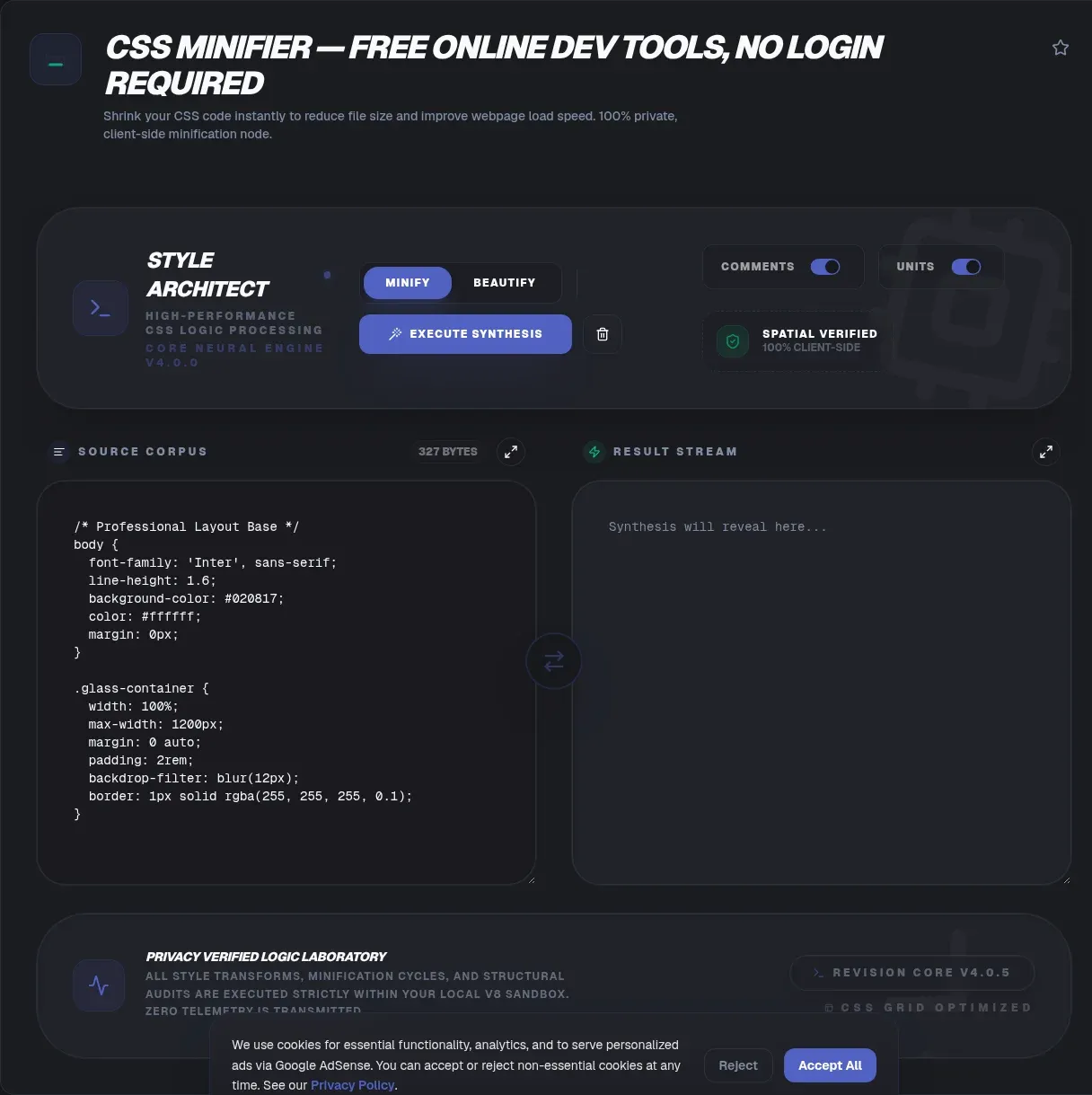
Paste any stylesheet into the ToolSura CSS Minifier and get compact, production-ready code in seconds. Everything runs in your browser, so even large vendor files never touch a server during processing. The tool strips whitespace, comments, and redundant characters while preserving every rule, selector, and piece of cascade behavior your design depends on.
Because the minifier executes locally in JavaScript, nothing is uploaded, logged, or retained. Proprietary front-end code never leaves your device, which matters when stylesheets carry client names, agency prefixes, or internal class conventions covered by an NDA. Speed is the second payoff: smaller files transfer faster, parse faster, and let browsers start painting sooner.
Key Takeaways
- Minification removes comments, whitespace, and redundant syntax without changing how browsers render your CSS (MDN).
- It stacks with gzip and Brotli: one shrinks the file, the other shrinks the transfer (MDN).
- Google lists minify and compress CSS among the fixes for hitting its 2.5-second LCP target (web.dev).
- The median mobile page transferred 68 KB of stylesheets per Web Almanac 2022 (HTTP Archive), published September 26, 2022.
- ToolSura runs the whole job locally in your tab and stays free.
What Is a CSS Minifier?
A CSS minifier rewrites a stylesheet to remove unnecessary or redundant data without affecting how a browser processes the resource, which is exactly how MDN defines minification. Comments disappear, indentation collapses, and verbose values compress into shorthand. The rendered page stays pixel identical while the file you ship gets measurably lighter.
MDN also describes minification as generally an automated step that happens at build time, which is how bundlers and PostCSS pipelines treat it (MDN). An online CSS minifier applies the same transformations on demand. That helps when you maintain a legacy site, hot-patch a compiled asset, or want to preview potential savings before wiring up a full build step.
What Gets Removed During CSS Minification?
Which parts of a stylesheet actually disappear? Mainstream engines remove comments, collapse whitespace, drop unneeded units, shorten colors, and trim duplicated declarations. clean-css documents Level 1 optimizations such as dropping unneeded units and converting RGB colors to shorter hex form (clean-css), while cssnano catalogs selector normalization, shorthand reduction, and initial-value replacement (cssnano). The example pair published in cssnano's own documentation makes the idea concrete:
/* Before */
.card { margin: 10px 20px 10px 20px; }
h1::before { color: #ff0000; }

/* After */
.card{margin:10px 20px}h1:before{color:red}
Three classic transforms sit in that pair. The four-value margin folds to two values because opposite edges pair automatically. The hex color becomes the shorter keyword red. The double colon drops to legacy single-colon syntax, one of several normalizations cssnano documents alongside replacing min-width: initial with 0 and rewriting gradient to bottom as 180deg (cssnano).
Engines differ in appetite. esbuild takes what its docs call a garbage-in, garbage-out philosophy toward CSS, yet treats it as a first-class content type, understanding enough syntax to bundle files together and minify them reasonably well; one documented transform turns color: rgba(255, 0, 0, 0.4) into the eight-digit hex #f006 (esbuild).
Is Minifying CSS Safe for Your Styles?
Yes, when you stay on default settings. cssnano states that it performs safe optimisations on your file unless you opt into its advanced preset (cssnano). clean-css describes Level 1 operations as generally safe and Level 2 as safe for most users, and it keeps its most aggressive restructuring flags switched off by default (clean-css).
The risk concentrates in restructuring. CSO merges declarations and rules by default, yet warns that forceMediaMerge, the option that reunites @media blocks split across breakpoints, is unsafe in general and should be used at your own risk (CSO). Lightningcss sits at the careful pole: its README states the output CSS should always behave identically to the input (lightningcss). Sensible practice is simple. Trust conservative defaults, and run a visual regression pass before adopting anything aggressive.
CSS Minifier vs Gzip and Brotli: Do You Need Both?
You need both, because they operate on different layers. Minification edits the asset itself before deployment, while gzip and Brotli compress bytes during transfer and are decoded before the browser parses anything, so the savings stack rather than overlap (MDN). MDN even documents layered values such as deflate followed by gzip, applied in the order listed.
Brotli itself is defined in RFC 7932 as a lossless compressed data format combining LZ77 and Huffman coding, registered as the br HTTP content coding in July 2016 (RFC 7932). The practical recipe follows directly: minify at build time, enable Brotli at your server or CDN, and let each layer handle the job it was designed for.
Why Does CSS Size Affect LCP and Render Blocking?
How much does an oversized stylesheet cost you? Style sheets loaded from the HTML markup block rendering of all content that follows them, as Google's LCP guide states outright (web.dev). Good Largest Contentful Paint values sit at 2.5 seconds or less, poor values exceed 4.0 seconds, and sites should meet the 2.5-second bar on at least 75% of page visits. Bloated CSS pushes real pages toward the wrong end of that scale.
Chrome's Lighthouse documentation adds that any link rel=stylesheet lacking a disabled attribute and a device-matching media attribute blocks first paint, and media=all counts as render-blocking (Chrome). Its recommended fixes: inline critical resources, defer non-critical ones, remove unused code, and minify your CSS to strip extra whitespace and characters. Every byte trimmed shortens the parse-and-paint queue.
How Much Smaller Does CSS Get When Minified?
Honestly? No universal percentage survives scrutiny, because savings track how commented and verbose your source happens to be. The defensible anchors come from vendors themselves. cssnano's documentation demo compresses one 325-byte snippet down to 177 bytes gzipped, a 54.46% saving on that particular fragment (cssnano). Treat it as an illustration of mechanics, never as a site-wide promise.
For real-world scale, the Web Almanac 2022 (HTTP Archive), published September 26, 2022, measured mobile stylesheet transfer sizes at 6, 28, 68, 139, and 256 KB across the 10th through 90th percentiles, with desktop figures landing within about 10 KB of mobile (Almanac). Those pages loaded between 1 and 22 stylesheets depending on percentile, so per-file savings multiply quickly across a request waterfall.
Should You Minify CSS in Development?
No. Minified output hides the indentation and comments you debug with, and MDN points out that minified code is far less legible, which is why browser DevTools offer prettification to add white space back for reading (MDN). Author in readable source files and reserve minification for what actually ships to users.
Keep development servers serving original files, and let production builds apply compaction automatically. If your stack lacks a build step entirely, an online tool fills the gap for one-off landing pages, email templates, or CMS-injected style blocks. And when you must inspect someone else's deployed stylesheet, beautify a local copy first so you are reading your own formatting choices rather than the production build's.
What Are Source Maps and Why Do They Matter?
Source maps map your source code to your compiled code so it stays readable and debuggable even after being combined, minified, or compiled, according to Chrome's DevTools documentation (DevTools). Deployed files carry a sourceMappingURL comment that points tooling back toward the originals.
By convention those companion files use the .map extension. DevTools Settings ships a dedicated CSS source maps toggle, and its Editor links deployed stylesheets to their sources for inspection (DevTools). Ship maps alongside production builds, or keep them behind authentication if you prefer; either way your public payload stays minimal while debugging stays humane.
How Do Popular Build Tools Handle CSS Minification?
Pipeline adoption is enormous. lightningcss recorded 138,834,170 downloads during the week of August 16 to 22, 2026 per the npmjs.org API, cssnano recorded 18,542,876, and clean-css-cli recorded 148,040 over the same week (npm, npm, npm). Read raw totals cautiously: npm counts transitive-dependency installs too, so bundler ecosystems pulling libraries in automatically inflate these figures well beyond true direct adoption.
| Tool | Positioning | Default behavior |
|---|---|---|
| lightningcss | Rust parser, transformer, bundler, and minifier | Output designed to behave identically to input |
| cssnano | Modular optimizer in the PostCSS ecosystem | Safe optimisations on; advanced preset opt-in |
| clean-css | Fast optimizer for Node.js and modern browsers | Level 1 on; restructuring flags off |
| CSO | Compact optimizer with restructuring | Declaration and rule merge on; media merge flagged unsafe |
Speed comparisons deserve sourcing discipline. lightningcss describes parsing and minifying large files in milliseconds with significantly smaller output than other tools, and its README table lists bootstrap-4.css at 4.16 ms and 143,091 bytes, versus cssnano at 544.809 ms and 159,636 bytes and esbuild at 17.199 ms and 160,332 bytes, all as reported in lightningcss's own README benchmarks (lightningcss). Vendor-run numbers favor the vendor; benchmark against your own workload before switching pipelines.
What Is Critical CSS?
Critical CSS extracts the styles for above-the-fold content, everything a viewer sees on load before scrolling, so the browser can render the top of the page without waiting on the full stylesheet (web.dev). web.dev suggests keeping above-the-fold output under 14 KB compressed, a nod to TCP slow start. Remember that the browser must download and parse CSS files before it can show the page at all.
web.dev frames extraction as an advanced performance technique that can improve loading but can also lead to bugs, naming Critical, criticalCSS, and Penthouse as established tooling options (web.dev). A pragmatic sequence: extract critical rules, minify them aggressively, inline them into the document head, then load the remainder asynchronously.
How Do You Use the ToolSura CSS Minifier?
The workflow fits in five steps:
- Open the CSS Minifier in any modern browser; no account or installation required.
- Paste your stylesheet into the input editor, or drop in a .css file.
- Start the minification; processing happens locally in your browser.
- Copy the compact output straight to your clipboard, or download it for deployment.
The whole loop finishes in seconds and handles vendor bundles and hand-written modules alike. Because output is deterministic text, diffing a fresh result against your previous deploy catches accidental deletions fast. There is no upload progress bar to babysit, because nothing ever uploads.
How Does ToolSura Compare With Other Online CSS Minifiers?
Visible differences are easy to document fairly. Toptal's minifier offers a paste-only textarea with Clear and Minify buttons plus a public raw API endpoint; the page shows no visible option toggles and does not disclose its underlying engine (Toptal). Minifier.org accepts pasted code, file upload, URL input, and drag-drop, credits the open-source PHP library matthiasmullie/minify, and advertises that it removes whitespace, strips comments, and combines files (minifier.org). DigitalOcean hosts a community minify page that did not disclose tool features on the page as fetched (DigitalOcean).
We cannot speak to how competing services handle submissions on their servers, and that uncertainty is precisely why local execution is easy to appreciate. ToolSura completes processing entirely in your browser tab, requires no sign-in, and surrounds the job with adjacent utilities, from HTML escaping to case conversion, so a styling session never bounces between unrelated websites.
Quick Wins: A Pre-Launch CSS Checklist
Before shipping, run through this short list:
- Minify every stylesheet, including third-party themes, admin skins, and print styles.
- Confirm Brotli or gzip is actually active at your host or CDN, not merely configured.
- Re-run Lighthouse and verify no unexpected render-blocking sheets remain.
- Inline critical CSS if your template stack supports it safely.
- Publish source maps beside minified files for calmer future debugging sessions.
None of these steps takes long, and together they compound into noticeably faster first paints.
Frequently Asked Questions
Quick answers to the questions developers ask most about CSS minification:
Is minifying CSS safe?
Default modes across mainstream engines are built to preserve rendering behavior; documented risk clusters in opt-in restructuring such as merging media rules. Stick with conservative settings and regression-test anything aggressive.
Does a CSS minifier improve SEO and page speed?
It supports speed goals directly: Google lists minify and compress CSS among its LCP size-reduction techniques. Ranking impact stays indirect, so combine minification with compression, caching, and solid Core Web Vitals overall.
Do I still need gzip or Brotli?
Yes. Minification edits the file before deployment while transport compression shrinks delivery over the wire. The layers operate independently and their savings stack.
Can I reverse minification?
Formatting can be restored with a beautifier or DevTools prettification. Comments and any structure the minifier removed are gone for good, so keep authored sources versioned.
Will it break media queries or custom properties?
Safe modes preserve semantics by design; lightningcss states output should behave identically to input. Breakage reports concentrate in opt-in merge features, which deserve visual testing.
How much smaller does CSS get?
Vendor demonstrations show meaningful cuts on sample snippets, but no honest universal percentage exists. Results depend on comment density and verbosity, so measure your own files.
What is a source map?
A companion mapping file, referenced by a sourceMappingURL comment, that lets DevTools display your original readable sources even while the site serves minified code.
Related Tools
Bookmark the rest of the ToolSura toolkit while you are here:
- HTML, CSS & JS Minifier
- JSON Formatter & Validator
- URL Encoder/Decoder
- Word Counter
- HTML Entity Encoder/Decoder
When you are ready to slim down your stylesheets, head back to the CSS Minifier and ship lighter code today.