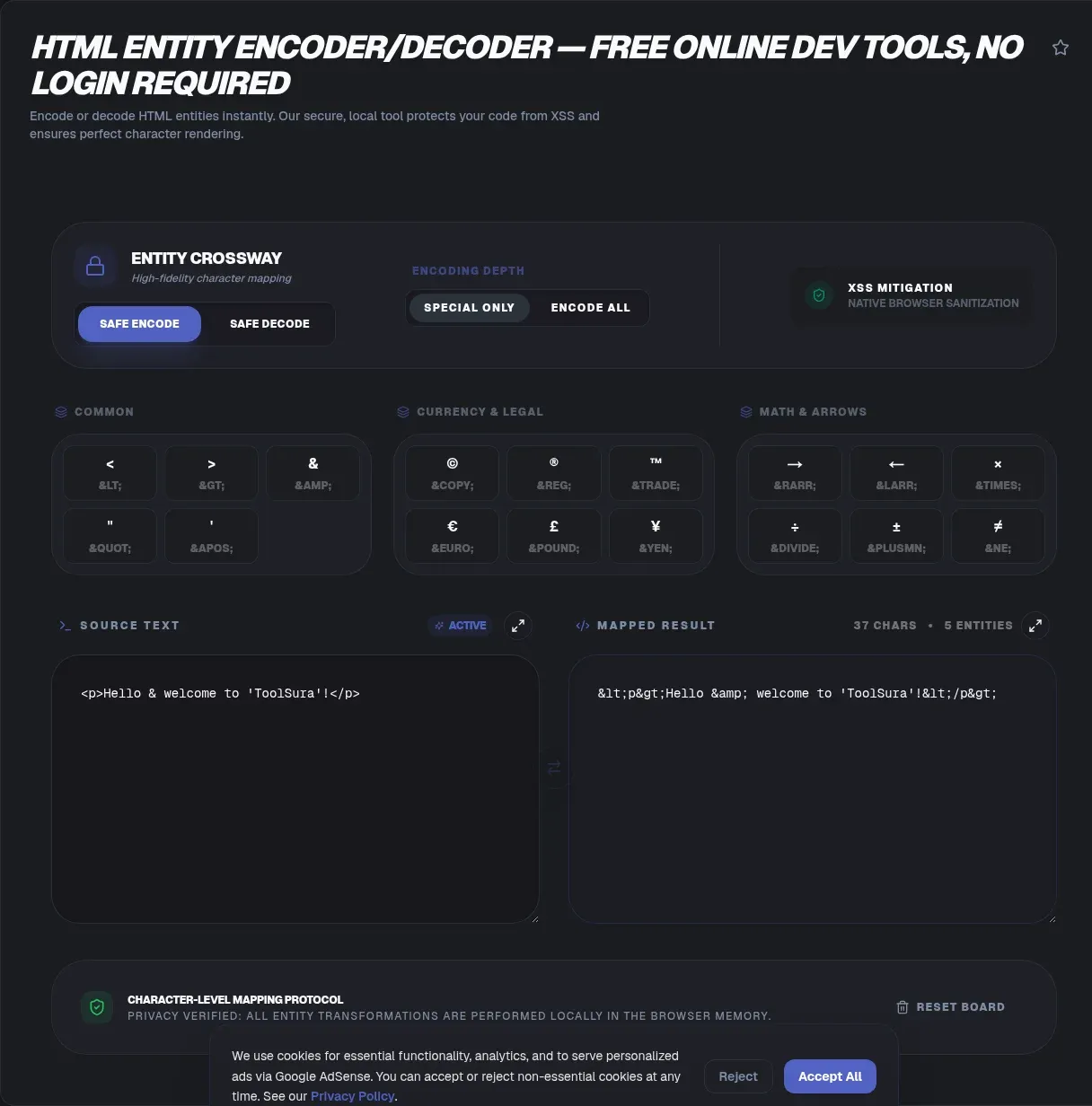
The web reads angle brackets as instructions, which turns everyday text into a minefield. Paste a code snippet into a CMS and half of it vanishes; type 5 < 10 into a template and the parser hunts for a tag named 1. An HTML entity encoder decoder neutralizes the problem by converting risky characters into safe reference form, and ToolSura performs every conversion locally in your browser.
That local execution matters. Because the page documents a zero-knowledge, client-side architecture, your text never leaves your device, so credentials and customer records stay put while you work. Below: how entities work, when encoding is mandatory, where the trick fails against XSS, and how the major online converters compare.
Key Takeaways
- Every character reference begins with an ampersand and yields one glyph (WHATWG)
- OWASP Rule #1 rests on exactly five escapes for element content (OWASP Cheat Sheet Series)
- Named and numeric references render identically in modern browsers
- Encoding fails inside script blocks, comments, and event handlers
- ToolSura encodes and decodes client-side with named and numeric support
What Is an HTML Entity?
An HTML entity is an escape sequence that starts with an ampersand and stands in for another character in the rendered page (MDN). SGML supplied the vintage vocabulary, and modern specifications call the identical mechanism a character reference. The practical goal: print reserved symbols as visible text instead of feeding them to the parser.
Why care so much about two punctuation marks? Because < opens tags, anything following it gets parsed as markup until a closing bracket arrives. Encode the bracket as < and the same characters become harmless, searchable, copyable text. One substitution, zero rendering surprises.
What Are the Three Forms of Character References?
The WHATWG standard recognizes exactly three kinds: named, decimal numeric, and hexadecimal numeric (WHATWG). All begin with U+0026, the humble ampersand, and all resolve to the same destination character, so <, <, and < display identically. Pick whichever reads better in your source.
Named references draw on a fixed vocabulary whose entries run from Aacute to zwnj, and the editors state the list will not be expanded or changed in the future (WHATWG named character references). Matching is case sensitive, and semicolons are mandatory for the modern set.
Numeric forms trade names for code points: decimal takes digits after &#, hexadecimal takes hex digits after &#x. MDN's glossary confirms the three spellings are interchangeable notation for one target glyph (MDN Character reference). Browsers stop caring long before readers notice.
The Five Characters You Must Always Escape
Escaping starts with a short, fixed list. OWASP's Rule #1 prescribes five escapes for HTML element content: &, <, >, ", and ' for the apostrophe (OWASP Cheat Sheet Series). Note the deliberate choice of numeric ' rather than ', a reference older HTML versions supported inconsistently.
| Character | Named | Decimal | Hexadecimal | Why it breaks markup |
|---|---|---|---|---|
| < | < | < | < | Starts a tag mid-text |
| > | > | > | > | Ends constructs early |
| & | & | & | & | Begins every entity |
| " | " | " | " | Closes double-quoted attributes |
| ' | ' | ' | ' | Closes single-quoted attributes |
Attributes demand stricter handling. OWASP advises encoding every non-alphanumeric character in &#xHH; form inside quoted attributes, spaces included, and insists on surrounding interpolated values with quotation marks, because encoding cannot rescue a malformed attribute boundary.
When Do You Need to Encode HTML?
MDN sorts the everyday triggers into three buckets: reserved characters the parser would read as markup, invisible characters such as non-breaking spaces and directional marks, and characters too awkward to type directly (MDN). Untrusted user input heading for a page deserves a bucket of its own.
XML raises the stakes further. The W3C grammar forbids literal & and < outside markup delimiters, attributes included, and forces an escaped greater-than sign inside the sequence ]]> (W3C XML). Fragments that survive sloppy HTML often fail strict XML parsing for exactly this reason.
Timing matters as much as selection. Store raw text in your database, encode once at the output boundary where data becomes markup, and never save pre-escaped strings. Teams that encode twice, once into storage and once into templates, spend weeks debugging doubled ampersands.
Named or Numeric: Which Format Should You Pick?
Modern browsers treat the formats as equals, so readability and coverage drive the decision. Names read naturally during review; numerics reach any valid code point, including glyphs the fixed name list never covered. ToolSura handles both directions across named and numeric references, so neither option is off the table.
| Criterion | Named | Numeric |
|---|---|---|
| Source readability | Self-documenting words | Opaque numbers |
| Coverage | Fixed spec list only | Any valid code point |
| Legacy posture | Some old names lacked semicolons | Uniform behavior |
| Library default | Opt in via he's useNamedReferences flag | he emits hexadecimal by default |
Libraries lean numeric. The MIT-licensed he package emits hexadecimal output unless you opt into names, a compatibility-first default straight from its README (he). Email pipelines and legacy parsers reward that caution; human reviewers reward spelled-out names for the common five.
What Happens When a Character Reference Is Invalid?
Three outcomes await broken references, each mapped to a named parse error in the WHATWG grammar (WHATWG parsing). Unknown names and digitless numerics display literally. Null values, lone surrogates, and out-of-range code points collapse into U+FFFD, the replacement character. Missing semicolons produce the sneakiest result.
| Broken input | Parser verdict | Readers see |
|---|---|---|
| &noway; | Unknown named reference | Literal text, unresolved |
| &#qux; | Digits missing | Shown as typed |
| � | Null reference | U+FFFD replacement glyph |
| � | Lone surrogate | U+FFFD replacement glyph |
| ¬in | Longest-match resolution | The ¬in trap below |
That last row earns a demo straight from the spec: ¬in without its semicolon parses like ¬in, rendering the characters ¬in, while ∉ correctly yields the ∉ symbol. Attribute contexts play harsher rules, since the standard bans ambiguous ampersands there entirely, and he's README notes foo&bar decodes in text yet stays untouched as an attribute value.
What Is Double Escaping and How Do You Fix It?
Double escaping strikes when already-encoded text meets another encoder. Tom & Jerry turns into Tom & Jerry, then Tom & Jerry, and the page proudly displays raw markup to visitors. Once you have seen those stray letter sequences in production text, you will spot them everywhere.
The repair follows four steps:
- Decode repeatedly until the glyphs look correct and decoding stops changing anything.
- Identify the layer that encoded last; that layer is the offender.
- Remove the redundant step, usually a CMS field plus a template helper both escaping.
- Re-encode exactly once at the render boundary.
Prevention beats cleanup every time. Raw storage, one encode at output, and an audit of any pipeline where two frameworks touch one field will spare you the archaeology. Rich-text editors that silently pre-escape pasted content are frequent hidden culprits.
Can HTML Entity Encoding Stop XSS on Its Own?
Entity encoding defends exactly one placement: untrusted data inside element content or quoted attributes. OWASP lists the contexts where it fails outright, among them script and style bodies, HTML comments, tag names, attribute names, callback functions, and event handlers such as onclick or onerror (OWASP Cheat Sheet Series).
- Element text: apply the five standard escapes.
- Quoted attribute: encode every non-alphanumeric character, spaces included.
- URL parameter: apply percent-encoding through encodeURIComponent.
- Script, style, and comment interiors: keep untrusted data out entirely.
- Event handlers and eval-family sinks: keep untrusted data out entirely.
MDN's innerHTML documentation calls the property probably the most common vector for cross-site scripting attacks, demonstrating how an image payload with an onerror handler fires through a simple assignment (MDN innerHTML). A script tag injected this way stays dormant, yet the image trick executes. Context decides the countermeasure.
How Do You Handle Entities in JavaScript?
Modern DOM APIs remove the guesswork. Assigning user text to textContent renders it inert, and OWASP notes the property automatically applies HTML entity encoding (OWASP Cheat Sheet Series); document.createTextNode builds a node the parser never treats as markup. Both approaches display hostile input safely with no manual escaping.
const host = document.querySelector('#feed');
host.textContent = visitorComment;                         // safe: encoded at render time
host.appendChild(document.createTextNode(visitorComment));  // equally safe
When you need literal entity strings rather than safe rendering, reach for dedicated libraries. The entities package logged 282,025,813 downloads during the week of August 16 to 22, 2026 per the registry API, while he logged 41,854,226 that same week (npm registry, registry API). npm counts installs wherever a package sits in any dependency tree, so transitive pulls dominate both figures.
Two cautions finish this section. encodeURIComponent solves a different job entirely, percent-encoding UTF-8 bytes into %3C-style output and never producing < (MDN encodeURIComponent). And if a framework forces innerHTML, sanitize every fragment through DOMPurify first, the filter OWASP recommends.
Emoji and Astral Characters as Entities
Any valid code point qualifies: the standard excludes only carriage return, noncharacters, and control characters other than ASCII whitespace (WHATWG). Astral emoji become single references rather than surrogate pairs. The mothereff playground shows the progression neatly: © maps to ©, the snowman to ☃, and a four-digit mathematical glyph to 𝌆 (mothereff.in).
Splitting an astral character into surrogate halves backfires, because each half resolves to U+FFFD and you receive two replacement boxes instead of one glyph. Tool coverage varies more than standards do: according to W3docs' documentation, its decimal encoder tops out near U+9999 and lets emoji slip through untouched (W3docs).
How to Use the ToolSura HTML Entity Encoder Decoder
The workflow fits in one sentence: paste your text, press Encode to turn reserved characters into named or numeric entities, press Decode whenever the reverse direction is needed, then copy the result (ToolSura). Both directions accept the named set plus decimal and hexadecimal numeric forms.
Privacy claims come from the page itself: a Verified 100% Client-Side badge, execution inside a V8 sandbox, and a zero-knowledge architecture promising no data transmission to servers. Those guarantees matter when the payload includes API keys, customer records, or unreleased copy, and the page stamps itself last updated August 12, 2026.
Practical uses documented on the page: wrapping snippets in < and > so tutorials show tags as text, encoding quotes and brackets from user submissions so they render rather than execute, and preparing entity-safe email templates. Its quick-reference table covers the six characters people forget fastest: <, >, &, the double quote, the apostrophe, and the copyright sign.
How Does This Tool Compare With Other Online Encoders?
Alternatives narrower than expected fill this category. ConvertString offers single-direction encoding and caps input at 32,768 characters (ConvertString). Browserling splits encoder and decoder onto separate pages and displays a 51K usage figure whose methodology goes undisclosed (Browserling). Neither surfaces an explicit privacy statement.
mothereff.in, built on he by that library's author, converts live in both fields, generates permalinks, and handles astral symbols gracefully, though its homepage carries no privacy messaging (mothereff.in). Meanwhile the similarly named urlencoder.org page presents percent-encoding options rather than HTML entity conversion, a mix-up waiting to happen.
Measured against that field, bidirectional conversion, named plus numeric support, full HTML5 charset coverage, and explicit client-side positioning give ToolSura the strongest feature-plus-privacy mix in this survey.
Frequently Asked Questions
What are HTML entities?
An HTML entity is an escape sequence beginning with an ampersand that represents another character, such as < for the less-than sign. HTML inherited the term from SGML, and modern specifications call the same thing a character reference. Entities exist so reserved, invisible, or hard-to-type characters can appear in a page without breaking its markup.
What is the difference between named and numeric character references?
Named references use memorable words like ©, while numeric references cite the raw code point as decimal © or hexadecimal ©. Browsers render all three identically. Names cover only the fixed list maintained in the HTML standard; numerics reach any valid code point, which is why many libraries emit numeric output by default.
Is ' valid in HTML5?
Yes. The WHATWG named-character-reference table maps apos; to U+0027, and XML has always predefined it. Even so, OWASP specifies hexadecimal ' in its prevention rules because older HTML consumers supported ' unevenly. When compatibility outweighs brevity, ToolSura users typically encode the apostrophe numerically and sidestep that history completely.
Why does my page display & instead of a single ampersand?
Your text was encoded twice somewhere in the pipeline. The second encoder converted the ampersand inside & into &, so the browser faithfully displays the literal code. Store raw text in your database, hunt down the duplicated step, usually a CMS field plus a template helper, and encode exactly once at render time.
Does HTML entity encoding prevent all XSS attacks?
No. Encoding protects untrusted data placed in element content or quoted attributes, but OWASP catalogs contexts where it fails: inside script or style elements, HTML comments, tag and attribute names, event handlers, and eval-style functions. Match the defense to the context, and treat ToolSura's encoder as one layer in that broader strategy.
How do I decode HTML entities in JavaScript?
Assign encoded text to an element's textContent property, or build a node with document.createTextNode, and the browser handles conversion while keeping the string inert. Never decode untrusted input through innerHTML; route fragments through a sanitizer such as DOMPurify instead. For quick one-off jobs, ToolSura's Decode button handles the conversion without any code.
Can I convert emoji to HTML entities?
Yes. The HTML standard permits any code point except carriage return, noncharacters, and most control characters, so emoji become single numeric references like 𝌆 without splitting into surrogates. ToolSura supports the full HTML5 character set, while some competing converters stop near U+9999 and leave emoji untouched, so verify coverage before converting in bulk.
Related Tools
Pair entity work with these companions:
- URL Encoder Decoder: percent-encode query parameters and form values correctly.
- Base64 Encoder Decoder: move binary payloads through text-only channels.
- JSON Formatter Validator: inspect API responses carrying escaped HTML strings.
- HTML CSS JS Minifier: shrink finished markup without breaking entities.
- Word Counter: confirm length limits after any conversion pass.
- CSS Minifier: streamline stylesheets alongside your templates.
And when markup safety calls next, the HTML Entity Encoder Decoder keeps every conversion on your side of the wire.