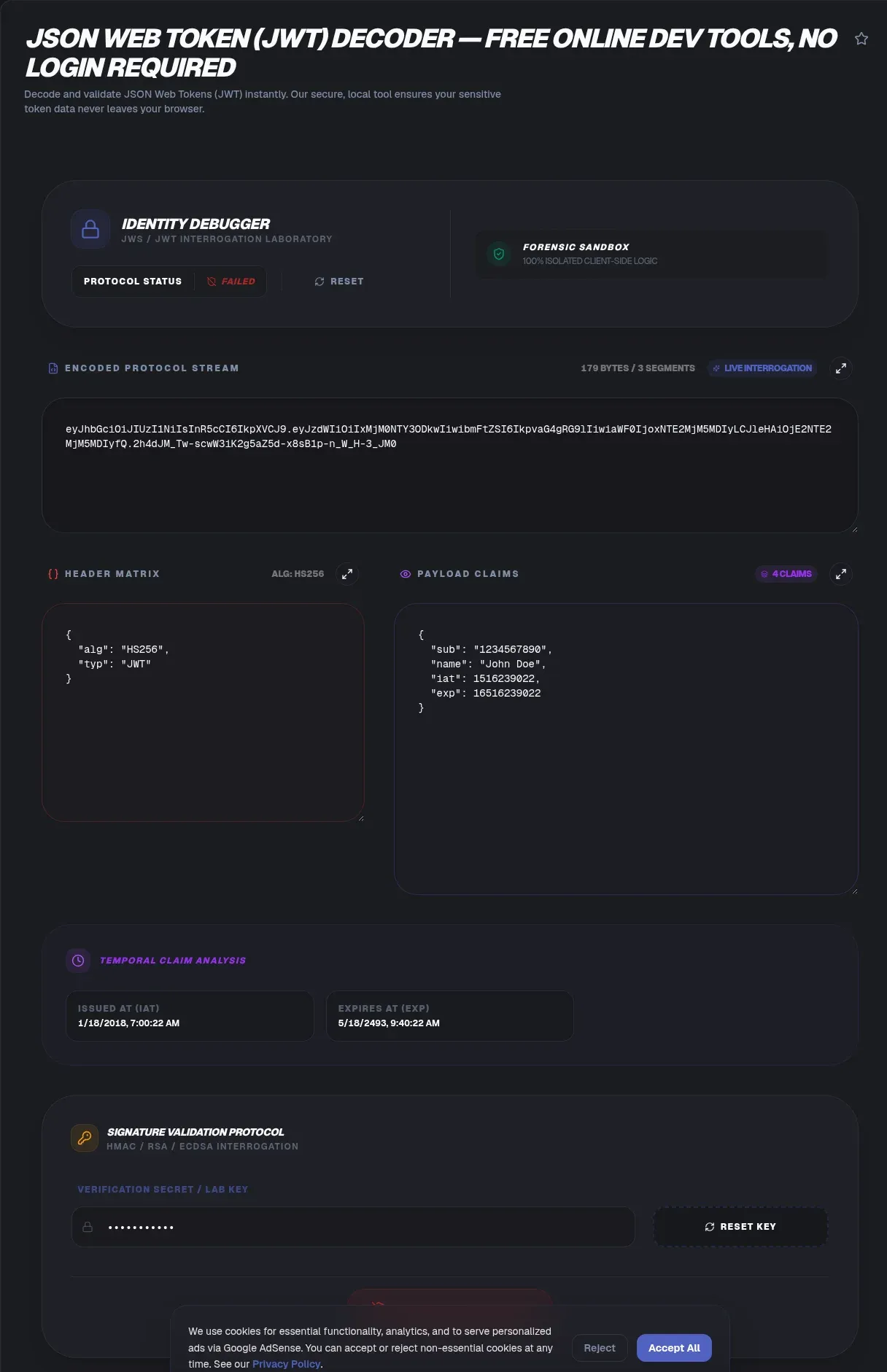
The ToolSura JWT Decoder splits any JSON Web Token into readable parts the moment you paste it: the header with its signing algorithm, the payload with every claim, and human-readable conversions of embedded timestamps, all inside your browser Source. Tokens typically arrive in Authorization headers wearing their Bearer prefix, in cookies, or tucked into URL parameters, per the page's own orientation notes.
Processing runs client-side within the browser sandbox, and the page states sensitive tokens are never sent to a server; as with every privacy claim in this series, treat that as the operator's description while following the credential-hygiene habits this article reinforces throughout Source.
The Anatomy of a JSON Web Token
Every JWT consists of three segments joined by dots: a header, a payload, and a signature. Each segment is Base64Url-encoded, which means the first two are reversible encodings anyone can read, not encrypted containers hiding their contents.
That structural fact explains everything a decoder does. Splitting on dots and decoding each part reveals the header's algorithm declaration and the payload's complete set of claims. The signature remains an opaque cryptographic blob by design: it exists to be verified with keys, not to be read.
Why Decoding Needs No Secret
The page makes the foundational distinction clearly: header and payload decode without any secret because Base64Url is reversible encoding rather than encryption, while signature verification requires the key that created them Source. Encoding scrambles representation; encryption would scramble meaning. JWTs do the former only.
Practical consequence: assume every token that leaves your hands was read by everyone who saw it. A signed JWT is a tamper-evident postcard, not a sealed envelope. Anyone holding one can read its contents; only holders of the signing key can produce new versions that verify.
What This Tool Shows You
Per its documentation, the decoder identifies the algorithm from the JOSE header, distinguishing asymmetric RS256 from symmetric HS256 at a glance, and renders the full claims payload as formatted JSON Source.
Timestamp handling gets special treatment: the exp claim arrives as a raw Unix number in most tokens, and the tool converts it automatically to human-readable date and time so expiration checks happen by inspection rather than mental arithmetic Source.
Reading the Standard Claims
Certain claim names recur across virtually every token because specifications reserve them. The issuer field names who minted the token; the subject identifies whom it concerns; the audience records which system should accept it; issued-at and expiration timestamps bracket its useful life Source.
Beyond those registered names sit whatever custom claims each application adds: roles, permissions, tenant identifiers, feature flags. Decoding exposes all of them, which is exactly why tokens deserve careful handling, since they broadcast their authorization context to anyone who reads them.
Expiration Made Human
Expired-token bugs generate endless confusion because raw Unix timestamps mean nothing at a glance. Automatic conversion closes that gap: paste the token, look at the rendered expiry, and know immediately whether you are debugging a stale-credential problem or something deeper Source.
The FAQ highlights this flow specifically, pointing users to locate the exp claim and read the converted timestamp Source. When paired with the timestamp converter for bulk log work, entire authentication-timeline questions resolve in minutes.
RS256 Versus HS256
Algorithm identification matters because the two families behave differently under attack and misconfiguration. Per the tool's FAQ, RS256 uses an asymmetric key pair where signing needs the private half, while HS256 relies on a shared secret known to everyone who must verify Source.
Spotting which family a token uses frames every follow-up question correctly: who holds which key, whether shared secrets leaked through broad distribution, and whether verification failures trace to wrong material rather than tampering. Invalid signatures, per the same FAQ, indicate post-signing alteration or simply wrong keys supplied to the check.
Decoding Is Not Validating
The distinction this article exists to teach: reading a token proves nothing about it. Signature verification happens against keys, ideally server-side, and until that check runs, any decoded content is unverified text. Our OAuth playground coverage made the same point from the other direction Source.
Never build authorization decisions on decoded-but-unverified claims. Client-side reads are for debugging and understanding; enforcement belongs behind keys on servers. Teams that blur this line ship systems where anyone holding a text editor rewrites their own permissions at will.
Token Hygiene While Debugging
Real credentials deserve real caution regardless of any tool's local-processing design. Prefer decoding expired or throwaway tokens during learning, keep production secrets out of web forms as unconditional habit, and rotate anything pasted anywhere once debugging completes Source.
Remember also what bearer semantics mean, as our OAuth coverage documented from RFC sources: whoever holds the token can use it until expiry, no password required. Treat every token like the live key it is, and hygiene stops feeling optional.
Where Tokens Hide in Real Requests
Finding tokens to decode is its own small skill the page addresses directly: Authorization headers beginning with Bearer lead the list, followed by session cookies and occasionally URL parameters where implementations place them less wisely Source.
Each location carries different hygiene implications. Headers travel with deliberate requests; cookies move automatically with every navigation; URL parameters leak into referrer logs, browser history, and shared links most readily of all. When you control implementation, keep tokens in headers or secure cookies, never in addresses.
Custom Claims and What They Broadcast
Beyond registered names, applications pack their own claims into payloads: role assignments, permission lists, tenant identifiers, feature-flag states. Decoding exposes every one of them, which is the feature that makes decoders valuable for debugging authorization logic step by step.
The same exposure defines the handling rule. A payload announcing admin: true inside a session token tells any reader exactly which cookie to steal for elevated access. Payloads should carry as little privilege description as design allows, because encoding guarantees integrity of messages, never secrecy of them Source.
Signature Errors and What They Usually Mean
When a verification attempt reports an invalid signature, exactly two causes exist per the tool's FAQ guidance: either the token changed after signing, or the wrong key material was supplied to the check Source.
Distinguishing them follows simple logic. Re-decode the token and compare its claims against what the issuer says it generated: identical content points toward key mismatch, differing content points toward alteration. Both outcomes deserve attention, though only the second constitutes an incident worth escalating.
Key Takeaways
- JWTs carry three dot-separated segments: readable header, readable payload, verifiable signature.
- Base64Url is encoding, not encryption, so tokens reveal their claims to anyone holding them.
- Algorithm identification separates asymmetric RS256 from shared-secret HS256 families instantly.
- Automatic exp conversion turns stale-credential mysteries into visible timestamps.
- Decoding never equals validating: authorization decisions belong behind server-side signature checks.
Frequently Asked Questions
Can I read a JWT without knowing the secret key?
Yes. Header and payload are Base64Url-encoded, which is reversible encoding rather than encryption, so both decode freely without keys, exactly as the tool page notes. Only the signature segment resists casual reading, since verifying it requires the key that originally signed the token.
Does decoding a token prove it is legitimate?
No. Decoding merely displays contents; legitimacy comes from signature verification against trusted keys, which belongs server-side in production flows. Until that check passes, decoded claims are unverified text. Building authorization on decoded-only values lets anyone with an editor grant themselves whatever permissions they write in.
What do iss, sub, aud, and exp mean?
These are registered claim names: issuer names the token's creator, subject identifies whom it concerns, audience declares which system should accept it, and expiration bounds its lifetime. The decoder converts exp Unix values into readable dates automatically, making stale-token diagnosis immediate rather than arithmetical.
What is the difference between RS256 and HS256?
RS256 signs with an asymmetric private key, so anyone holding the public half can verify but nobody can forge without the private half. HS256 signs and verifies with one shared secret, meaning everyone who can verify could also sign. The decoder identifies which family a token uses from its JOSE header per its documentation.
Why does my token keep reporting as expired?
Its exp claim timestamp has passed, and servers reject such tokens by design. Decode the token to see the converted expiration time and compare against current clock time. If drift seems impossible, check whether clocks themselves disagree between services, since significant skew produces phantom expirations.
Are JWTs encrypted?
No. They are signed, not encrypted, which makes them tamper-evident but fully readable by any holder, as the tool page emphasizes when explaining why no secret is needed for decoding. Never place sensitive data inside payloads you would not publish, and treat transmitted tokens as public to everyone on their path.
Is it safe to paste production tokens into a decoder?
Prefer not to, as standing habit rather than judgment about any particular tool. Use expired or deliberately minted test tokens for demos, run real credentials through local runtimes instead of web forms, and rotate anything pasted anywhere once debugging finishes. Bearer semantics mean leaked tokens work until they expire, no passwords involved.
Related Tools
Complete the token toolkit:
- OAuth Demo Playground walks real token handshakes.
- Base64 Encoder/Decoder decodes segments manually.
- JSON Formatter & Validator pretty-prints decoded claims.
- URL Encoder/Decoder cleans tokens pulled from URLs.
- Timestamp Converter converts exp values in bulk.
- UUID Generator mints key IDs for signing configs.Debugging sessions close properly the same way they open: knowing which token you pasted, why, and when it stopped mattering. That tiny discipline around provenance keeps decoder convenience from ever becoming an incident report.Debugging sessions close properly the same way they open: knowing which token you pasted, why, and when it stopped mattering. That tiny discipline around provenance keeps decoder convenience from ever becoming an incident report.That completes the inspection loop this tool exists for: paste, read, understand, then verify through proper channels before any trust decision gets made.Between token anatomy, claim reading, algorithm awareness, and honest hygiene habits, inspection becomes routine rather than ritual. Paste, read, verify through proper channels, and move on: that is the entire discipline, practiced one token at a time.For teams standardizing the practice, a one-line runbook entry suffices: decode locally, confirm claims against expectations, verify signatures server-side, rotate anything questionable. Four steps, consistently applied, keep token debugging fast without ever trading away the security the tokens exist to provide.Eighty-two tools, one consistent habit: understand the format before trusting the string, and keep every credential decision where it belongs, behind keys and inside your own infrastructure.Paste, read, verify, move on. Every single time.
- OAuth vs OpenID Connect: Which One Does What