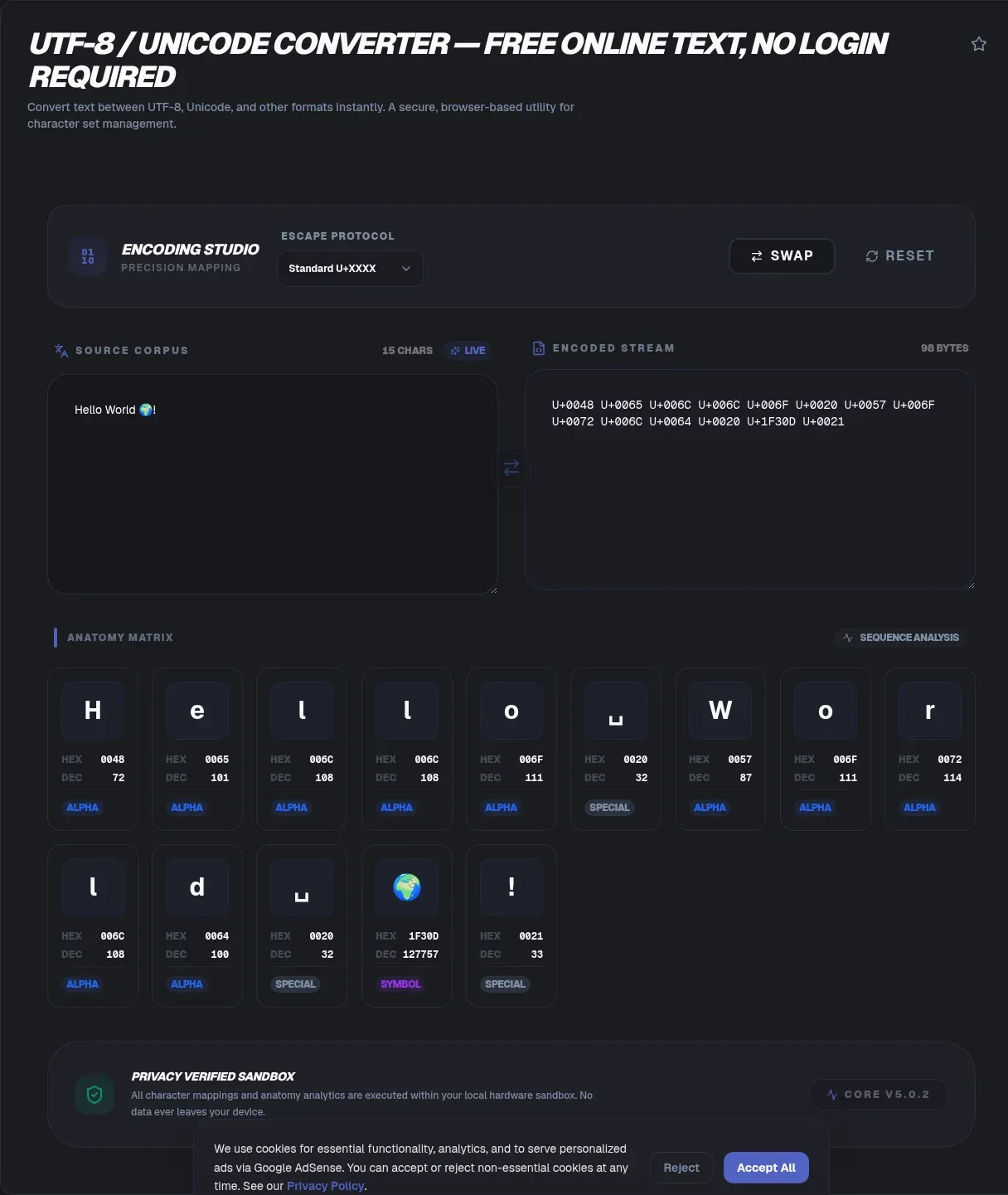
The ToolSura UTF-8 / Unicode Converter transforms any text into UTF-8 bytes, Unicode code points, hexadecimal, decimal, binary, URL escapes, or HTML escapes, then reverses any of those forms back into readable text, all working locally in your browser Source. A per-character breakdown shows exactly how each input symbol maps to its representations.
Conversion runs entirely locally per the page's documentation: text never leaves your device, nothing is uploaded, and the tool keeps working offline once loaded Source.
Unicode Versus UTF-8: The Distinction That Matters
The page opens with the distinction that untangles most confusion: Unicode is the character set, a numbered catalog running from U+0000 through U+10FFFF, while UTF-8 is one specific way of encoding those numbers into bytes, defined by RFC 3629 at one to four bytes per character Source.
Keeping those layers separate explains half of all encoding bugs. Characters have identities independent of their byte representations; encodings are agreements about turning identities into bytes; and every mojibake incident ever witnessed came from two parties disagreeing about which agreement was in force.
What Is a Code Point?
A code point is the number identifying one character, conventionally written as U+ followed by hexadecimal digits. The page notes the catalog spans 1,114,112 possible slots organized across seventeen planes Source. Crucially, code points are neither bytes nor glyphs: they are abstract identities that encodings translate into bytes and fonts translate into shapes.
This abstraction explains why the same character can occupy different byte counts across encodings yet remain fundamentally one character. Inspecting code points strips away representation questions and answers the cleaner question underneath: which character is this, exactly?
How Many Bytes Per Character?
Under UTF-8 rules documented on the page: ASCII characters take one byte, accented Latin letters like e-with-acute take two, most world scripts take three, and emoji take four Source. The variable-length design keeps English text compact while still reaching every code point.
Length calculations follow from these rules. A string's byte size depends on its script mix, which surprises developers who sized buffers assuming one byte per character. The per-character breakdown view makes each mapping visible individually, turning abstract encoding rules into observable facts for whatever text you paste.
Diagnosing Mojibake
Mojibake is decoded-wrongly text: bytes meant for one encoding interpreted under another, producing classics like cafe with acute rendered as caf plus à plus copyright symbol. The page documents both the symptom and the cure: re-encode the garbled string using whichever wrong encoding produced it, then decode the result as UTF-8 Source.
The reverse-engineering trick works because mojibake preserves the original bytes underneath the misinterpretation. Walking backwards through the mistake recovers clean text without retyping, provided you identify which encoding assumption went wrong along the way.
The Byte Order Mark Question
A byte order mark is an optional leading marker, EF BB BF in UTF-8, signaling encoding presence. The FAQ guidance cuts against blind inclusion: the mark may break JSON parsers and shell scripts, so omit it unless legacy systems truly demand it, and use the tool to inspect whether files carry one before making the call Source.
Invisible markers cause disproportionately loud failures. When JSON parses fine everywhere except one endpoint, or shell scripts misbehave only on files from one source, checking for stray marks early saves hours of chasing ghosts through otherwise correct logic.
URL and HTML Escapes
Two escape families serve transport contexts. Percent-encoding prepares characters for URLs; HTML entities prepare them for markup. Both appear among output modes here alongside raw byte views Source, letting one paste answer several context questions simultaneously.
Choosing correctly matters because each escape scheme decodes in only its own context. Entity-encoded text pasted into addresses stays entity-encoded; percent-encoded strings dropped into HTML display as literal codes. Matching escape type to destination remains a human decision the tool equips but does not automate.
Why Local Processing Matters Here
Encoding inspection often involves sensitive material: log lines containing user data, tokens with embedded claims, database exports mid-migration. The page's architecture keeps such content on-device via browser-native encoder interfaces, transmitting nothing during conversion Source.
That locality also enables offline work after first load, useful for air-gapped environments where encoding questions arise precisely because systems there handle unusual character sets. Whatever brought the question, the conversion itself never becomes another transmission to audit.
Where This Fits Among Encoders
Each representation has a dedicated sibling tool when you need depth beyond inspection: Base64 handles binary-in-text packing, URL encoding covers parameter contexts, HTML entities cover markup, and the timestamp converter decodes numeric values embedded in logs Source. This converter is the cross-reference layer tying them together at the character level.
Debugging sessions rarely respect tool boundaries. A single corrupted field might require byte inspection, then entity decoding, then timestamp conversion. Having character-level ground truth available makes every downstream tool's job unambiguous.
Practical Debugging Workflows
Encoding questions rarely arrive alone; they arrive attached to symptoms. A JSON parser rejecting a file suggests a stray mark needing inspection. A shell script mangling accented filenames points at locale assumptions. Search failing to match visibly identical strings hints at normalization differences rather than encoding itself.
The converter serves each investigation at character level: paste the suspect string, switch views between bytes and code points, and abstraction collapses into observable facts. Once you can see which bytes actually exist, most encoding mysteries resolve within minutes instead of after afternoon-long speculation sessions.
Practical Debugging Workflows
Encoding questions rarely arrive alone; they arrive attached to symptoms. A JSON parser rejecting a file suggests a stray mark needing inspection. A shell script mangling accented filenames points at locale assumptions. Search failing to match visibly identical strings hints at normalization differences rather than encoding itself.
The converter serves each investigation at character level: paste the suspect string, switch views between bytes and code points, and abstraction collapses into observable facts. Once you can see which bytes actually exist, most mysteries resolve within minutes instead of after afternoon-long speculation sessions Source.
Escape Families and When to Use Each
The output modes cover three escape dialects serving different destinations. Percent-encoding prepares characters for URLs, where reserved punctuation would otherwise alter address structure. HTML entities prepare characters for markup contexts, preventing browsers from interpreting them as tags. Raw byte views expose the underlying UTF-8 truth for debugging.
Choosing the wrong family produces output that looks escaped but decodes nowhere usefully. Match escape type to destination context first, then convert; the per-character breakdown makes verifying each mapping trivial afterward Source.
Teaching Value Beyond Debugging
Encoding concepts cement through observation better than through prose. Watching one emoji become four bytes teaches variable-length encoding more memorably than any diagram; watching an accented letter become two makes the ASCII-plus rule concrete. Students, new team members, and curious colleagues all benefit from pasting their own names and seeing what emerges.
That teaching angle doubles as documentation strategy: teams that keep a converter bookmarked answer newcomer questions by demonstration rather than lecture, building shared intuition faster than style guides alone ever manage.
Key Takeaways
- Unicode names characters up to U+10FFFF; UTF-8 is one RFC-defined encoding of those names into 1-to-4 bytes.
- ASCII costs one byte, most scripts three, emoji four under UTF-8 rules.
- Mojibake is reversible: re-encode with the wrong assumption, decode as UTF-8, recover clean text.
- Byte order marks are optional and frequently harmful; inspect before keeping them.
- Per-character breakdowns turn abstract encoding rules into observable, debuggable mappings.
Related Tools
Related encoding utilities:
- Base64 Encoder/Decoder covers the byte-level alphabets beside UTF-8.
- URL Encoder/Decoder percent-encodes text for safe transport.
- HTML Entity Encoder/Decoder escapes characters for markup contexts.
- JSON Formatter & Validator validates escapes inside structured data.
- Word Counter measures multilingual text accurately.
- Case Converter normalizes letter case across locales.
- Text to Emoji Converter
Frequently Asked Questions
What is the difference between Unicode and UTF-8?
Unicode is the character set: a numbered catalog of characters running through U+10FFFF. UTF-8 is one particular encoding translating those numbers into byte sequences of one to four bytes each, as defined in RFC 3629 and explained on the tool page. Confusing the catalog with an encoding causes most encoding confusion generally.
What exactly is a code point?
The number identifying a single character, conventionally written U+ followed by hexadecimal digits. The catalog spans over a million slots across seventeen planes. Code points are neither bytes nor visual glyphs; they are abstract identities that encodings render into bytes and fonts render into shapes, sitting between the two as pure identity.
How many bytes does each character need in UTF-8?
Between one and four depending on the character: ASCII takes one byte, accented Latin letters take two, most world scripts take three, and emoji take four, per the page's breakdown. Variable length keeps common text compact while preserving access to every code point, though buffer sizing must assume the maximum.
Why does my text display as café instead of café?
That garbling is mojibake: UTF-8 bytes interpreted under a different encoding assumption. The fix documented on the tool page runs the mistake backwards: re-encode the garbled text using whichever wrong encoding mangled it, then decode the result as UTF-8, recovering the original characters without manual retyping.
Should my files include a byte order mark?
Usually not. The mark is optional in UTF-8, invisible when present, and capable of breaking JSON parsers and shell scripts that fail to expect it, per the page's guidance. Strip it unless a legacy consumer specifically requires it, using inspection first to see whether your files carry one at all.
Is UTF-16 ever preferable to UTF-8?
Rarely for interchange. The page cites UTF-8 dominating known website encodings as of mid-2026, while UTF-16 persists mainly inside Windows APIs and Java internals rather than in files or network traffic. Default to UTF-8 for storage and transport; encounter UTF-16 mostly when debugging native-platform boundaries.
Does converting require uploading my text anywhere?
No. Conversion runs through browser-native encoding interfaces entirely on your device, with the page documenting zero transmission, no file handling, and offline operation once loaded. Standard caution still applies to sensitive material in any web form, but local processing keeps routine encoding inspection private by default.Encoding knowledge used to require memorizing byte tables; per-character tooling replaces memorization with observation. Teams adopting it report faster resolutions across log triage, data migrations, and integration debugging alike, because guessing disappears from the process entirely.Whatever encoding question brought you here, the answer lives in the bytes, and with a per-character converter open, the bytes are always one paste away from being understood.Paste the problem string, choose the view that answers your question, and move on with certainty instead of suspicion. That is the entire workflow, and it works the first time you try it.Bookmark it beside your other encoders, and encoding questions stop being interruptions; they become lookups. The characters were always knowable; now they are always checkable.