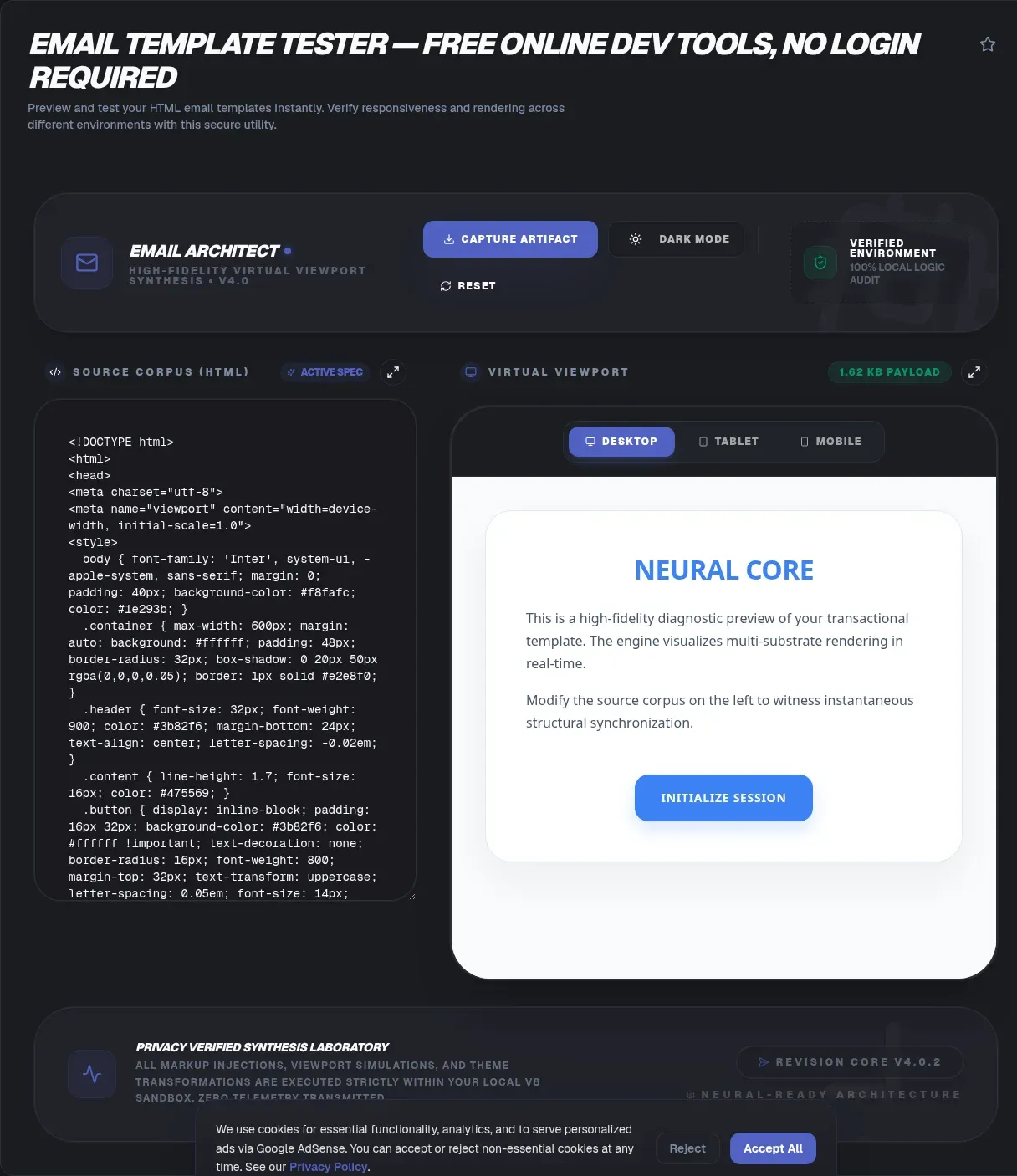
The ToolSura Email Template Tester renders your email HTML right in your browser, simulating how Gmail, Outlook, Apple Mail, desktop windows, tablets, and phones would treat your markup before a single message ships Source. Paste your template, press preview, and compare layouts side by side.
Nothing is uploaded in the process. The tool processes your code locally inside the browser sandbox, stores nothing server side, and requires no account; per its own documentation, previews happen entirely without sending test emails to real inboxes Source.
Why Email HTML Is Not Web HTML
Web developers enjoy a rough consensus: browsers implement shared specifications, so one stylesheet behaves similarly everywhere. Email enjoys no such consensus. Each client ships its own rendering engine with its own support matrix, so a gradient that works in Apple Mail can vanish entirely elsewhere.
The scale of that fragmentation is measurable. Can I Email, the community-maintained support database for HTML and CSS in email, tracks eighteen clients including Gmail across four platforms, Outlook across six, Apple Mail on macOS and iOS, Thunderbird, ProtonMail, and more Source. Its scoreboard format tells the story at a glance: entries like Apple Mail on macOS scoring 288 of 308 tested features sit alongside clients with far patchier coverage.
Meet the Reference Every Tester Leans On
Can I Email describes itself as support tables for HTML and CSS in email, based on the original caniuse.com model that web developers already know Source. Community contributors file support data through GitHub, each feature entry carries a date, and a five-level legend distinguishes supported, not supported, partial, mixed, and unknown states.
Two habits make this database really handy in daily work. Before adopting any flashy property, look it up and see which of your subscribers' clients would drop it. And when a rendered preview surprises you, check whether the culprit property sits in a partial-support cell, because most email rendering bugs are documented limitations rather than your mistakes.
What This Tool Actually Does
The tool page documents a focused workflow: paste complete email HTML into the input area, then let the tester simulate rendering across major clients and form factors Source. Alongside the visual previews you get markup validation that flags syntax errors and deprecated tags, plus a spam-factor review that surfaces characteristics commonly associated with filter trouble.
It also handles two modern realities. Templates built with MJML can be tested by pasting their compiled HTML output after the build step. And a dark mode simulation shows how inverted color schemes treat your palette, which matters now that many readers read mail in low-light themes by default.
Previewing Without Sending
Traditional email testing meant sending real messages to seed accounts, waiting for delivery, and hoping nothing got filtered en route. This tool's FAQ draws the line clearly: previews happen without sending anything Source. Your draft never touches an SMTP relay, so there are no send limits, no waiting, and no risk of a broken template reaching anyone.
That design suits iteration. Fixing a layout usually takes three or four quick attempts, and rendering locally turns each fix into an immediate observation rather than a five-minute delivery cycle. When the template finally looks right everywhere, you export it to your actual sending platform for live checks.
Desktop and Mobile Views in One Pass
Responsive email fails in specific ways: media queries ignored by certain clients, tables that refuse to stack, buttons too small for thumbs. The tester answers with a toggle between desktop and mobile view modes so you can verify fluid behavior in both directions during one session Source.
Work through both widths deliberately rather than eyeballing one. Confirm the single-column collapse happens where intended, that images scale instead of overflowing, and that tap targets stay generous on the mobile pass. Those three checks catch the bulk of responsive email defects long before subscribers meet them.
Dark Mode Simulation
Dark mode breaks naive email palettes in two classic ways: light gray text disappears against forced-dark backgrounds, and transparent-background logos designed for white turn invisible. The tool includes a dark mode simulation specifically for readability under inverted schemes Source.
Treat the simulation as a strong first signal rather than absolute truth, since each client implements dark mode differently and some recolor aggressively while others leave colors untouched. If your design survives simulated inversion with legible text and visible branding, add solid background colors behind critical imagery as extra insurance, then spot-check on a real device if dark mode matters to your audience.
Validation and Spam-Factor Flags
The validator checks structure: unclosed tags, deprecated elements, and syntax errors that could scramble rendering or trip deliverability heuristics Source. Running it costs seconds and catches the copy-paste artifacts that manual review misses, especially inside long promotional templates assembled from several sources.
The spam-factor check reviews characteristics commonly associated with filter triggers, such as spammy phrasing patterns or risky markup choices. No local checker can promise inbox placement, because filtering depends on sender reputation, authentication records, and engagement history at the receiving side. Use the flags as an early warning layer, then rely on proper sending infrastructure for the factors only providers control.
The CSS Inlining Question
Many email workflows require CSS inlined onto elements, because some clients strip embedded style blocks. The tool's FAQ is explicit about scope: it focuses on previewing and rendering, highlighting where inlining is needed rather than performing it Source.
Keep inlining in your build pipeline, whether that is a script in your templating step or a feature of your email service provider. Then use this tester to confirm the result renders correctly afterward. The division of labor is deliberate: transforms belong to build tooling, verification belongs to previewing, and conflating them makes both slower.
Working With MJML
MJML compiles a component language into bulletproof email HTML, and the tester supports the standard flow: compile first, then paste the generated output for previewing Source. Testing compiled output means what you validate is exactly what subscribers will receive, with no gap between framework source and delivered markup.
If a compiled template misbehaves in a particular simulated client, the validation flags point at the offending markup, which you can trace back to its MJML component. That feedback loop shortens the distance between framework abstraction and rendering reality considerably.
The Outlook Problem
Outlook on Windows is the perennial outlier in email rendering, and the tool page addresses compatibility testing aimed at exactly those Word-engine limitations, helping identify markup likely to break there Source. Whatever your stance on legacy clients, a meaningful share of business audiences still reads mail in them.
Practical guidance follows from the support database: lean on table-based structures and widely supported properties for critical layout, treat flexbox and grid as progressive enhancements where cells permit, and always define fallback fonts Source. Test the Outlook simulation before every send rather than after complaints arrive.
How It Compares
| Tool | Model | Strength | Account needed |
|---|---|---|---|
| ToolSura Email Template Tester | Client-side preview | Instant multi-client rendering, no sending | None |
| Testi@ | Screenshot previews | Spam test module, compare mode | Sign-up based |
| Mailtrap Email Sandbox | Fake SMTP inbox | Safe staging-mail capture | Registration implied |
Testi@ markets screenshot-based previews with a dedicated spam test section and shareable links, operating on registered accounts with pricing held behind its pricing page Source. Mailtrap's Email Sandbox positions itself as a fake SMTP mailbox for capturing staging emails safely, a different job centered on interception rather than rendering, with registration expected throughout Source.
This tool occupies the zero-friction slot: no account, no sending, local processing per its page Source. Choose the sandbox products when you need to inspect real outbound pipelines; choose instant rendering when you need fast layout truth during template development.
A Pre-Send Checklist
Run every campaign template through the same sequence. Render at both widths and confirm the mobile collapse. Flip on dark mode and verify text and logos stay visible. Clear the validation flags. Review the spam-factor notes. Check that every image carries alt text so blocked-image previews still communicate.
Then hand off to infrastructure concerns outside any renderer's scope: authenticated sending domains, list hygiene, and engagement-based sending practices. Rendering correctness earns attention; deliverability reputation earns inboxes.
Key Takeaways
- Email clients fragment rendering because each ships its own engine with different HTML and CSS support.
- Local preview without sending removes delivery delays from the template iteration loop entirely.
- Can I Email documents per-client support across eighteen clients with dated, community-reviewed entries.
- Dark mode simulation and dual-width toggles catch the failures subscribers actually complain about.
- Inlining stays in your build pipeline; verification belongs in preview, and spam flags are early warnings, not guarantees.
Frequently Asked Questions
Why does my email look different in every mail client?
Each client ships its own HTML and CSS engine with different support levels, so identical markup renders differently across Gmail, Outlook, and Apple Mail. Can I Email documents those gaps across eighteen clients using a five-level legend from full support to unknown. Testing previews against multiple simulated clients catches the differences before your subscribers do.
Can I test a template without sending an email?
Yes. ToolSura's tester renders pasted HTML locally in your browser, and its FAQ states previews happen without sending anything. There are no seed accounts to maintain, no delivery waits, and no send quotas to burn. Iterate freely, then move the finished template to your email platform for final live checks with real infrastructure involved.
Should I use tables or modern CSS for email layout?
Table-based structures remain the dependable backbone for email because support for modern layout properties varies widely by client. Treat flexbox and grid as progressive enhancements layered over a sound table skeleton, and consult per-property support data before relying on either. The safest templates degrade gracefully wherever advanced layout rules get dropped.
What is Can I Email?
It is the email world's equivalent of caniuse: community-maintained support tables for HTML and CSS across eighteen email clients, with dated feature entries, a five-level support legend, and downloadable JSON data. Contributions flow through GitHub from working email developers. Check a property there whenever you plan to depend on it in a campaign template.
Does this tool inline my CSS for me?
No. The tool's FAQ says it focuses on previewing and rendering, flagging where inlining is needed rather than performing the transformation itself. Handle inlining in your build pipeline or through your email platform, then paste the inlined result back here to confirm it renders correctly across the simulated clients and view modes.
How do I test dark mode email designs?
Use the built-in dark mode simulation to see how inverted schemes treat your text, backgrounds, and logo treatments. Designs that survive should still use solid background colors behind critical images as insurance, since real clients invert differently and some recolor aggressively. Spot-check on a physical device if a large share of your audience reads in dark themes.
Is my template code safe when I paste it here?
Per its documentation, the tester processes code locally in the browser sandbox with nothing stored or transmitted to servers, and it requires no login. Standard caution still applies to any web tool: avoid pasting proprietary assets you would not publish, and keep customer data out of test templates entirely. Placeholder content makes the best test material anyway.
Related Tools
Support the rest of your template workflow:
- HTML CSS JS Playground prototypes markup interactively.
- HTML Entity Encoder/Decoder fixes special characters in copy.
- Word Counter keeps subject lines and preheaders tight.
- JSON Formatter & Validator checks merge-tag payloads.
- Color Picker & Palette Generator builds accessible brand palettes.
- Image Resizer preps lightweight email imagery.
Before the next campaign ships, run the template through the Email Template Tester and let the simulated clients argue with your markup first.